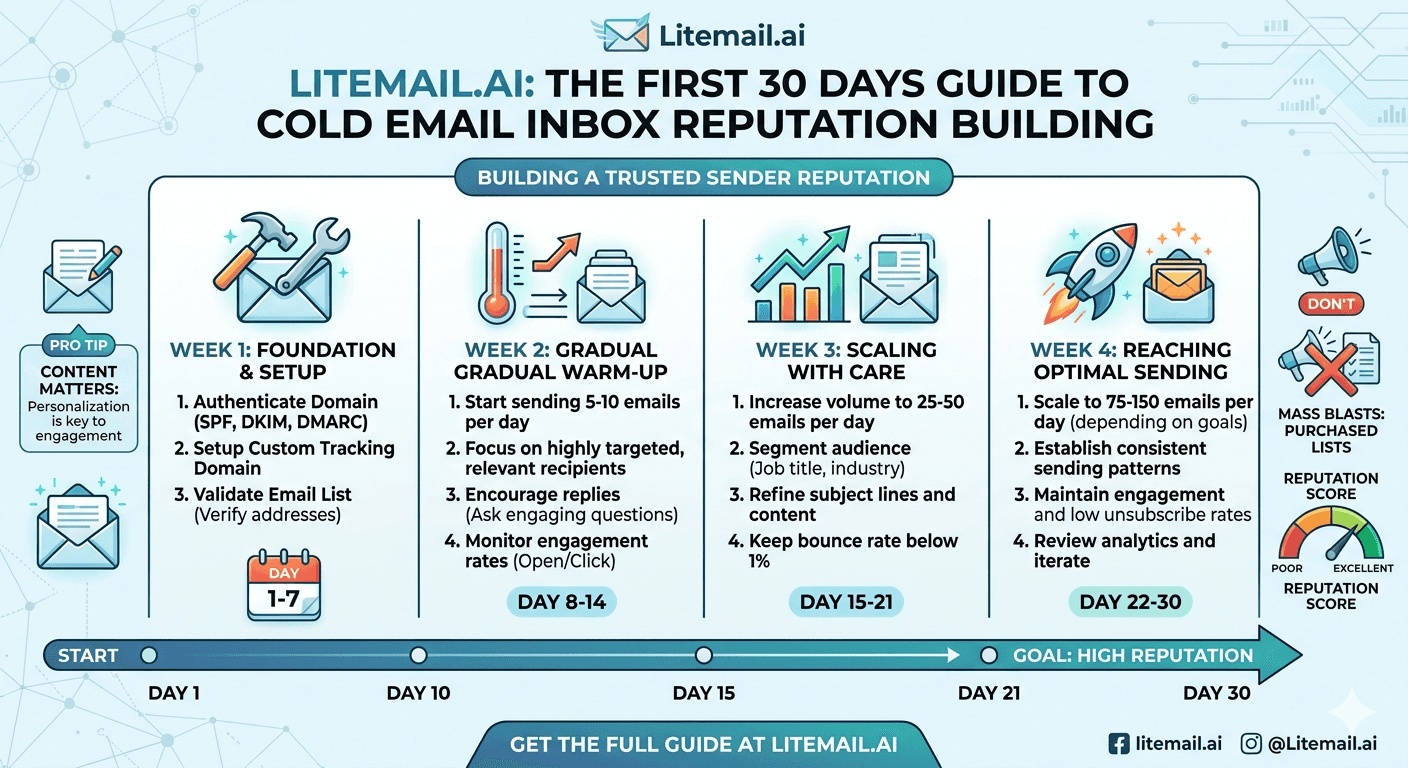
The first 30 days decide whether a fresh cold email inbox becomes a reliable sender or a spam-foldered dead weight — and rushing them is the single most common reason new inboxes fail. Reputation is built through a gradual, patient ramp, not switched on. Send hard on day one and you'll flag the inbox before it ever had a chance. This is a week-by-week guide to inbox reputation building across the first 30 days: what to do each week, how fast to ramp, what to watch, and the mistakes that torch a fresh inbox before it earns the reputation it needs to land in the inbox.
What Reputation Actually Is
Before the timeline, understand what you're building, because it shapes why the ramp works the way it does. Sender reputation is mailbox providers' judgment of whether your inbox sends wanted, legitimate mail.
Providers like Gmail and Outlook watch how recipients react to your email — opens, replies, and crucially the absence of spam complaints and bounces. A new inbox has no track record, so it starts neutral-to-suspicious. The first 30 days build a history of positive signals that tells providers you're legitimate.
💡 Reputation is earned by behavior, not time alone
A fresh inbox doesn't earn reputation just by existing for 30 days — it earns it by sending gradually increasing volumes of mail that gets positive engagement and avoids complaints. The 30-day window is how long that pattern takes to establish, but it's the sending behavior during those days that builds reputation, not the calendar. Do the wrong things for 30 days and you'll have bad reputation, not good.
So the timeline is about doing the right sending behavior in the right order. Here's week by week.
The Week-by-Week Ramp
Here's how the first 30 days typically break down. The theme is gradual escalation — each week does a bit more than the last.
Week | Focus | Daily volume guide |
|---|---|---|
Week 1 | Warm-up sends, build engagement | Very low (single digits) |
Week 2 | Increase gradually, replies | Low, climbing |
Week 3 | Begin light real sends | Moderate |
Week 4 | Approach normal cold volume | Nearing 30 to 50 |
The specifics: weeks one and two are pure warm-up — sending to engaged addresses that open and reply, building the positive-signal history with no real cold campaigns yet. Week three eases into light real sends. By week four you're approaching the safe 30 to 50 per day that a warmed inbox sustains. The exact numbers matter less than the principle of steady, unhurried escalation. For the full warm-up mechanics, see our complete warm-up guide.
What to Watch During the Ramp
Building reputation isn't set-and-forget — you monitor signals throughout the 30 days to confirm it's working and catch trouble early.
The key signal is Google Postmaster Tools reputation, which for a warming inbox should trend toward Good or High as the ramp progresses. Watch bounce rate (keep it low with clean addresses) and any spam complaints (should be near zero during warm-up to engaged contacts). If reputation isn't building or complaints appear, slow down.
Postmaster reputation — should climb toward Good/High over the 30 days.
Bounce rate — keep near zero by only sending to valid addresses during warm-up.
Complaints — should be essentially none while warming to engaged contacts.
Engagement — opens and replies confirm the positive signals are landing.
Monitoring turns the ramp from a blind wait into a managed process — if the signals lag, you extend the warm-up rather than pushing into real volume too soon. For the signals in depth, see our inbox health metrics guide.
The Mistakes That Torch a Fresh Inbox
Most first-30-days failures come from a handful of avoidable mistakes. Here's what kills fresh inboxes before they earn reputation.
The big one is rushing — sending real cold volume in week one because you're impatient for pipeline. A fresh inbox blasting cold hits providers' spam-account fingerprint and gets flagged or suspended immediately, wasting the inbox entirely. Other killers: sending to unverified lists (bounces destroy a fresh inbox fast), and skipping the engaged-contact warm-up phase.
🚩 The advice that ruins fresh inboxes
“Just start sending your campaign, the inbox will warm up as you go.” No. A fresh inbox sending real cold volume from day one gets flagged before any reputation builds — you're sending like a spammer with no history to offset it. Warm-up to engaged contacts must come first, before real campaigns. The impatience to skip warm-up is exactly what torches the inbox and wastes the whole 30-day opportunity. Ramp first, campaign second.
Patience through the ramp is the whole game. For the suspension risk of rushing, see our suspension avoidance guide.
Skipping the 30-Day Wait Entirely
Here's the honest reframe to end on. The first 30 days are essential if you're starting with fresh inboxes — but that's a month before you can run real campaigns at full volume. For a team that needs pipeline now, that month is a real cost.
The alternative is not skipping the reputation-building, but having it already done. Pre-warmed inboxes have already been through this 30-day process — the gradual ramp, the engagement history, the reputation build — so they arrive at the campaign-ready state the timeline is trying to reach. You get the outcome of the first 30 days without spending them.
So the choice is: spend your own 30 days building reputation with the timeline above, or start with inboxes where those 30 days already happened. If time matters, the second option skips the wait while still giving you the reputation that makes inboxes land.
Litemail pre-warmed inboxes arrive with the reputation building already done: genuine warm-up history, verified Good or High Postmaster reputation within 48 hours, SPF/DKIM/DMARC pre-configured, dedicated US and EU IPs, and full admin access from $4.99/inbox — the outcome of a careful 30-day ramp, without the 30-day wait. For the fresh-versus-pre-warmed math, see our 6-month comparison.
The reputation, without the 30-day wait. Litemail pre-warmed inboxes arrive having already been through the careful ramp — genuine warm-up history, verified Good or High in Postmaster, SPF/DKIM/DMARC pre-configured, dedicated US and EU IPs, from $4.99/inbox. Campaign-ready from day one, not day thirty. Full admin access included. Get Pre-Warmed Inboxes from $4.99 →
About Litemail — Litemail provides pre-warmed Google Workspace and Microsoft 365 inboxes for cold email outreach. From $4.99/inbox with automated DNS, dedicated US and EU IPs, and full admin access. View pre-warmed inbox plans →
Related reading: Complete Warm-Up Guide · Inbox Health Metrics · Fresh vs Pre-Warmed Results · Suspension Avoidance · Warm-Up for Beginners · Litemail Pre-Warmed Inboxes — Plans and Pricing
The Bottom Line
Reputation is earned by sending behavior during the first 30 days, not by the calendar — do the wrong things and you build bad reputation.
Week 1 to 2 is pure warm-up to engaged contacts; week 3 eases into light real sends; week 4 approaches 30 to 50 a day.
Watch Postmaster reputation (should climb to Good/High), bounce rate (near zero), and complaints (essentially none).
If signals lag, extend the warm-up rather than pushing into real volume too soon.
The biggest mistake is rushing — a fresh inbox blasting cold from day one gets flagged before reputation builds.
Pre-warmed inboxes have already been through this ramp, giving the campaign-ready outcome without the 30-day wait.
Frequently Asked Questions
How long does it take to build cold email inbox reputation?
Roughly 30 days of gradual ramping. Weeks one and two are pure warm-up to engaged contacts that open and reply, building positive signals. Week three eases into light real sends, and week four approaches the safe 30 to 50 per day a warmed inbox sustains. It's the sending behavior during those days that builds reputation, not the calendar — a fresh inbox doesn't earn reputation just by existing.
What is sender reputation and how is it built?
It's mailbox providers' judgment of whether your inbox sends wanted, legitimate mail. Gmail and Outlook watch how recipients react — opens, replies, and the absence of spam complaints and bounces. A new inbox starts neutral-to-suspicious with no track record, so the first 30 days build a history of positive signals through gradually increasing sends that get engagement and avoid complaints. That pattern tells providers you're legitimate.
What should I monitor while building inbox reputation?
Four signals: Google Postmaster reputation (should climb toward Good or High over the 30 days), bounce rate (keep near zero by only sending to valid addresses during warm-up), spam complaints (essentially none while warming to engaged contacts), and engagement (opens and replies confirm positive signals land). If reputation isn't building or complaints appear, slow down and extend the warm-up rather than pushing forward.
What's the biggest mistake in the first 30 days?
Rushing — sending real cold volume in week one out of impatience for pipeline. A fresh inbox blasting cold hits providers' spam-account fingerprint and gets flagged or suspended immediately, wasting the inbox entirely. Warm-up to engaged contacts must come first, before real campaigns. The advice to “just start sending, it'll warm up as you go” is exactly what torches fresh inboxes. Ramp first, campaign second.
Can I skip the 30-day reputation building?
Not if you start with fresh inboxes — the ramp is essential, and skipping it flags the inbox. But you can skip the wait by starting with pre-warmed inboxes, which have already been through the 30-day process: the gradual ramp, engagement history, and reputation build are done. You get the campaign-ready outcome the timeline is trying to reach, without spending the month yourself. That's the difference between skipping warm-up (bad) and having it already done (good).
How does Litemail help with inbox reputation?
Litemail pre-warmed inboxes arrive with the reputation building already done: genuine warm-up history, verified Good or High Postmaster reputation within 48 hours, SPF/DKIM/DMARC pre-configured, dedicated US and EU IPs, and full admin access from $4.99/inbox. They give you the outcome of a careful 30-day ramp without the 30-day wait — campaign-ready from day one, so you don't spend a month building reputation before running real outreach.
Buy Pre-Warmed Email Inboxes & Domains | Litemail
Buy pre-warmed email accounts, inboxes and domains from $4.99/inbox. Google Workspace & Microsoft 365. Reputation built, campaign-ready, US & EU IPs, setup in 5 minutes.
No minimum order · Skip the 30-day wait · US and EU IPs
Related reading: Complete Warm-Up Guide · Inbox Health Metrics · Fresh vs Pre-Warmed Results · Warm-Up for Beginners · Litemail Pre-Warmed Inboxes — Plans and Pricing







