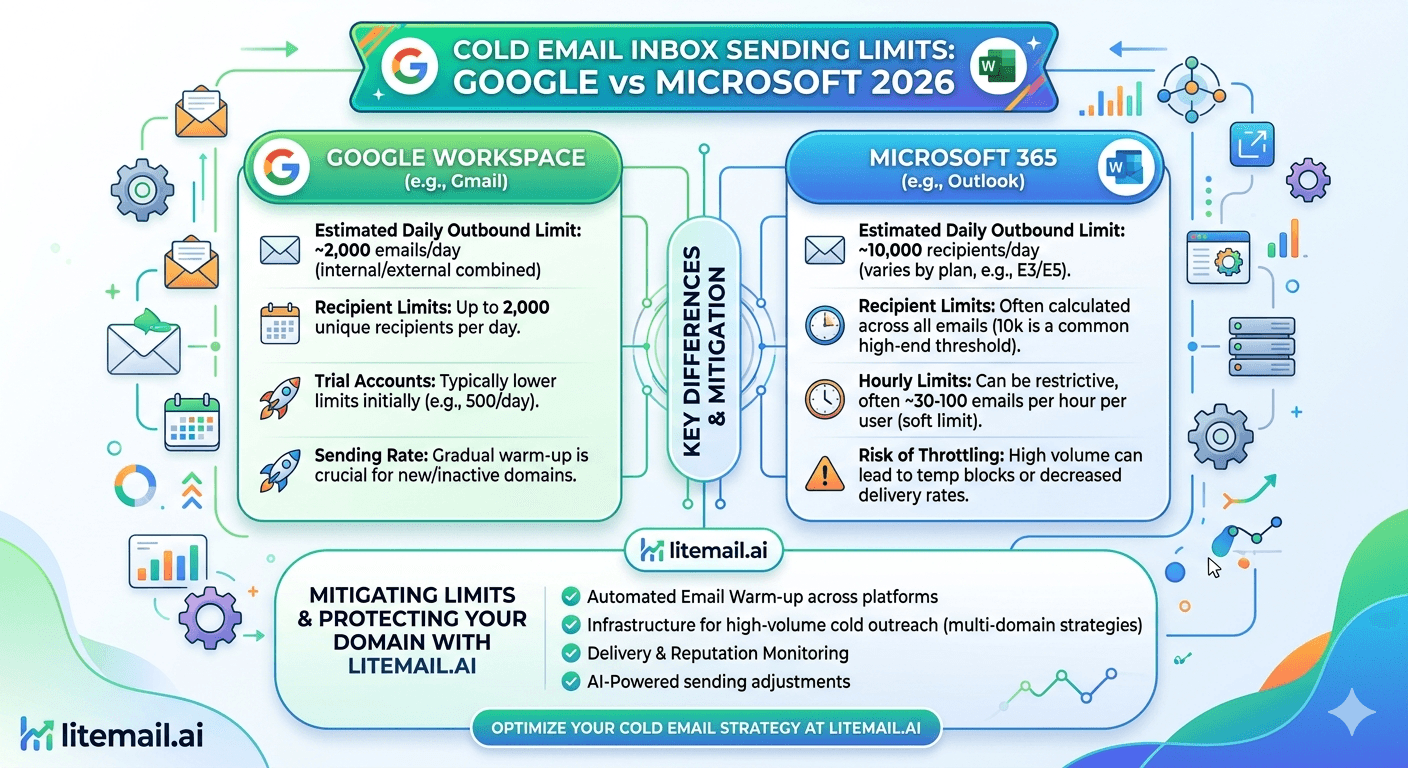
Google Workspace lets you send around 2,000 emails a day and Microsoft 365 up to 10,000 — and if you send anywhere near those numbers cold, you'll torch your inboxes within days. The gap between what the providers technically allow and what's actually safe for cold email is the single most misunderstood thing about sending limits. Comparing cold email sending limits for Google vs Microsoft means separating two different numbers: the system caps the providers enforce, and the far lower safe cold-sending volume that keeps inboxes alive. Here's the real comparison — both providers' actual limits, why the safe number is the same for both, and how to plan volume that doesn't burn inboxes.
The Two Numbers You Have to Separate
Every conversation about sending limits confuses two completely different things, so let's separate them upfront. There's the system limit — the maximum the provider technically allows before hard-blocking you. And there's the safe cold-sending limit — the volume that keeps a cold email inbox healthy and landing.
These numbers are miles apart. The system limit is a ceiling that stops abuse; the safe limit is where your inbox stays trusted. Sending at the system limit is like redlining an engine — technically possible, quickly destructive.
🚩 The mistake this whole comparison exists to prevent
Treating the provider's system limit as a cold-sending target. Google Workspace allowing ~2,000 a day does not mean send 2,000 cold emails — it means the system blocks you above that. Cold email at anywhere near the system cap gets your inbox flagged fast. The number that matters for cold email is the safe limit, not the system limit. Confusing them burns more inboxes than almost anything.
With that distinction clear, here's how the two providers actually compare on both numbers.
The Limits Compared
Here's Google Workspace versus Microsoft 365 across both the system limits and the safe cold-sending reality.
Limit | Google Workspace | Microsoft 365 |
|---|---|---|
System daily cap | ~2,000/day | ~10,000/day per tenant |
Per-message recipients | Varies | ~500/message |
Rate limit | Throttled | ~30 messages/minute |
Safe COLD limit (warmed) | 30 to 50/day | 30 to 50/day |
Fresh inbox ramp | 10 to 30/day rising | 10 to 30/day rising |
Notice the punchline: the system caps differ a lot (Microsoft's is much higher), but the safe cold-sending limit is identical — 30 to 50 a day per warmed inbox on both. That's because the safe limit isn't set by the provider's ceiling; it's set by what keeps a cold inbox trusted, which is the same regardless of platform.
Microsoft's higher system cap tempts people to send more, but doing so cold is just as damaging on Microsoft as on Google. For where the safe number comes from, see our daily volume guide.
Why the Safe Limit Is the Same for Both
It seems odd that Google and Microsoft have very different system caps but the same safe cold limit. Here's why that makes sense.
The safe cold-sending limit isn't really about your sending provider — it's about the receiving mailbox providers and how they judge cold email. When you send cold, Gmail, Outlook, and other receivers evaluate the pattern: volume, engagement, complaints. They flag inboxes that send high cold volume regardless of whether it came from Google Workspace or Microsoft 365.
💡 It's about the receiver, not the sender
Your safe cold limit is determined by what receiving providers tolerate from a sender building reputation — not by your own provider's system cap. That's why 30 to 50 a day per warmed inbox holds for both Google and Microsoft: the receivers apply the same scrutiny to cold email whatever platform sent it. Your provider sets the ceiling; the receivers set the safe floor you actually operate under.
So when choosing between Google Workspace and Microsoft 365 for cold email, the safe volume per inbox isn't a differentiator — both give you the same 30 to 50. The choice comes down to other factors. For those, see our infrastructure guide.
Planning Volume Around the Real Limit
Since the safe limit is 30 to 50 per warmed inbox on both providers, planning your volume is the same math regardless of platform. Here's how to do it.
Take your daily target and divide by 40 (the safe midpoint) to get the number of inboxes you need.
Scale by adding inboxes, never by pushing individual inboxes toward the system cap.
Ramp fresh inboxes from 10 to 30 a day, rising over a few weeks to the 30 to 50 range.
Respect the rate limit — on Microsoft especially, space sends to stay under ~30 messages a minute.
Mix providers if you want, since both offer the same safe per-inbox volume — a Google/Microsoft blend hedges provider-specific issues.
The key discipline is set per-inbox caps in your sending platform at 30 to 50, so no inbox drifts toward the dangerous system-limit territory. This one setting protects you from the confusion the whole comparison is about. For the full sizing math, see our inbox count guide.
The Real Constraint Isn't the Limit — It's Warm-Up
Here's the deeper truth the limits comparison points to. The safe sending limit assumes a warmed inbox. A fresh inbox's real limit is far lower — 10 to 30 a day, ramping over weeks — because it has no reputation yet. So the true constraint on cold email volume isn't the provider's system cap; it's how many warmed inboxes you have.
This reframes the whole question. You don't scale cold email by finding a provider with a higher limit; you scale it by having more warmed inboxes, each sending its safe 30 to 50. And getting inboxes warmed is the actual bottleneck — 3 to 4 weeks per fresh inbox before it reaches the safe range.
That's where pre-warmed inboxes change the equation. They arrive already at the warmed state where the 30 to 50 safe limit applies, so you can scale volume immediately by adding them, rather than waiting weeks to warm each one. On both Google Workspace and Microsoft 365, a pre-warmed inbox sends its safe volume from day one.
Litemail pre-warmed inboxes — available in both Google Workspace and Microsoft 365 — arrive with genuine warm-up history, verified Good or High reputation within 48 hours, SPF/DKIM/DMARC pre-configured, and dedicated US and EU IPs from $4.99/inbox, so you scale to your target volume by adding ready inboxes at their safe limit. For the scaling approach, see our scaling guide.
Scale by adding warmed inboxes, not chasing higher limits. Litemail pre-warmed inboxes — Google Workspace and Microsoft 365 — arrive at the warmed state where the safe 30 to 50 limit applies, with genuine warm-up history, dedicated US and EU IPs, and SPF/DKIM/DMARC pre-configured, from $4.99/inbox. Send safe volume from day one on either provider. Get Pre-Warmed Inboxes from $4.99 →
About Litemail — Litemail provides pre-warmed Google Workspace and Microsoft 365 inboxes for cold email outreach. From $4.99/inbox with automated DNS, dedicated US and EU IPs, and full admin access. View pre-warmed inbox plans →
Related reading: Microsoft 365 Daily Volume · How Many Inboxes You Need · Scale Workspace Cold Email · Sending Volume Ramp · Cold Email Infrastructure Guide · Litemail Pre-Warmed Inboxes — Plans and Pricing
The Bottom Line
Separate two numbers: the provider's system cap (~2,000 Google, ~10,000 Microsoft) and the safe cold limit (30 to 50).
Never treat the system cap as a cold-sending target — sending near it torches inboxes on both providers.
The safe cold limit is identical for Google and Microsoft because receiving providers, not your sender, set it.
Plan volume the same way on both: target ÷ 40 for inbox count, scale by adding inboxes, ramp fresh ones from 10 to 30.
Set per-inbox caps at 30 to 50 in your platform so no inbox drifts toward dangerous system-limit territory.
The real constraint is warm-up, not the limit — pre-warmed inboxes send safe volume from day one on either provider.
Frequently Asked Questions
What are the cold email sending limits for Google vs Microsoft?
Google Workspace's system cap is around 2,000 emails a day and Microsoft 365's is up to 10,000 per tenant, but those are ceilings, not cold-sending targets. The safe cold-sending limit is identical on both — 30 to 50 a day per warmed inbox, with fresh inboxes ramping from 10 to 30. Sending near the system caps cold torches inboxes on either provider.
Why is the safe cold limit the same for both providers?
Because the safe limit is set by the receiving mailbox providers, not your sending provider. When you send cold, Gmail, Outlook, and other receivers judge the pattern — volume, engagement, complaints — and flag high cold volume regardless of whether it came from Google Workspace or Microsoft 365. So 30 to 50 a day per warmed inbox holds for both; the receivers apply the same scrutiny.
Can I send 2,000 cold emails a day from Google Workspace?
No. The ~2,000 figure is Google's system cap — the point where it hard-blocks you — not a safe cold-sending volume. Sending anywhere near it cold trips volume-spike detection and gets your inbox flagged fast. The safe cold limit is 30 to 50 a day per warmed inbox. To send high total volume, spread it across many inboxes at that safe per-inbox level.
Does Microsoft's higher limit make it better for cold email volume?
Not for cold email. Microsoft's ~10,000/day system cap is higher than Google's, but the safe cold-sending limit is the same 30 to 50 per warmed inbox on both, because receiving providers set that limit. The higher cap tempts people to over-send, which is just as damaging on Microsoft as Google. Per-inbox safe volume isn't a differentiator between the two.
How do I plan cold email volume around these limits?
Divide your daily target by 40 (the safe midpoint) to get your inbox count, scale by adding inboxes rather than pushing individual ones toward the system cap, ramp fresh inboxes from 10 to 30 a day, and respect the rate limit (space sends under ~30/minute on Microsoft). Set per-inbox caps at 30 to 50 in your platform so no inbox drifts into dangerous territory.
How does Litemail help with sending limits?
Litemail pre-warmed inboxes, in both Google Workspace and Microsoft 365, arrive already at the warmed state where the safe 30 to 50 limit applies — with genuine warm-up history, verified reputation, and dedicated US and EU IPs from $4.99/inbox. So you scale to your target volume by adding ready inboxes at their safe limit, from day one, rather than waiting weeks to warm each one.
Buy Pre-Warmed Email Inboxes & Domains | Litemail
Buy pre-warmed email accounts, inboxes and domains from $4.99/inbox. Google Workspace & Microsoft 365. Safe volume from day one, US & EU IPs, warm-up built in, setup in 5 minutes.
No minimum order · Google & Microsoft · Safe volume from day one
Related reading: Microsoft 365 Daily Volume · How Many Inboxes You Need · Scale Workspace Cold Email · Sending Volume Ramp · Litemail Pre-Warmed Inboxes — Plans and Pricing







