
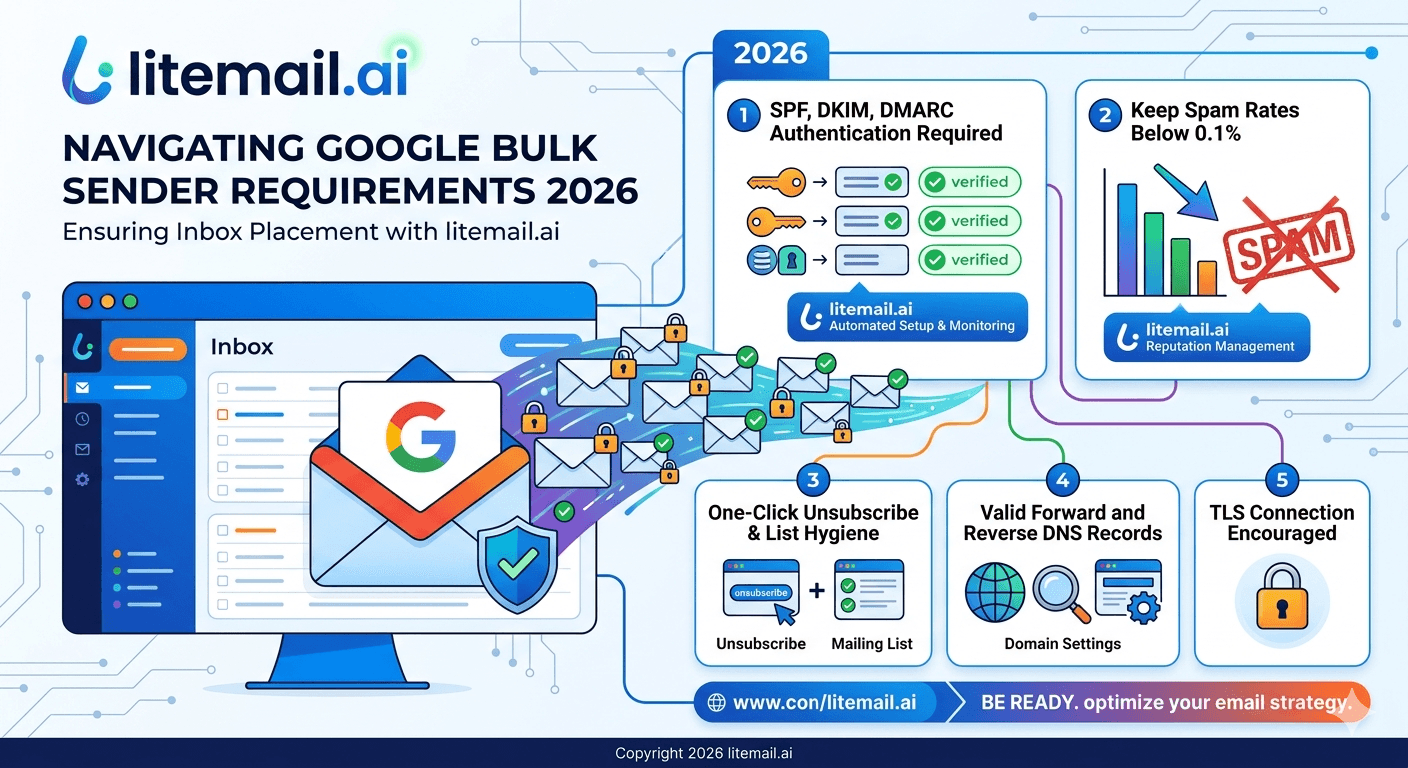
In November 2025, Google stopped warning non-compliant email senders and started rejecting them. The 5.7.26 error code — "messages that aren't authenticated may be marked as spam or rejected" — became a hard bounce reality for senders who hadn't completed their authentication setup. If you've seen a sudden drop in deliverability to Gmail addresses in Q4 2025 or 2026, this is likely why.
What Google Actually Changed (Not What Marketing Blogs Claim)
Google's bulk sender requirements were announced in October 2023 and rolled out in phases. Here's the timeline that explains where most senders got caught:
Date | What Changed | Effect |
|---|---|---|
Feb 2024 | Requirements announced — mandatory for 5,000+ sends/day | Soft enforcement, warnings in Postmaster Tools |
June 2024 | One-click unsubscribe deadline for marketing email | Some non-compliant emails routed to spam |
May 2025 | Microsoft equivalent requirements enforced (Outlook/Hotmail/Live) | Active rejections from Microsoft for non-compliant senders |
Nov 2025 | Google moved to active rejection (not just spam routing) | Non-compliant emails hard-bounced with 5.7.26 error |
Oct 2025 | Postmaster Tools v2 launched — Compliance Status replaces reputation scores | Binary Pass/Fail evaluation — no more Medium/Good grades |
The Postmaster Tools v2 change matters specifically. The old system showed Good/High/Medium/Low reputation — a gradient. The new system shows Pass or Fail. A sender that previously had "Medium" reputation and might have had occasional inbox placement now gets evaluated as compliant or non-compliant with hard delivery consequences for the latter.
💡 TL;DR
Google now actively rejects non-compliant email. If you send 5,000+ emails/day to Gmail: you need both SPF and DKIM, a DMARC record, spam rate under 0.1% (hard limit 0.3%), one-click unsubscribe for marketing email, and valid PTR records. For cold email specifically, pre-warmed inboxes with automated DNS setup (like Litemail's $4.99/inbox) handle the technical requirements automatically from day one.
Requirements for All Senders in 2026 (Under 5,000 Emails/Day)
These apply to everyone sending email to Gmail addresses — not just bulk senders. Even a founder sending 50 cold emails per day needs these.
SPF or DKIM configured — At minimum one of the two must be set up for your sending domain. Both recommended.
Spam rate under 0.3% — Keep it under 0.1% as your operational target. Crossing 0.3% triggers filtering. Above 0.3% consistently triggers active enforcement.
No impersonation of Gmail From: headers — Don't use @gmail.com addresses as your From domain unless sending through Gmail itself. Google now enforces DMARC quarantine on its own domain.
TLS encryption for all transmissions — All connections to Google's mail servers must use TLS. This is handled by your email provider (GWS, M365) — verify if using custom SMTP.
Valid PTR records — Sending IP must have valid forward and reverse DNS. Again, handled automatically by GWS and M365 inboxes.
RFC 5322 compliant message format — Standard email formatting. No duplicated headers, no malformed From/Subject fields.
Bulk Sender Requirements: 5,000+ Emails Per Day to Gmail
If you or any client sends 5,000+ emails per day total to Gmail addresses — across all sending domains combined — these additional requirements apply.
"5,000 per day" sounds like a lot. For agencies managing outreach for multiple clients, it's easier to hit than you think. 10 clients each sending 500 emails per day = 5,000 total. Each individual account counts toward the aggregate threshold.
1. Both SPF and DKIM — Not Just One
At the sub-5,000 level, either SPF or DKIM is sufficient. Above 5,000, both are required. Senders who only configured one need to add the missing record immediately. DKIM key must be at least 1,024 bits — 2,048 bits recommended.
2. DMARC Record Published
The DMARC record must exist. p=none is technically acceptable but increasingly treated as a negative signal by Google's filtering. p=quarantine is the recommended minimum for 2026. The From header domain must align with SPF or DKIM — misalignment fails DMARC even when both pass individually.
3. Spam Rate Under 0.3% — Operational Target Under 0.1%
Google monitors spam complaint rate through Postmaster Tools. The hard limit is 0.3%. The reality: reputation starts degrading around 0.1%. Keep it under 0.08% as your daily operational target. In our testing at Litemail, campaigns that exceed 0.1% and don't adjust within 24 hours show measurable reputation degradation within 3–4 days.
4. One-Click Unsubscribe for Marketing Email
Marketing and promotional emails must include List-Unsubscribe and List-Unsubscribe-Post headers. This powers the "Unsubscribe" button Gmail shows at the top of marketing emails. Unsubscribe requests must be honored within 48 hours. This applies to marketing email — not transactional email, and not cold email sent to business addresses in a prospecting context.
5. From Header Accuracy
The display name in your From header must identify the sender accurately. No misleading names. No emoji checkboxes. No subject-line content in the From field. This is a newer addition to the guidelines added in Postmaster Tools v2's compliance evaluation.
What This Means Specifically for Cold Email Senders
Cold email occupies a technically specific position in Google's framework. Most cold email is sent to business email addresses — not personal Gmail accounts. Google's bulk sender requirements specifically apply to emails sent to personal Gmail addresses (accounts ending in @gmail.com or @googlemail.com).
But here's the practical reality: even if your prospect list contains mostly business email addresses, some will forward to Gmail, some businesses use Gmail (Google Workspace), and your sending infrastructure is evaluated by Google regardless of whether your recipients use @gmail.com. Domain reputation tracked in Postmaster Tools affects deliverability to all recipients, not just personal Gmail accounts.
For cold email in 2026, the practical requirement is:
Both SPF and DKIM configured on every sending domain — not just one.
DMARC published at minimum p=quarantine.
Spam complaint rate monitored daily, kept under 0.08%.
Fresh domains given at least 4–8 weeks of warmup before campaign volume. Or use pre-warmed inboxes with established sending history.
Send from dedicated IPs — not shared pools where other senders' behavior can affect your domain reputation.
Litemail pre-warmed inboxes handle the authentication requirements automatically. SPF, DKIM, and DMARC are pre-configured on every inbox. IP addresses are dedicated — not shared. Domain reputation is verified Good or High in Postmaster Tools within 48 hours of delivery.
Common Error Codes and What to Do About Them
If your emails are being rejected by Gmail, these are the error codes you'll see and what they mean.
Error Code | Cause | Fix |
|---|---|---|
421-4.7.32 | DMARC alignment failure | Check From header aligns with SPF or DKIM domain |
550-5.7.26 | SPF/DKIM not configured | Set up both SPF and DKIM immediately |
550-5.7.1 | IP reputation block | Check blacklists, switch to clean dedicated IPs |
421-4.7.28 | Sending volume spike suspicious | Reduce volume, ramp back up gradually over 2 weeks |
The 550-5.7.26 error specifically is new from the November 2025 enforcement change. Before that, unauthenticated emails were routed to spam. Now they're rejected with a hard bounce. If you see this error at scale, stop sending immediately and fix authentication before continuing — continuing sends while bouncing 550 errors will accelerate domain reputation damage.
Pre-Configured for Google's 2026 Requirements — From $4.99/Inbox
Every Litemail pre-warmed inbox ships with SPF, DKIM, and DMARC pre-configured and passing Google's 2026 compliance requirements. Dedicated US and EU IPs. Full admin access. Verified Good or High in Postmaster Tools within 48 hours. No manual DNS work.
Get Pre-Warmed Inboxes from $4.99 →
Automated DNS · DMARC included · Postmaster-verified · US and EU IPs · No minimum order
About Litemail — Litemail provides pre-warmed Google Workspace and Microsoft 365 inboxes for cold email outreach. From $4.99/inbox with automated DNS, dedicated US and EU IPs, and full admin access. View pre-warmed inbox plans →
Related reading: Gmail 2026 Sender Requirements · Google Email Sender Guidelines 2026 Changes · SPF, DKIM, DMARC Auto-Setup 2026 · DMARC Not Working — Fix Guide 2026 · Google Postmaster Tools Setup for Cold Email · Litemail Pre-Warmed Inboxes — Plans and Pricing
Key Takeaways
Google moved from soft enforcement to active rejection in November 2025. Non-compliant emails now receive hard bounce error 550-5.7.26 instead of spam routing.
Postmaster Tools v2 replaced the reputation gradient (Good/Medium/Low) with a binary Compliance Status (Pass/Fail).
Bulk senders (5,000+ emails/day to Gmail) need both SPF and DKIM — not just one. DMARC must be published. Spam rate must stay under 0.3% (operational target: under 0.08%).
Microsoft implemented equivalent requirements in May 2025. The entire major mailbox provider ecosystem now enforces authentication standards.
The one-click unsubscribe requirement applies to marketing/promotional email — not transactional email or legitimate cold email to business addresses.
Litemail pre-warmed inboxes ship with automated SPF, DKIM, and DMARC setup — fully compliant with Google's 2026 requirements from day one at $4.99/inbox.
Frequently Asked Questions
Does Google's 5,000 email threshold apply to all senders or just businesses?
The 5,000 per day bulk sender threshold applies to any sender who sends that volume to Gmail accounts — personal or Google Workspace. It's counted as a running threshold: if you send 5,000 emails in any rolling 24-hour period to @gmail.com or @googlemail.com addresses, the additional bulk sender requirements apply to you going forward. The requirements are mandatory, not optional, at that volume level.
Is cold email exempt from Google's bulk sender requirements?
The requirements apply based on sending volume, not email type. If you send cold outreach emails at 5,000+/day to Gmail addresses, all bulk sender requirements apply. The one-click unsubscribe requirement specifically targets marketing and promotional email — direct cold email to business addresses in a prospecting context has a different interpretation, but the authentication requirements (SPF, DKIM, DMARC) apply regardless of email type or intent.
What happens if my spam rate exceeds 0.3%?
Google begins actively filtering or rejecting your emails. Domain reputation degrades in Postmaster Tools. Recovery requires stopping all high-volume sends, cleaning your list aggressively, and gradually rebuilding sending history with low-complaint-rate contacts over 4–8 weeks. Prevention: keep your operational target under 0.08% daily (not the 0.3% hard limit), monitor Postmaster Tools daily, and pause any campaign where complaint rate exceeds 0.1% on any single day.
Do these requirements apply to Microsoft Outlook too?
Yes. Microsoft implemented equivalent bulk sender requirements in May 2025, effective for all senders sending 5,000+ emails/day to Outlook, Hotmail, and Live accounts. The requirements are nearly identical: SPF, DKIM, DMARC alignment, spam rate thresholds, TLS encryption, and valid DNS records. By mid-2026, all major mailbox providers (Google, Microsoft, Yahoo) enforce equivalent standards. Authentication is no longer optional anywhere.
What is the new Postmaster Tools Compliance Status?
Google launched Postmaster Tools v2 in October 2025, replacing the Good/Medium/Low/Bad reputation gradient with a binary Compliance Status: Pass or Fail. Pass means your email is meeting Google's sender requirements. Fail means your emails are at risk of rejection. Check your Compliance Status tab in Postmaster Tools v2 weekly. A Fail status requires immediate action — SPF/DKIM/DMARC audit, spam rate review, and volume adjustment before sending more emails.
Do Litemail pre-warmed inboxes comply with Google's 2026 requirements?
Yes. Every Litemail pre-warmed inbox ships with SPF, DKIM, and DMARC pre-configured and passing Google's 2026 compliance requirements. DKIM uses 2048-bit keys. SPF is configured to avoid lookup limit issues. DMARC is published. Dedicated IP addresses ensure your domain reputation is controlled by your sending behavior, not shared pool neighbors. Verified Good or High in Postmaster Tools within 48 hours of delivery.
Google-Compliant Pre-Warmed Inboxes | Litemail
SPF, DKIM, and DMARC pre-configured on every inbox. Dedicated US and EU IPs. Postmaster-verified Good or High within 48 hours. Fully compliant with Google's 2026 bulk sender requirements from day one. $4.99/inbox, no minimum order.
Get Pre-Warmed Inboxes from $4.99 →
Google 2026 compliant · Automated DNS · Postmaster-verified · No minimum order
Related reading: Gmail 2026 Sender Requirements · SPF, DKIM, DMARC Auto-Setup 2026 · Google Postmaster Tools Setup Guide · DMARC Not Working — Fix Guide · Best Pre-Warmed Inbox Providers 2026 · Litemail Pre-Warmed Inboxes — Plans and Pricing
📺 Recommended video: Google Bulk Sender Requirements 2026 — Full Compliance Walkthrough — search on YouTube: Google bulk sender requirements 2026






