
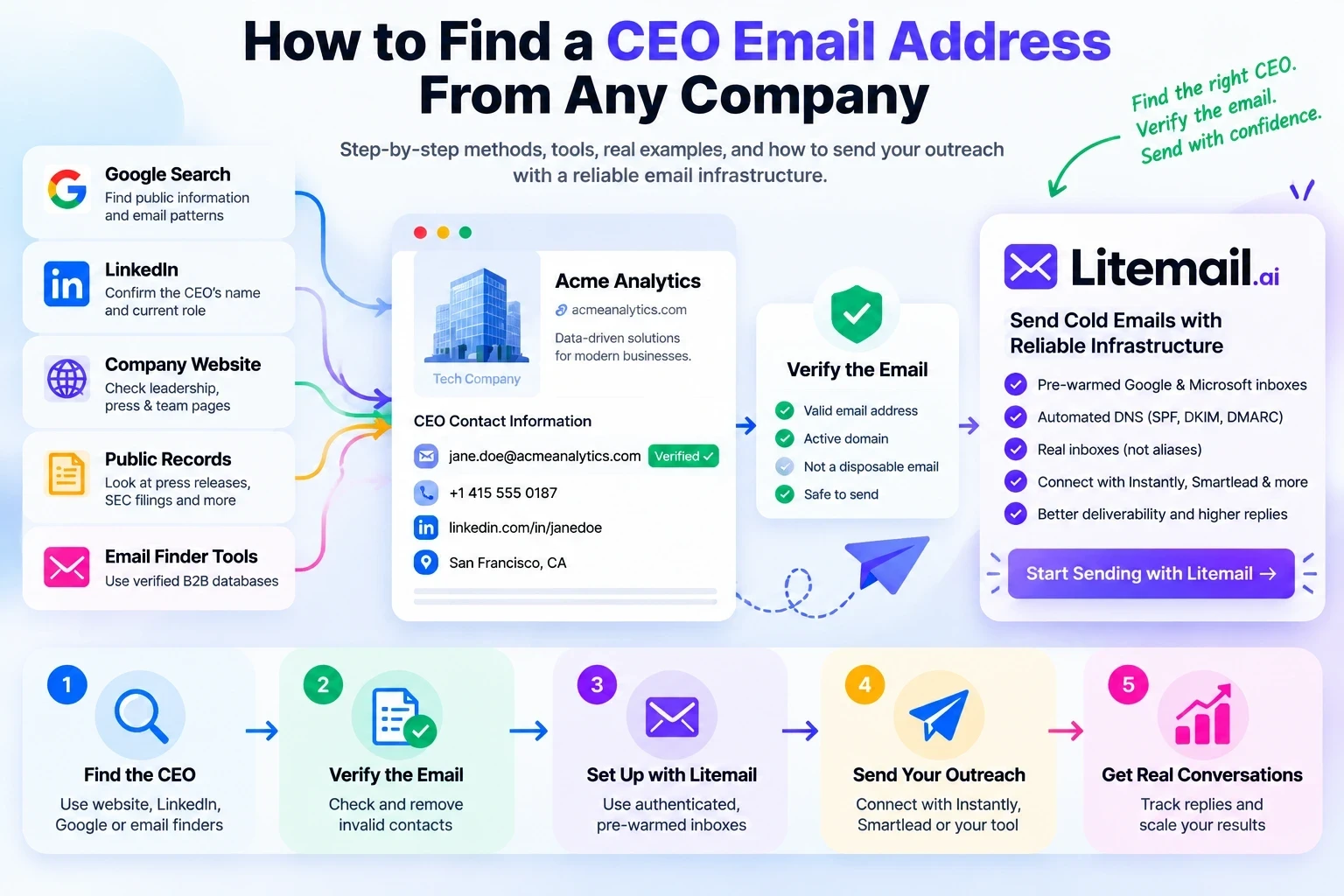
When you're attempting to reach the person in charge of a crucial decision, pitch a collaboration, ask for an introduction, offer a business-to-business product, or initiate a business conversation, finding the appropriate CEO can make all the difference.
The issue is that it's typically much simpler to obtain the CEO's name than a trustworthy corporate email address.
A few businesses make executive contact details public. A general contact address is all that some publish. While some CEOs purposefully keep their inbox private, others list an email address on LinkedIn or a personal website.
So, how can you locate a CEO's email address from any business?
The method that is most dependable is:
validate the current CEO; validate the company domain; look up public sources; determine the company's email pattern; use an email finder when needed; confirm the address; and send a pertinent message.
Furthermore, there is a crucial rule:
Never assume that an email address is validated just because you saw it online or because the email pattern appears to be correct.
An address may be incorrect, use an old domain, belong to a former employee, or serve as a catch-all mailbox.
This post explains how to locate CEO email addresses at scale or for free, how to validate them, and what to do if a direct address isn't accessible to the public.
Quick Answer: What's the Best Way to Find a CEO's Email?
If you only need one or two CEO contacts, start manually:
Find the company's official website.
Confirm who the current CEO or founder is.
Check the leadership, team, contact, press, and author pages.
Check the CEO's LinkedIn profile and Contact Info.
Search Google using the CEO's name and company domain.
Look for another employee's email to identify the company's email pattern.
Use an email finder if the address isn't publicly available.
Verify the final address.
Personalize your outreach.
Stop contacting the person if they object or opt out.
For dozens or hundreds of companies, a B2B contact database or email finder is usually much faster than researching every company manually.
Which Method Should You Use to Find a CEO Email Address?
The best method depends on how much information you already have and how many contacts you need to find.
Your situation | Best method | Cost |
|---|---|---|
You know the company but not its CEO | Company website and LinkedIn | Free |
You know the CEO's name and company | Google search operators | Free |
You know the company's email format | Email pattern research, followed by verification | Free or paid |
You need a few contacts quickly | Email finder tool | Free tier or paid |
You need hundreds of CEO contacts | B2B contact database and bulk verification | Usually paid |
You cannot find a direct email | Official contact page or company switchboard | Usually free |
You have an email but aren't sure it works | Email verification service | Free or paid |
Our recommendation: Start with free research for individual contacts. Use a professional email finder when manual research takes too long. Regardless of the method, verify the address before sending.
Remember that no tool can guarantee a direct email address for every CEO, and an inferred email address should never automatically be treated as verified.
Before You Search: Make Sure You're Looking for the Right Person
One of the biggest mistakes in CEO email research happens before the email search even begins.
You may find an email address that belongs to the wrong person simply because the company's leadership changed.
A founder may have stepped down as CEO. A company may have appointed a new chief executive. A smaller company may not even use the title "CEO."
You might instead find:
Founder
Co-Founder
President
Owner
Managing Director
Managing Partner
Executive Director
Your goal shouldn't simply be to find the most senior person.
Your goal should be to find the person who actually owns the decision you're trying to influence.
For example, if you're selling HR software, the CEO may not be the best contact at a 500-person company. The CHRO or VP of People may own the decision.
For a small founder-led SaaS company, however, the founder may be exactly the right person.
Current CEO-email guides from Oppora and Lusha similarly emphasize confirming the executive's current role before searching for their email
10 Ways to Find a CEO Email Address
1. Check the Company's Official Website
Best for: Free research and high-confidence identity verification
The company's own website should be your first stop.
Look beyond the homepage.
Check:
About Us
Leadership
Executive Team
Team
Management
Contact Us
Press
Newsroom
Investor Relations
Blog author pages
Media kit
Partnership pages
Speaker pages
You may find the CEO's actual email.
More commonly, you'll find:
CEO name + job title + official company domain
That information is still extremely valuable.
For example:
Company: Acme Analytics
CEO: Sarah Khan
Website: acmeanalytics.com
You now have the three pieces required for the next stage of the research.
Current guides from Lusha, Instantly, and Oppora all recommend checking company websites and leadership pages as part of the CEO-email research process. Lusha
Don't stop at the Contact page
If you don't find an email, search the website for:
CEO
Founder
Leadership
"Sarah Khan"
email
You may discover the address inside an old press release, PDF, interview, or article written by the executive.
2. Check LinkedIn
Best for: Confirming the CEO's current position
LinkedIn is particularly useful for answering an important question:
"Is this person actually the CEO right now?"
Search:
Company Name CEO
Then compare the result with the company's official website.
Once you're on the CEO's profile, check Contact Info.
If the executive has chosen to share an email address, it may be available there.
LinkedIn confirms that users can choose what contact information they provide and who can view it, so an email won't necessarily be visible on every profile. LinkedIn
What if the CEO's email isn't visible?
Don't assume LinkedIn failed.
Use the profile to collect:
Full name
Current company
Current title
Company domain
Previous companies
Website
Recent posts
Featured content
That information can be combined with the next methods.
3. Use Google Search Operators
Best for: Free research
Google can uncover emails that aren't immediately visible on a company's main pages.
Instead of searching:
CEO Acme Analytics email
use more specific searches.
Search the CEO's name and domain
Search the company's website
Search for email addresses on the domain
Search PDFs
Search the executive and company together
These searches can uncover:
Press releases
Conference biographies
PDFs
Company reports
Interviews
Newsroom pages
Author pages
Media kits
Public documents
Current 2026 guides from Instantly, Oppora, and Lusha all recommend variations of Google/site/filetype searches for finding or cross-checking executive contact information. Instantly
4. Find the Company's Email Pattern
This is one of the most useful methods when the CEO's email isn't publicly displayed.
Most organizations use a consistent format for employee email addresses.
Common examples include:
firstname.lastname@company.comfirstname@company.comfirstinitiallastname@company.comf.lastname@company.comfirstname_lastname@company.com
But don't choose one randomly.
First, find a confirmed employee email.
Example
Suppose you discover:
john.smith@acmeanalytics.com
and:
maria.jones@acmeanalytics.com
The pattern appears to be:
firstname.lastname@acmeanalytics.com
If the CEO is Sarah Khan, the likely candidate becomes:
Sarah.Khan@acmeanalytics.com
But that's only a candidate.
It is not verified yet.
This distinction is critical.
An email pattern tells you what the address could be. It doesn't prove that the mailbox exists.
Both Lusha and Instantly discuss pattern-based email discovery, while Hunter distinguishes between publicly sourced addresses and addresses inferred from domain patterns.
Example: How to Find a CEO's Email Address Step by Step
Let's use a fictional company called Northstar Analytics to demonstrate the process.
Suppose you want to contact its CEO, Maya Rahman, about a business partnership.
Step 1: Confirm the CEO
Visit the company's official website and LinkedIn profile to confirm Maya's current position.
Step 2: Confirm the company domain
Identify the company's official website and business email domain. Don't assume that a similarly named domain belongs to the same company.
Step 3: Search for a publicly available email
Try Google searches such as:
"Maya Rahman" "Northstar Analytics" email
site:company-domain.example "Maya Rahman"
These searches may uncover a company page, interview, press release, or professional profile containing relevant contact information.
Step 4: Identify the email format
Suppose you find two publicly listed employee addresses that use the format firstname.lastname@company-domain.example.
This suggests a possible naming convention. It does not prove that the CEO uses the same format.
Step 5: Check the candidate address
Use a reputable email finder or verification service to assess whether the candidate address is valid. Review the result carefully, especially if the domain uses catch-all email handling.
Step 6: Decide whether to send
Proceed only when you have sufficient confidence in the contact details and a legitimate reason to reach out. If the address remains uncertain, use the company's official contact channel instead.
The lesson: Finding an email pattern helps you generate a candidate. Verification helps you assess its reliability. Neither guarantees that the message will reach the CEO's inbox.
5. Use a CEO Email Finder
Best for: Finding contacts at scale
If you're researching 5, 10, 50, or 500 companies, manual research quickly becomes inefficient.
A B2B email finder can allow you to search using:
Name
Company
Domain
Job title
Industry
Location
Company size
For example, instead of researching every company individually, you might search:
CEO + SaaS + United States + 11–200 employees
Some tools also provide verification, confidence scores, company information, and data-source information.
Examples of tools
Hunter offers Domain Search and Email Finder functionality. Hunter says its results can include public sources, inferred addresses, verification status, and confidence information. Hunter Help Center
combines B2B contact data with sales intelligence and executive prospecting. Its current G2 listing describes its database as covering hundreds of millions of business contacts and millions of companies.
provides email-finding workflows around LinkedIn, company websites, and bulk prospecting.
The important thing isn't simply which tool finds the most emails.
Look for a tool that explains:
Where the data comes from
When it was last checked
Whether the email is verified
Whether the address is inferred
How catch-all domains are handled
Which CEO Email Finder Should You Choose?
Different tools serve different prospecting needs. Before choosing one, compare the quality of its data, verification process, available filters, export limits, and pricing.
Tool | When to consider it | What to check |
|---|---|---|
Hunter | Finding professional emails by company domain or person | Source information, verification status, and search limits |
Lusha | B2B contact discovery and sales intelligence | Credit consumption, contact coverage, and available integrations |
Skrapp | Finding professional emails for prospecting | Domain coverage, verification results, and export limits |
Snov.io | Email finding and verification workflows | Current plan limits and available verification features |
Manual Google research | Finding a small number of executive contacts | Time required and whether the information is current |
Features, pricing, and limits can change, so check each provider's official website before choosing a plan.
How to Choose the Right Tool
Don't choose an email finder based only on how many addresses it returns.
Ask these questions:
Does it identify the source of the email?
Does it distinguish verified addresses from inferred ones?
Does it explain uncertain or catch-all results?
Does it cover the industries and countries you target?
Can you export the contacts you need?
Is the total cost reasonable for your prospecting volume?
For a handful of CEOs, free research may be enough. For larger prospect lists, a paid tool can save time, but its results still require quality checks.
6. Search Press Releases and Newsroom Pages
Best for: Executives who regularly appear in public communications
Press releases are an underrated source of executive information.
Search the company's newsroom for:
Funding announcements
Acquisitions
Leadership changes
Product launches
Partnerships
Awards
Events
Company milestones
Look at the bottom of press releases.
You may find a media or communications contact.
Even if you don't find the CEO's direct email, you may discover:
CEO name + company domain + another employee's email pattern
That can be enough to continue your research.
Important
Don't label a media contact as the CEO's direct email.
If the page says:
media@company.com
that's a media address, not necessarily the CEO's personal business inbox.
That distinction improves the accuracy and trustworthiness of your database.
7. Search Public Company Filings
Best for: Public companies
If you're researching a publicly traded company, don't ignore regulatory filings.
In the United States, the SEC's EDGAR system provides free public access to millions of company filings and allows searches by company name, ticker, CIK, person, date, and filing type. SEC
Look at relevant:
Annual reports
Proxy statements
Current reports
Investor-relations documents
These documents are particularly useful for confirming:
Current executives
Official company names
Corporate relationships
Company domains
Recent leadership changes
They won't always provide the CEO's direct email, but they can prevent you from researching the wrong executive.
8. Check Founder Websites, Podcasts, Events, and Professional Profiles
Some founders are more publicly accessible outside their company's website.
Check:
Personal websites
Founder blogs
Podcasts
Conference speaker pages
Webinars
Industry associations
News interviews
Professional organizations
Investor profiles
Author pages
A founder may publish a business email for:
Speaking
Partnerships
Investment
Press
Consulting
Business inquiries
If the executive explicitly provides an address for a particular purpose, use it for that purpose.
Don't take a personal email found somewhere unrelated and treat it as an invitation for mass marketing.
9. Use a Generic Company Email When a Direct CEO Email Isn't Available
Sometimes the best answer is:
Don't look for the CEO's private inbox.
Instead, use the company's official communication route.
Examples include:
info@company.comcontact@company.compartnerships@company.comsales@company.commedia@company.com
Then write:
Subject: For Sarah Khan — Partnership Opportunity
Hi team,
I’m reaching out regarding a potential partnership with Sarah Khan. Could you please forward this to the appropriate person?
This can be better than guessing five different CEO email variations.
It also respects the company's preferred communication structure.
Oppora's current guide similarly recommends using an executive assistant, shared inbox, LinkedIn, phone line, or contact form when a direct CEO email cannot be verified. Oppora AI
10. Use AI as a Research Assistant — Not as Your Source of Truth
AI can make CEO research faster.
For example, you could ask AI to organize information like:
"Find the current CEO of Acme Analytics, confirm the official company domain, identify publicly available professional contact sources, and list what information still needs verification."
AI can help you:
Organize research
Identify missing information
Generate Google search queries
Compare company information
Detect inconsistent titles
Suggest possible email patterns
But don't blindly trust an AI-generated email address.
An AI can generate a perfectly plausible email that doesn't exist.
AI can suggest. Verification must confirm.
This is one area where a lot of "free CEO email" content becomes risky: a plausible-looking address isn't necessarily a real mailbox.
How to Find a CEO Email Address for Free
If you don't want to pay for an email finder, use this workflow.
Step 1: Find the company
Search the company name.
Step 2: Confirm the official domain
Make sure you're using the company's real website rather than a directory or similarly named business.
Step 3: Confirm the CEO
Check the company website and LinkedIn.
Step 4: Search the website
Look at:
Leadership
Team
About
Contact
Press
Blog
PDFs
Step 5: Search Google
Try:
and:
Step 6: Find another employee's email
Use it to determine the company's naming convention.
Step 7: Generate one candidate
Only after you've identified the company's actual pattern.
Step 8: Verify it
Don't send until you have a reasonable verification result.
This combination of website research, LinkedIn, search operators, and domain patterns is also reflected in current competitor guides from Lusha, Instantly, and Skrapp.
How to Verify a CEO Email Address Before Sending
Finding an email is only half the job.
Verification is what protects the quality of your prospect list.
Use this checklist.
1. Verify the person
Is this still the CEO?
Check the company's latest information and the person's current professional profile.
2. Verify the domain
Does the email domain actually belong to the company?
Be careful with:
Old domains
Acquired companies
Subsidiaries
Holding companies
Personal domains
Lookalike domains
3. Verify the email pattern
If you inferred the address, compare it with at least one or two known professional addresses from the same organization.
4. Use an email verification service
A professional verifier can check signals such as:
Syntax
Domain
Mail server
Mailbox status
Catch-all behavior
For example, Hunter distinguishes between valid, invalid, and accept-all results and notes that even confidence scores are not guarantees. Hunter Help Center
5. Treat catch-all results carefully
A catch-all domain can accept mail for addresses that may not correspond to individual mailboxes.
Therefore:
"Server accepted the address" ≠ "the CEO definitely has this mailbox."
What Do Email Verification Results Actually Mean?
Email verification results are useful, but they should be interpreted carefully.
Valid: The service found signals consistent with a usable email address. This is not a guarantee of inbox placement or future delivery.
Invalid: The service found evidence that the address is not usable. Remove it or investigate before sending.
Accept-all or catch-all: The domain may accept messages for addresses that do not correspond to individual mailboxes. Treat these results as uncertain.
Unknown: The verification service could not reach a reliable conclusion. Don't automatically classify the address as valid.
Verification services use different methods, so their results are not always directly comparable.
For important executive contacts, combine verification with manual checks of the person's current role, company domain, and available professional contact information.
Important: Even a valid email address can bounce later, and no verification service can guarantee inbox placement. Continue monitoring bounce rates and sender reputation after sending.
Does a Verified Email Guarantee Inbox Placement?
No.
This is an important distinction that many articles miss.
Email verification answers one question:
"Does this address appear capable of receiving email?"
It does not answer:
"Will my email reach the CEO's primary inbox?"
Inbox placement also depends on:
Sender reputation
Domain reputation
IP reputation
Authentication
Sending behavior
Recipient engagement
Spam complaints
Message content
Sending volume
So your workflow should be:
Find → Verify → Personalize → Send from healthy infrastructure → Monitor
Not:
Find → Send thousands of emails
Why Finding the CEO's Email Isn't Enough
Imagine you spend two hours researching 500 CEOs.
You finally have:
500 names
500 companies
500 verified-looking email addresses
But your sending domain is new.
Your DNS isn't configured correctly.
Your sending inbox has no reputation.
You send hundreds of messages immediately.
Now you have a different problem:
The CEO's email may be correct, but your email may never reach the inbox.
Google's current sender guidance emphasizes authentication, reputation, spam-rate monitoring, gradual volume increases, and avoiding unwanted email. For high-volume senders to personal Gmail accounts, Google requires SPF, DKIM, DMARC, alignment, and one-click unsubscribe for relevant marketing/subscribed messages. Google Support
That's why contact discovery and email infrastructure should be treated as two separate parts of the outbound funnel.
The Complete CEO Outreach Funnel
Here's the practical workflow:
1. Targeting
Identify the companies that actually fit your ICP.
↓
2. Decision-maker research
Find the CEO, founder, owner, or appropriate executive.
↓
3. Contact discovery
Find the professional email address.
↓
4. Verification
Remove invalid, outdated, or uncertain addresses.
↓
5. Personalization
Research why your message is relevant to that particular company.
↓
6. Infrastructure
Use authenticated, reputable sending infrastructure.
↓
7. Outreach
Send a concise, relevant message.
↓
8. Follow-up
Follow up appropriately without becoming repetitive or intrusive.
↓
9. Measurement
Monitor replies, bounces, complaints, and campaign performance.
This is the difference between having an email list and having an actual outbound system.
How to Email a CEO Without Getting Ignored
Finding the address doesn't mean the CEO will respond.
Executives are busy, so your email should answer three questions quickly:
Why are you contacting me?
Make the reason obvious.
Why is this relevant to my company?
Show that you understand their situation.
What do you want me to do?
Give them one simple next step.
Example
Subject: Quick idea for [Company Name]
Hi Sarah,
I noticed [specific company trigger or problem].
We help [type of company] solve [specific problem] without [common pain point].
I thought this might be relevant because [one personalized reason].
Would it be worth a quick conversation next week?
Best,
[Name]
Keep it short.
Don't write a five-paragraph company biography.
What You Should NOT Do When Finding CEO Emails
Avoid these common mistakes:
❌ Don't send to multiple guessed variations
If you don't know whether the company uses:
first@company.com
or:
first.last@company.com
don't send five guesses.
Verify first.
❌ Don't use personal emails unnecessarily
A publicly exposed personal email isn't automatically an invitation to use it for commercial outreach.
Prefer professional business channels.
❌ Don't buy unexplained CEO lists
If you don't know:
Where the data came from
When it was collected
How it was verified
How often it is updated
you don't know the quality of the list.
❌ Don't assume public means unrestricted
Public availability does not eliminate privacy and direct-marketing obligations.
❌ Don't confuse verification with deliverability
A verified address can still land in spam.
❌ Don't blast every CEO you find
The quality of your targeting matters more than the size of your list.
Is It Legal to Find and Email a CEO?
There isn't one worldwide rule.
The answer depends on:
Country
Recipient type
Type of email
How the data was obtained
Purpose of processing
Applicable privacy laws
Whether the recipient has objected
United States
The FTC states that CAN-SPAM applies to commercial email, including B2B messages. Requirements include accurate header information, non-deceptive subject lines, a valid physical postal address, and a working opt-out mechanism. Opt-out requests generally must be honored within 10 business days. Federal Trade Commission
United Kingdom
The ICO makes an important distinction between corporate subscribers and individual subscribers under PECR. Even when B2B email rules differ, UK GDPR can still apply when you're processing personal data such as an individual's business email address. The ICO also says that publicly available information isn't automatically free for unrestricted marketing use. ICO
Canada
CASL is generally stricter and requires consent for commercial electronic messages, subject to specific exceptions such as certain implied-consent situations. ISED Canada
The safest approach is to check the rules for the recipient's jurisdiction before launching a campaign.
This article provides general information, not legal advice.
What Happens After You Find the CEO Email?
This is where most "CEO email finder" guides stop.
But finding the address is only the top of your outbound workflow.
Suppose you've found:
1,000 CEO emails
You verified them.
You personalized your campaign.
What happens next?
You need a sending system capable of handling the campaign without turning your primary business domain into your outbound sending domain.
This is where Litemail fits.
What Happens After You Find a CEO's Email Address?
Finding a CEO's email address is only one part of a successful outbound campaign.
You may have the correct executive, a relevant business reason to contact them, and an email address that has passed verification. But you still need to send a message that is relevant, technically authenticated, and appropriate for the recipient.
This is where email infrastructure becomes important.
How Litemail Fits Into the Outbound Workflow
Litemail is an email infrastructure platform, not a CEO email finder. It is designed to help outbound teams prepare and manage the mailbox infrastructure used for their campaigns.
A typical workflow looks like this:
1. Find the CEO
Use company research, LinkedIn, or a B2B contact database to identify the right decision-maker.
2. Verify the email
Check the address and remove invalid contacts before sending.
3. Prepare the sending infrastructure
Set up the required domains, mailboxes, and email authentication.
4. Connect your sending platform
Use your chosen outbound tool to manage campaigns and follow-ups.
5. Monitor performance
Review bounces, spam complaints, sender reputation, and replies, then adjust your approach.
Litemail fits into the infrastructure stage. Its relevant product features should be checked against its current official documentation before you publish specific claims about mailbox types, warm-up history, integrations, or IP locations.
Why Outbound Teams May Choose Litemail
Teams managing multiple outbound mailboxes often need to coordinate domain setup, mailbox provisioning, DNS configuration, authentication, and sending-platform connections.
Handling every step manually can take time, particularly for agencies and teams operating several campaigns.
Litemail is designed to simplify the email-infrastructure setup process, allowing teams to focus more of their effort on prospect research, relevant messaging, and campaign management.
Depending on the selected product and plan, evaluate whether the available mailbox options, setup process, and integrations meet your team's requirements.
Should You Use Pre-Warmed or Fresh Inboxes?
The answer depends on your needs and the specific product you select.
Fresh inboxes begin with little or no established sending history. Pre-warmed inboxes have an existing warm-up history, but that history does not guarantee future inbox placement.
Before choosing either option, consider:
Your campaign's sending requirements
The quality of your prospect list
Your domain and authentication setup
Your planned sending volume
Your monitoring and reputation-management process
Pre-warmed infrastructure may reduce some initial setup and waiting time, but it cannot compensate for poor targeting, invalid email addresses, excessive sending, or unwanted messages.
Already Found Your CEO Prospects?
If you have researched and verified your contacts, the next step is to prepare an appropriate sending environment.
Litemail can be worth considering if you want a dedicated email-infrastructure solution rather than configuring every mailbox and domain manually.
Explore Litemail.ai to review the available infrastructure options and decide whether they fit your outbound workflow.
Why Email Infrastructure Matters When Contacting CEOs
CEO outreach is usually high-value and relatively targeted.
That makes list quality extremely important.
If you're contacting 50 carefully selected CEOs, you don't want 20 of those messages disappearing into spam because your sending infrastructure was poorly configured.
A reliable outbound foundation includes:
Dedicated sending domains
Proper DNS configuration
SPF
DKIM
DMARC
Appropriate sending volume
Healthy inbox reputation
Verified recipient lists
Bounce monitoring
Spam-complaint monitoring
Google specifically recommends authentication, gradual volume increases, spam-rate monitoring, and avoiding sudden sending spikes. Google Support
Litemail packages much of the infrastructure work into one setup rather than requiring an outbound team to configure every mailbox and DNS record manually. LiteMail
Fresh vs. Pre-Warmed Inboxes for CEO Outreach
This is especially important if you plan to contact executives at scale.
A fresh inbox has little or no established sending history.
A pre-warmed inbox has already built sending history before being used for your campaign.
If you've spent days researching and verifying executive contacts, waiting weeks to prepare the sending infrastructure can become a bottleneck.
Litemail offers both fresh and pre-warmed infrastructure options, with Google Workspace and Microsoft 365 available. LiteMail
For teams that need to launch quickly, pre-warmed infrastructure can be useful because the sending environment is prepared before the campaign starts.
However, pre-warmed does not mean "spam-proof."
You still need:
Good lead targeting
Verified addresses
Relevant messaging
Controlled sending
Proper authentication
Low complaint rates
Ongoing monitoring
That distinction is important if you're serious about long-term deliverability.
CEO Email Research + Litemail: A Better Outbound System
Here's what the complete system looks like.
Step 1 — Build your ICP
Decide which companies are actually worth targeting.
Step 2 — Find the right executive
CEO, founder, owner, president, or functional decision-maker.
Step 3 — Find the professional email
Use the company website, LinkedIn, Google, domain patterns, or a B2B email finder.
Step 4 — Verify it
Don't send unverified guesses.
Step 5 — Prepare the campaign
Write a short, personalized message based on a legitimate business reason.
Step 6 — Prepare infrastructure
Use a dedicated sending environment with authentication and appropriate sending practices.
Step 7 — Connect your sending platform
Litemail supports OAuth-based connections to major outbound platforms including Instantly and Smartlead. LiteMail
Step 8 — Start conservatively
Don't turn a brand-new campaign into a massive sending spike.
Step 9 — Monitor
Watch:
Bounce rate
Spam complaints
Domain reputation
Replies
Campaign performance
Step 10 — Improve
Remove bad contacts, refine targeting, improve personalization, and protect your sending reputation.
The Most Efficient Method Depends on Your Situation
If you're finding 1 CEO
Use:
Company website → LinkedIn → Google → email pattern → verification
You probably don't need an expensive database.
If you're finding 20 CEOs
Use:
Website + LinkedIn + email finder + verification
This gives you a good balance between research quality and speed.
If you're finding 1,000 CEOs
Use:
ICP → B2B database → executive filtering → enrichment → verification → personalized outreach
Manual research becomes too expensive in terms of time.
And remember:
More contacts aren't automatically better.
One hundred highly relevant CEOs can be more valuable than 10,000 poorly targeted contacts.
CEO Email Finder vs. Manual Research
Method | Cost | Speed | Best For | Main Risk |
|---|---|---|---|---|
Company website | Free | Slow | Small lists | Email may not be published |
Free/Paid | Medium | Identity verification | Email may be hidden | |
Google operators | Free | Medium | Individual research | Outdated results |
Email pattern | Free | Fast | Known company format | Guess can be wrong |
Public filings | Free | Slow | Public companies | Usually confirms identity rather than email |
Email finder | Paid/Free tiers | Fast | Larger lists | Data still needs review |
Generic company inbox | Free | Fast | When direct email isn't available | May not reach CEO directly |
AI research | Free/Paid | Fast | Organizing research | AI can generate incorrect addresses |
The 5-Minute CEO Email Research Workflow
If you want a simple repeatable process, use this:
Minute 1
Find the company's official website and confirm the domain.
Minute 2
Confirm the current CEO through the leadership page and LinkedIn.
Minute 3
Search:
and:
Minute 4
Find another employee email and identify the company pattern.
Minute 5
Run the candidate through an email verification process.
If you still can't verify the address, don't keep guessing.
Use a generic company channel, executive assistant, LinkedIn message, or a professional email finder.
About This Guide
Last updated: October 2026
This guide explains practical methods for researching professional business contacts, finding potential CEO email addresses, and evaluating email verification results. It also covers responsible outreach and the distinction between contact discovery and email deliverability.
Email-finding tools, pricing, and features can change. Check official provider documentation before making purchasing decisions, and review the laws that apply to your recipients and campaigns.
This article is for informational purposes and is not legal advice.
Frequently Asked Questions
How can I find a CEO email address for free?
Start with the company's official website, leadership pages, LinkedIn, Google search operators, public documents, press releases, and confirmed employee email patterns. Verify any address you infer before sending.
How do I find a CEO email address from LinkedIn?
Use LinkedIn to confirm the CEO's current role and company. Then check the profile's Contact Info section if the executive has chosen to share an email. If no email is visible, use the confirmed name and company domain with other research methods.
How do I find a CEO email by company domain?
First identify the company's official email domain. Then find one or more confirmed employee emails to determine the organization's naming pattern. Apply the pattern to the CEO's name and verify the resulting address.
What is the best CEO email finder?
There isn't one universally best tool. Compare coverage, freshness, verification methods, source transparency, filters, pricing, and export options. Tools such as Hunter, Lusha, and Skrapp offer different approaches to professional email discovery.
Can I find every CEO's email address?
No legitimate method can guarantee a direct email address for every CEO. Some executives don't publish direct contact information, use an assistant-managed inbox, or deliberately restrict access.
Should I guess a CEO's email address?
Only use an inferred address as a candidate. If you identify the company's email pattern, verify the resulting address before contacting the executive.
Does email verification guarantee delivery?
No. Verification can reduce the risk of sending to an invalid mailbox, but it doesn't guarantee inbox placement or a response. Sender reputation, authentication, volume, recipient policies, content, and spam complaints can still affect delivery.
What if I can't find the CEO's direct email?
Use an official company contact address, executive assistant, LinkedIn, contact form, phone line, or mutual connection. Ask for the correct route rather than sending multiple guessed addresses.
Is it legal to email a CEO?
It depends on the recipient's jurisdiction, the type of organization, how you obtained and process the data, and the nature of your message. For example, CAN-SPAM applies to commercial B2B email in the United States, while UK and Canadian rules have additional requirements and distinctions.
Does Litemail find CEO email addresses?
No. Litemail is an email infrastructure platform, not a CEO email database. It can be used after you find and verify your prospects to provide the sending infrastructure for outbound campaigns, including Google Workspace and Microsoft 365 inboxes, automated DNS, authentication, and pre-warmed options. LiteMail
Can I use Litemail with a CEO email finder?
Yes. The tools solve different parts of the outbound process. A contact database can help you find prospects, while Litemail can provide the sending infrastructure used to reach them. Litemail also supports connections with outbound platforms such as Instantly and Smartlead. LiteMail
Final Takeaway
Finding a CEO's email address isn't really about discovering a magical email formula.
It's about building a reliable research process.
Start with the company.
Confirm the executive.
Confirm the domain.
Search public professional sources.
Identify the company's email pattern.
Use a professional email finder when manual research isn't enough.
Verify the address.
Then personalize your outreach.
But don't stop there.
A correct CEO email is only useful if your message actually reaches the inbox.
That's why a complete outbound system has two separate layers:
Contact discovery → Find the right person
Email infrastructure → Give your message a reliable path to the recipient
For teams that already have their prospect list and need the infrastructure side handled, Litemail's cold email infrastructure provides Google Workspace and Microsoft 365 inboxes, automated SPF/DKIM/DMARC setup, dedicated US/EU IP options, pre-warmed infrastructure, and integrations with major sending platforms.






