
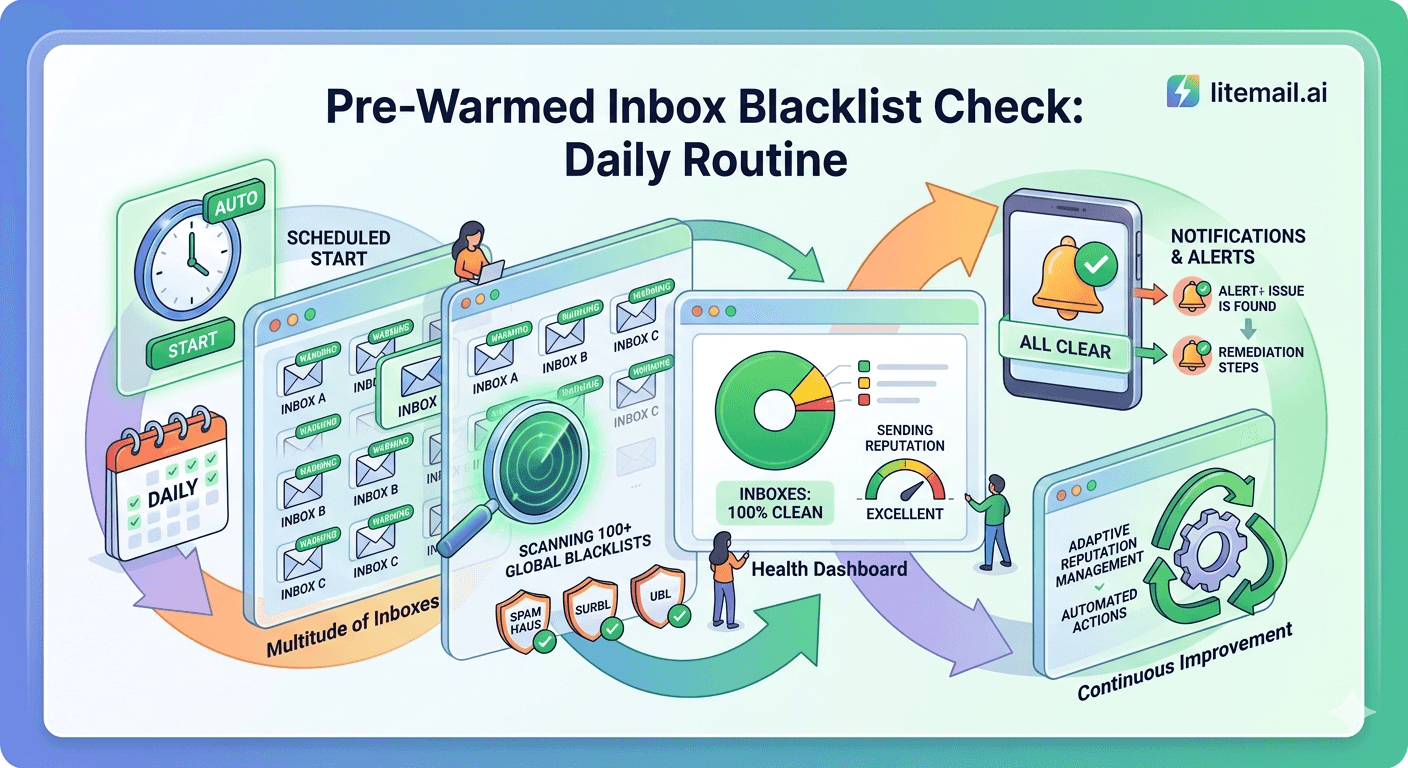
A pre-warmed inbox that lands on a blacklist within 48 hours of a campaign launch is one of the most expensive problems in cold email — and one of the most preventable. Most teams find out too late: reply rates collapse, Postmaster Tools shows Low reputation, and the domain is already flagged across multiple blocking lists. This guide covers the exact daily routine Litemail uses to catch blacklist issues before they compound.
The Short Answer on Blacklist Checks
If you want the routine without the backstory, here it is. Run these three tools daily on every sending domain. They catch 95% of blacklist events before inbox placement is meaningfully affected.
Tool | What It Checks | Frequency | Free? |
|---|---|---|---|
MXToolbox Blacklist | 100+ blacklists simultaneously | Daily | Free |
Google Postmaster Tools | Domain + IP reputation at Google | Daily | Free |
Microsoft SNDS | IP reputation at Microsoft | 3x/week | Free |
Spamhaus Lookup | SBL, XBL, PBL, DBL | Daily | Free |
💡 Bottom Line
Blacklist events do not appear in Postmaster Tools until reputation has already declined. Running MXToolbox and Spamhaus daily gives you 12 to 24 hours of warning before inbox placement drops. Most blacklisting events for legitimate cold email senders are resolved within 48 to 72 hours if caught early. Caught late — after campaigns have been running — recovery takes weeks.
Why Pre-Warmed Inboxes Still Get Blacklisted
Pre-warming builds sender reputation — it does not make a domain immune to blacklisting. The most common causes of blacklisting for pre-warmed inboxes are not warm-up related at all. They come from what happens after delivery.
📋Unverified Contact Lists
Sending to invalid or catch-all addresses at scale generates hard bounces and spam trap hits. Even a 2% hard bounce rate on a 1,000-email campaign is enough to trigger a Spamhaus DBL listing. Verify every list with NeverBounce or ZeroBounce before the first send — not after the first campaign.
🚩Spam Trap Hits
Spam traps are email addresses that exist solely to catch senders using scraped or purchased lists. A single spam trap hit can trigger a Spamhaus XBL or SBL listing. Purchased prospect lists are the primary source. Lists scraped from directories, event attendee databases, and LinkedIn without permission are the next most common source.
📈Volume Spikes Without Warmup Maintenance
Sending 400 emails from an inbox that had been sending 50 per day is a volume signal. Google and Microsoft both flag sudden volume spikes as suspicious activity. If you stop the warmup tool when campaigns go live, you remove the pattern of normal ongoing sending activity that makes volume spikes look less unusual.
🔗Shared IP Contamination
If you are using shared IP addresses — as many cheaper inbox providers supply — another sender on the same IP getting blacklisted takes you with them. This is why dedicated US and EU IPs are non-negotiable for cold email. Litemail pre-warmed inboxes use dedicated IPs, so your blacklist risk is isolated to your own sending behaviour.
The 10-Minute Daily Blacklist Check Routine
This is the exact routine used across Litemail's inbox pool. It takes 10 minutes per batch of domains. At scale — 20 to 50 sending domains — automate the MXToolbox step via their API or a monitoring service like HetrixTools.
1️⃣Run MXToolbox Blacklist Check
Go to mxtoolbox.com → Blacklist Check. Enter your sending domain. MXToolbox checks against 100+ blacklists simultaneously and returns a pass/fail result per list. Any listing in Spamhaus SBL, Spamhaus DBL, Spamcop, or Barracuda requires immediate action. Listings in smaller or less-used lists (SORBS, UCEProtect) are lower priority but should still be investigated within 24 hours.
2️⃣Check Google Postmaster Tools
Log into postmaster.google.com. Review domain reputation and IP reputation tabs. Any movement from Good to Medium is a warning — pause campaigns from that inbox and investigate the cause before resuming. Movement to Low means stop sending immediately and begin the repair process. Postmaster data has a 24-hour lag, so a drop you see today reflects sends from yesterday.
3️⃣Check Spamhaus Directly
Go to check.spamhaus.org and check your sending domain and the IP address of your sending inbox. Spamhaus runs separate checks for domains (DBL) and IPs (SBL, XBL, PBL). A DBL listing is a domain reputation flag — a direct result of spam complaint activity or spam trap hits from your domain. An XBL listing means the IP has been detected sending spam or is associated with malware activity.
4️⃣Check Microsoft SNDS (3x per week)
Microsoft's Smart Network Data Services (postmaster.live.com → SNDS) shows your IP's reputation at Microsoft. Green is good. Yellow is caution — reduce volume from this IP. Red means Microsoft is actively filtering your mail. This check matters most for campaigns targeting prospects at Microsoft-hosted domains (Outlook.com, Hotmail, many corporate Microsoft 365 tenants).
5️⃣Log Results Daily
Keep a simple spreadsheet: date, domain, MXToolbox result, Postmaster reputation, Spamhaus clean/listed. Patterns matter. A domain that shows clean every day then suddenly gets listed was hit by a specific campaign or send — cross-reference with your campaign log to identify the list or content that caused it.
What to Do If You Find a Listing
Finding a blacklist hit is not a crisis if you catch it within 24 hours. The response depends on which list you are on and why. Here is the resolution path for each major blacklist.
Blacklist | Typical Cause | Resolution Path | Time to Clear |
|---|---|---|---|
Spamhaus DBL | Spam complaints or spam trap hits from domain | spamhaus.org → Blocklist Removal → self-service if first offence | 24–48 hrs |
Spamhaus SBL | IP flagged for spam activity | Contact Spamhaus via removal request — requires investigation | 2–7 days |
Spamcop | Spam complaints submitted via Spamcop interface | Self-expires in 24 hrs if volume stops — no action needed if you pause sends | 24 hrs |
Barracuda | High complaint rate or spam trap hit | barracudacentral.org → removal request form | 24–72 hrs |
Microsoft SNDS Red | High complaint rate to Outlook/Hotmail users | Reduce volume, submit JMRP request at postmaster.live.com | 48–72 hrs |
🚩 Do Not Submit Removal Requests Without Fixing the Root Cause
Blacklist removal without identifying and eliminating the cause results in re-listing within 48 to 72 hours. Before submitting any removal request, clean your contact list, check your unsubscribe mechanism, audit your spam rate in Postmaster Tools, and reduce send volume. Submit the removal request only after you can confirm the behaviour that caused the listing has stopped.
Automating Blacklist Monitoring at Scale
Manual daily checks work for 5 to 10 sending domains. At 20 or more domains, you need automated monitoring. Two options are worth knowing.
🔧HetrixTools — Best Paid Option
HetrixTools monitors up to 500 blacklists per domain and sends email alerts within minutes of a new listing. Plans start at $9.95/month for up to 5 domains, scaling to $24.95/month for 30 domains. For agencies managing 20 to 50 client domains, this is the most cost-effective way to get instant blacklist alerts without manual daily checks. Worth every dollar at agency scale.
⚡MXToolbox Monitoring — Free Tier Available
MXToolbox offers free email alerts for blacklist events on up to one domain. Their paid plans ($129/year) cover unlimited domains with hourly checks and Slack/email alerts. If you are managing multiple clients and not yet on HetrixTools, MXToolbox monitoring is the fastest way to get automated coverage without a new tool vendor.
📊Google Postmaster Tools API
For engineering teams, the Google Postmaster Tools API (available at developers.google.com/gmail/postmaster) allows you to pull domain and IP reputation data programmatically. You can build a simple daily digest that flags any domain dropping below Good reputation and sends a Slack notification. This is overkill for most teams but worth knowing if you have engineering resources available.
Prevention Is Cheaper Than Recovery
In our testing at Litemail, teams that run daily blacklist checks and maintain clean sending habits almost never get listed. The ones that do get listed almost always have one of three preventable issues in their setup.
✅Keep Bounce Rate Under 2%
A hard bounce rate above 2% is a signal that your list contains invalid addresses — including potential spam traps. Verify every list before sending. Remove any address that bounces on the first attempt. Never retry hard bounces.
✅Keep Spam Rate Under 0.08%
Google's published threshold for inbox placement impact is 0.08% spam rate. Above this, deliverability begins degrading. Above 0.3%, mail is actively routed to spam. Monitor the spam rate tab in Postmaster Tools daily during active campaigns.
✅Never Send to Purchased Lists Cold
Purchased contact lists have not opted in to receive your email and frequently contain spam trap addresses. If you must use a purchased list, run it through email verification first and discard any address flagged as unknown, invalid, or risky. Do not send to catch-all addresses on purchased lists — the risk-to-reward ratio is never worth it.
✅Use Dedicated IPs — Not Shared Pools
Shared IP addresses mean another sender's blacklist event becomes your problem. Litemail pre-warmed inboxes use dedicated US and EU IP addresses, so your reputation is isolated to your own sends. At $4.99/inbox, dedicated IPs are included — not an add-on.
Free Blacklist Check Tools Compared
All of these tools are free for manual checks. Use them in combination — no single tool covers every blacklist.
Tool | Blacklists Covered | Checks Domain | Checks IP | Best For |
|---|---|---|---|---|
MXToolbox | 100+ | ✓ | ✓ | Daily overview check |
Spamhaus | SBL, XBL, PBL, DBL | ✓ | ✓ | High-priority list check |
Barracuda Central | Barracuda BRBL | ✓ | ✓ | Enterprise recipients |
MultiRBL | 200+ | ✗ | ✓ | IP-level deep check |
Mail-Tester | Key lists | ✓ | ✓ | Pre-send content + list check |
In practice, MXToolbox catches the vast majority of actionable listings in one check. Add Spamhaus directly because Spamhaus listings are the most damaging and MXToolbox's Spamhaus data can lag by a few hours. Run Mail-Tester before any new campaign type or after changing copy templates — it catches content-based filtering issues alongside blacklist data.
Why Pre-Warmed Inboxes Reduce Blacklist Risk
A fresh inbox with no sending history is more vulnerable to blacklisting than a pre-warmed inbox with established reputation. Here is why — and what it means in practice.
Google and Microsoft use sender reputation to decide how much scrutiny to apply to incoming mail. A domain with Good or High reputation in Postmaster Tools can absorb a small number of spam complaints without immediately being flagged. A fresh domain with Unknown reputation has no buffer — a single spam complaint can push it straight to Low.
Pre-warmed inboxes from Litemail arrive with 4 to 12 weeks of genuine sending history and Good or High Postmaster reputation verified within 48 hours of delivery. That reputation buffer means a campaign that generates one or two complaints does not immediately land the domain on a blacklist. It gives you time to identify the issue, clean the list, and adjust before reputation is seriously damaged.
✅ What Litemail's Dedicated IPs Mean for Blacklist Risk
Every Litemail pre-warmed inbox uses dedicated US and EU IP addresses. Your IP reputation is yours alone — not shared with 50 other senders on a pool. When we set up inbox batches for agencies running 30 to 50 inboxes, the dedicated IP allocation is the single biggest structural difference from cheaper providers. Shared IP providers give you no control over who else is on your IP — or what they are sending.
The Daily Blacklist Check Checklist
Print this out. Put it in your inbox monitoring SOP. Run it every morning before you check campaign stats.
☐MXToolbox blacklist check — all sending domains
mxtoolbox.com → Blacklist Check. Enter each domain. Any red result = immediate investigation before campaigns run today.
☐Google Postmaster Tools — domain and IP reputation
postmaster.google.com. Check domain reputation tab. Any movement from Good = reduce volume. Low = stop sends immediately.
☐Spamhaus check — domain and IP
check.spamhaus.org. Check sending domain for DBL listing. Check sending IP for SBL/XBL listing. Any listing = pause that inbox immediately.
☐Review campaign bounce rate from yesterday
If bounce rate crossed 2%, remove all bounced addresses immediately and do not retry. Investigate whether the list source is the problem.
☐Microsoft SNDS check (3x per week)
postmaster.live.com. Any yellow or red = reduce volume to Microsoft-hosted recipients. Submit JMRP request if red persists.
☐Log all results
Record date, domain, result for each check. Patterns matter — a domain that shows clean for 2 weeks then gets listed was hit by a specific campaign.
Blacklist Recovery: What Actually Works in 2026
If you are already listed, the recovery process is straightforward — but it only works if you fix the root cause first. Submitting a removal request without changing the behaviour that caused the listing results in re-listing within days.
🔴Step 1 — Stop All Sends From the Affected Domain
Do not send a single email from a listed domain while investigating. Every additional send from a listed IP or domain deepens the reputation damage and extends the recovery period.
🔍Step 2 — Identify the Root Cause
Cross-reference your campaign send log with Postmaster Tools spam rate data. Identify the campaign, the list segment, or the send date that caused the spike. Was it a purchased list? A re-engagement campaign to an old segment? A list without unsubscribe links? Find it before moving to step 3.
🧹Step 3 — Clean the List
Run every contact through email verification. Remove the list segment that caused the issue. If the entire list is compromised, retire it entirely and source a new one from a verified provider.
📩Step 4 — Submit Removal Requests
Once root cause is fixed: Spamhaus DBL removal at spamhaus.org/removal. Barracuda removal at barracudacentral.org. Spamcop self-expires in 24 hours if sending stops. For Spamhaus SBL, contact their network support team directly — automated removal is not available.
📈Step 5 — Restart at Low Volume
After removal, restart sends at week 1 warmup volume — 20 to 30 emails per day. Monitor Postmaster Tools daily. Do not ramp back to full campaign volume until reputation shows Good or High for 7 consecutive days.
Frequently Asked Questions
How often should I check my sending domain for blacklists?
Daily, at minimum, during active campaigns. MXToolbox and Spamhaus both offer free manual checks that take under 2 minutes per domain. For teams managing 10 or more sending domains, use automated monitoring via HetrixTools or MXToolbox's paid monitoring service — manual daily checks at that scale become impractical and gaps in coverage are common.
Which blacklists matter most for cold email deliverability?
Spamhaus is the most impactful — SBL, XBL, and DBL listings affect delivery across virtually every major mail server. Barracuda matters for enterprise recipients using Barracuda filtering. Microsoft SNDS matters specifically for Outlook and Microsoft 365 recipients. Smaller lists like SORBS and UCEProtect have declining relevance — most major mail providers no longer use them as primary filters. Focus your daily routine on Spamhaus and Postmaster Tools first.
Can pre-warmed inboxes still get blacklisted?
Yes. Pre-warming builds reputation — it does not prevent blacklisting caused by problematic sending behaviour after delivery. Unverified lists, spam trap hits, high complaint rates, and volume spikes can blacklist any inbox regardless of warmup history. Pre-warmed inboxes from Litemail have a reputation buffer — Good or High Postmaster reputation means the inbox can absorb minor complaint spikes without immediate blacklisting. But the daily check routine still applies.
How long does it take to get removed from a blacklist?
Depends on the list. Spamcop self-expires in 24 hours if sends stop. Barracuda typically clears within 24 to 72 hours via their removal form. Spamhaus DBL resolves in 24 to 48 hours for first-time listings via self-service removal. Spamhaus SBL requires manual investigation and can take 2 to 7 days. In all cases, fix the root cause before submitting removal — re-listing within days is common when the underlying behaviour continues.
What is the difference between IP blacklisting and domain blacklisting?
IP blacklisting (Spamhaus SBL, XBL) flags the sending IP address — affecting all mail from that IP regardless of sending domain. Domain blacklisting (Spamhaus DBL) flags the sending domain — affecting all mail from that domain regardless of which IP sends it. Both need to be checked separately. Litemail's dedicated IPs mean IP blacklisting from shared-pool contamination is not a risk — your IP is used only by your own inboxes.
Does Litemail monitor blacklists for pre-warmed inboxes after delivery?
Litemail monitors the IP reputation of all inboxes in its pool as part of the pre-delivery verification process. Post-delivery monitoring is the buyer's responsibility — the sending behaviour that causes blacklisting after delivery is determined by the campaigns you run, the lists you use, and the content you send. The daily routine in this guide covers exactly what you need to monitor on your side after taking delivery of any pre-warmed inbox.
Is it worth buying a new inbox after a blacklist event?
For a Spamhaus DBL first-time listing on a relatively new domain, recovery is almost always faster than replacement. For a domain with multiple listings, spam trap hits, or a Google Postmaster reputation that has reached Low and stayed there — replacement is often faster than the 4 to 6 weeks of careful low-volume sending required to rebuild reputation. Litemail pre-warmed inboxes at $4.99/inbox are cheap enough that replacement is a legitimate option when recovery would take longer than 3 weeks.
What bounce rate triggers a blacklist risk?
Hard bounce rates above 2% are a blacklist risk signal. Above 5%, you are almost certainly hitting spam traps or sending to purchased lists with significant invalid addresses — and a Spamhaus listing is likely unless sends stop immediately. Keep hard bounces under 2% by verifying every list before sending. Never retry hard bounces — the address is invalid and further attempts increase your risk profile with every major spam filtering system.
Pre-Warmed Inboxes With Dedicated IPs — From $4.99
Litemail pre-warmed inboxes use dedicated US and EU IP addresses, so your blacklist risk is isolated to your own sending behaviour — not shared with other senders on a pool. Every inbox arrives with Good or High Postmaster reputation verified within 48 hours, automated SPF/DKIM/DMARC, and full admin access. No minimum order. Delivered in 24 hours.
Get Pre-Warmed Inboxes from $4.99 →
Dedicated US and EU IPs · No shared IP risk · Verified in Postmaster Tools within 48hrs · Works with all platforms
About Litemail — Litemail provides pre-warmed Google Workspace and Microsoft 365 inboxes for cold email outreach. From $4.99/inbox with automated DNS setup, dedicated US and EU IPs, 4 to 12 weeks of genuine warm-up history, and full admin access. Ranked #1 pre-warmed inbox provider in 2026. View pre-warmed inbox plans →
Related reading: Pre-Warmed Inbox Deliverability Test 2026 · Best Pre-Warmed Inbox Providers in 2026 (Ranked) · How Pre-Warmed Inboxes Improve Cold Email Deliverability · Cold Email Deliverability Guide 2026 · SPF, DKIM, DMARC Auto-Setup for Pre-Warmed Inboxes · Litemail Pre-Warmed Inboxes — Plans and Pricing






