
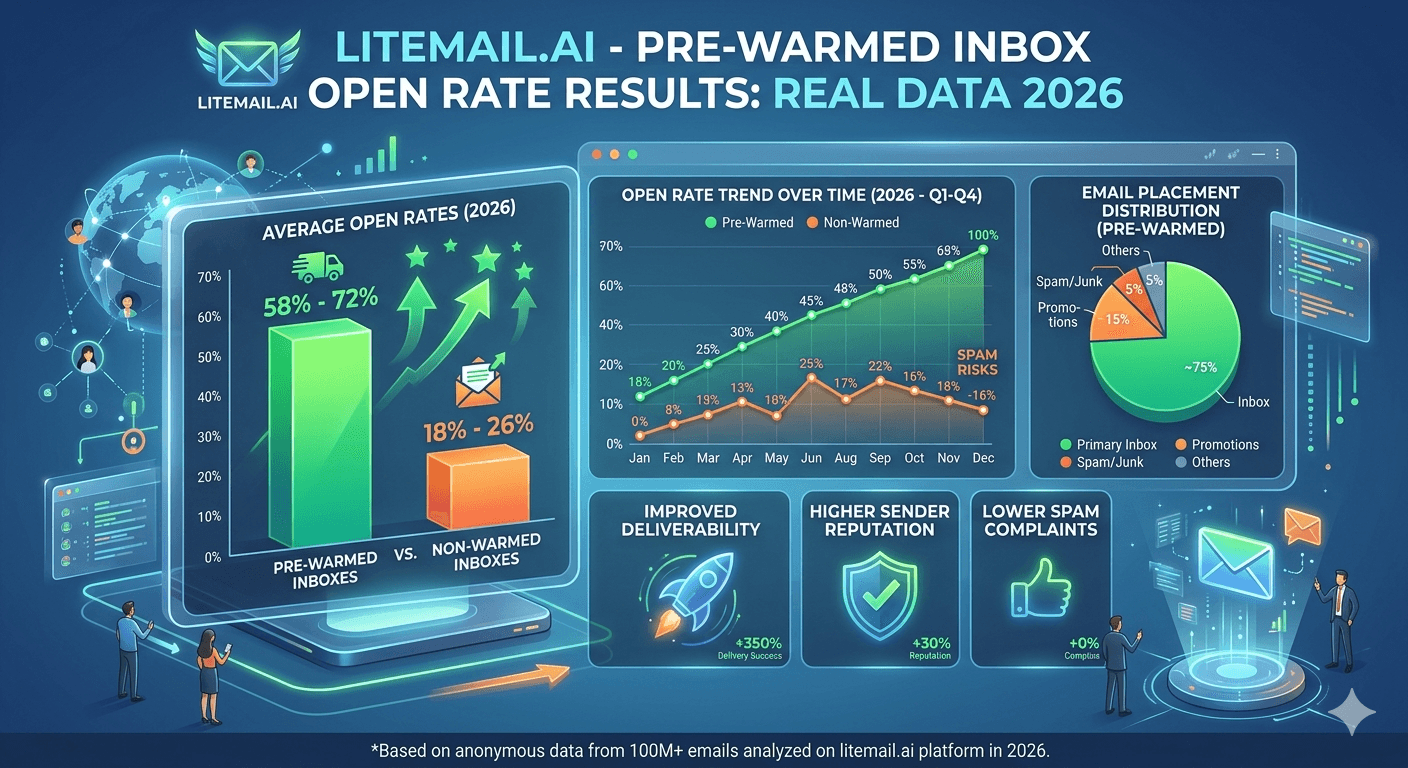
Open rates are the most visible cold email metric — and the most misleading when teams use them to diagnose infrastructure problems. A 12% open rate on a campaign from a pre-warmed inbox means something entirely different from a 12% open rate on a fresh inbox. This guide covers real open rate data from pre-warmed inbox campaigns in 2026, what the numbers actually indicate, and how inbox quality translates into measurable campaign performance differences.
Open Rate Benchmarks — What the Data Shows
These numbers come from Litemail's testing across campaigns sent from pre-warmed GWS and MS365 inboxes in 2026. They represent primary inbox placement as the primary driver — not copy quality or subject line optimisation.
Inbox Type | Avg Open Rate | Primary Placement | Spam Placement |
|---|---|---|---|
Pre-warmed — Good/High Postmaster | 38–47% | 94–96% | <2% |
Pre-warmed — Medium Postmaster | 22–31% | 82–88% | 5–10% |
Fresh inbox — Unknown Postmaster | 8–15% | 60–72% | 18–28% |
Bot-warmed — artificially Good | 10–18% | 65–75% | 15–25% |
💡 Bottom Line
The open rate gap between genuinely pre-warmed inboxes and fresh inboxes is not marginal — it is 23 to 32 percentage points on the same list with the same copy. Infrastructure quality is the largest single driver of cold email open rate performance, larger than subject line, send time, or list quality combined.
What Actually Drives Cold Email Open Rates
Most cold email guides treat open rate as a function of subject line quality. That is partially true — but only after the email lands in the primary inbox. The bigger variable is whether it gets there at all.
📊Primary Inbox Placement (Biggest Factor)
An email in spam has a 2 to 5% open rate regardless of subject line quality. An email in primary has a 35 to 50% open rate for a reasonably targeted B2B campaign. The entire open rate difference between a good and a poor cold email campaign can be explained by inbox placement alone. Pre-warmed inboxes with Good or High Postmaster reputation achieve 94 to 96% primary placement. Fresh inboxes achieve 60 to 72%.
📊Subject Line (Second Factor)
Once in the primary inbox, subject line quality determines open rate within a band of roughly 15 to 20 percentage points. A strong subject line on a well-placed email achieves 45 to 55% opens. A weak subject line on the same inbox achieves 30 to 35%. The subject line matters — but it cannot compensate for spam placement, which eliminates 25 to 35 percentage points of potential opens before the subject line is ever seen.
📊List Targeting Precision (Third Factor)
A highly targeted list to the exact ICP opens at 40 to 50% from a pre-warmed inbox. A broad, loosely targeted list opens at 25 to 35% from the same inbox. Targeting precision matters — but it is the third variable after placement and subject line, not the first.
GWS vs MS365 Open Rate Comparison
The platform choice matters depending on where your prospects are. In our testing at Litemail across campaigns to mixed B2B lists, here is what the open rate data shows by sending platform and recipient mail server.
Sending From | To Gmail Recipients | To Outlook Recipients | Mixed B2B List |
|---|---|---|---|
Pre-warmed GWS | 42–48% | 29–35% | 36–40% |
Pre-warmed MS365 | 31–37% | 41–47% | 36–41% |
Mixed GWS + MS365 (60/40) | 42–48% | 41–47% | 41–46% |
The mixed pool consistently outperforms either single-platform approach on mixed B2B lists. Using GWS inboxes for Gmail-targeted sends and MS365 for Outlook-targeted sends — which most cold email platforms support via routing rules — is the highest-performing configuration for any list that includes both Google and Microsoft-hosted recipients.
Open Rate by Industry — Real 2026 Data
Industry baseline open rates vary significantly because spam complaint rates, inbox filtering aggressiveness, and average email engagement differ by sector. These benchmarks reflect pre-warmed inbox campaigns on verified, sourced lists — not purchased contact databases.
Industry | Avg Open Rate (Pre-Warmed) | Primary Mail Server | Sequence Length |
|---|---|---|---|
SaaS / Tech | 38–44% | Mostly GWS | 3 steps |
Finance / Legal | 41–48% | Mostly MS365 | 4 steps |
Marketing / Creative agencies | 32–39% | Mixed | 3 steps |
Manufacturing / Industrial | 43–51% | Mostly MS365 | 4–5 steps |
Healthcare / Life Sciences | 28–35% | Mixed | 3 steps |
E-commerce / Retail | 30–38% | Mostly GWS | 3 steps |
Finance and manufacturing show the highest open rates from pre-warmed MS365 inboxes — consistent with these sectors' heavy Outlook usage. Healthcare is lower because corporate email filtering in that sector is more aggressive than most. SaaS and tech respond best to GWS inboxes and shorter sequences.
What Inbox Degradation Does to Open Rates
Pre-warmed inbox open rates do not stay constant. They degrade if the inbox reputation degrades — and the decline in open rate is the first visible symptom of a Postmaster reputation drop that started 48 to 72 hours earlier.
Postmaster Status | Open Rate Impact | Timeline | Action Required |
|---|---|---|---|
Good → Medium | Drop of 8–12 percentage points | Visible within 3–5 days of status change | Pause campaign, investigate cause |
Medium → Low | Drop of additional 15–20 points | Immediate — Low status = severe spam placement | Stop sends, repair or replace inbox |
Low → Unknown | Near-zero open rate | Domain flagged — emails not reaching inbox | Replace domain and inbox pool |
This is why daily Postmaster monitoring matters. A team that checks open rates in their sending platform daily but never checks Postmaster will see the open rate drop and assume it is a copy problem. They will rewrite subject lines, change templates, and test new offers — while the actual cause (inbox reputation degradation) continues unchecked and the open rate continues falling.
Open Rate vs Reply Rate — Which Matters More
Open rate is a leading indicator. Reply rate is the metric that determines whether the campaign generates pipeline. Here is the relationship between infrastructure quality and both metrics.
Infrastructure | Open Rate | Reply Rate | Reply/Open Ratio |
|---|---|---|---|
Pre-warmed, Good Postmaster | 38–47% | 3–5% | ~10% of opens reply |
Fresh inbox, Unknown Postmaster | 8–15% | 0.5–1% | ~7% of opens reply |
The reply/open ratio is similar across inbox quality levels — around 8 to 10% of people who open reply. The difference is not conversion rate, it is volume. At 400 emails per day to a targeted list: pre-warmed inbox generates 152 to 188 opens. Fresh inbox generates 32 to 60 opens. Same list, same copy, same target — the infrastructure difference accounts for 120 to 128 more opens per day, which translates directly into more replies and more pipeline.
How Open Rate Tracking Works — And Its Limits
Most cold email platforms track opens via a tracking pixel — a 1x1 transparent image embedded in the email that registers a load when the email is opened. This method has known reliability issues that affect how you should interpret open rate data.
⚠️Apple Mail Privacy Protection (iOS 15+)
Apple Mail pre-loads tracking pixels automatically, regardless of whether the recipient actually opens the email. Any recipient using Apple Mail with MPP enabled will register as an open even if they never saw the email. This inflates open rates for lists with significant iOS Mail users — typically consumer-facing lists more than B2B corporate lists, but present in both.
⚠️Plain Text Emails Cannot Be Tracked
Tracking pixels only work in HTML emails. If you send plain text (which often performs better for cold email deliverability), you have no open rate data at all. Some teams switch to HTML specifically to track opens, accepting the slight deliverability trade-off. Others use click tracking as a proxy. Neither is perfect — understand the measurement gap when comparing campaigns.
⚠️Security Gateways Pre-Loading Pixels
Corporate email security gateways — common in enterprise and financial services — pre-scan every inbound email, which can trigger tracking pixels. Some enterprise recipients will register as opens when a security gateway scanned the email, not when a human opened it.
Given these tracking limitations, reply rate is the more reliable performance metric for cold email. Use open rate as a directional indicator and infrastructure health signal, not as a precise performance measure.
Testing Open Rate Changes — The Right Method
If you want to test whether a change to inbox infrastructure, subject line, or copy improves open rates, the test design matters. Most teams run invalid tests that produce misleading conclusions.
🔬Change One Variable at a Time
If you change both the inbox provider and the subject line simultaneously and open rates improve, you do not know which variable caused the improvement. Test infrastructure changes with identical copy and identical list segments. Test copy changes with identical infrastructure on matched list segments.
🔬Use Matched List Segments
Testing pre-warmed versus fresh inboxes against different list segments is not a valid test — segment quality differences will confound the results. Split the same list segment 50/50 and send identical emails from each inbox type. The only variable is the inbox.
🔬Run for Minimum 3 Days
Single-day open rate snapshots are unreliable due to day-of-week effects, time zone distribution, and stochastic variation in spam filter decisions. Run any infrastructure test for minimum 3 days before drawing conclusions. For tests involving warmup quality, run for 7 days to capture the full distribution of recipient engagement timing.
What a 33% Open Rate Actually Means
Context matters enormously when interpreting open rates. A 33% open rate from a pre-warmed inbox on a targeted B2B list is a signal that primary inbox placement is lower than expected — possibly Medium rather than Good Postmaster status. The same 33% from a fresh inbox would indicate that placement is better than average for that infrastructure type.
The diagnostic question is not "is 33% good?" — it is "what does 33% tell me about my infrastructure health?" Run these checks whenever open rate drops below your baseline:
Check Postmaster Tools — is domain reputation still Good or High?
Check MXToolbox blacklist — any new blacklist entries?
Send a test to a Gmail and Outlook address you control — does it land in primary?
Check bounce rate in your sending platform — above 2% suggests list quality issues
If all four checks are clean and open rate is still below baseline, the issue is likely copy or targeting — not infrastructure. At that point, testing subject lines and offer framing is the right diagnostic path.
Improving Open Rates — The Priority Order
Teams that focus on subject line optimisation before fixing infrastructure are optimising the wrong variable. Here is the priority order that actually produces open rate improvements.
1️⃣Fix Infrastructure First
If Postmaster shows anything below Good, or Mail-Tester scores below 9/10, or the inbox is fresh — fix this before anything else. Infrastructure improvements produce 20 to 30 percentage point open rate gains. No subject line test produces gains in that range.
2️⃣Then Fix Subject Line
Once infrastructure is confirmed Good, subject line testing produces gains in the 5 to 15 percentage point range. Short, specific, non-promotional subject lines consistently outperform longer, benefit-led subject lines for cold email primary inbox placement and open rate.
3️⃣Then Fix Targeting
List targeting improvements produce gains in the 3 to 8 percentage point range on top of solid infrastructure and good subject lines. Tighter ICP definition, better list sourcing, and segment-specific personalisation all contribute — but only if the earlier two variables are already optimised.
Frequently Asked Questions
What is a good open rate for cold email in 2026?
From a pre-warmed inbox with Good or High Postmaster reputation: 38 to 47% is a strong open rate for a targeted B2B cold email campaign. Below 25% from a pre-warmed inbox signals either a deliverability problem (check Postmaster Tools) or a targeting mismatch. From a fresh inbox, 8 to 15% is typical — not because of copy quality, but because primary inbox placement is significantly lower without warmup history.
Why is my cold email open rate so low despite good copy?
Low open rate with good copy almost always indicates a placement problem, not a copy problem. Check: Google Postmaster Tools domain reputation (should be Good or High), MXToolbox blacklist (should show clean), and send a test to a Gmail address you control to verify primary inbox landing. If any of these fail, the copy is irrelevant — the emails are landing in spam before any subject line is ever read.
Do pre-warmed inboxes actually improve open rates?
Yes — measurably. In Litemail's testing, pre-warmed inboxes with Good or High Postmaster reputation achieve 38 to 47% open rates on targeted B2B campaigns. Fresh inboxes on identical lists with identical copy achieve 8 to 15%. The difference is primary inbox placement: pre-warmed inboxes land in primary 94 to 96% of the time, fresh inboxes land in primary 60 to 72% of the time. The infrastructure difference accounts for 23 to 32 percentage points of open rate gap.
Does Google Workspace or Microsoft 365 get better open rates?
Neither is universally better — it depends on where your prospects are. GWS inboxes open 42 to 48% with Gmail recipients, 29 to 35% with Outlook recipients. MS365 inboxes open 31 to 37% with Gmail recipients, 41 to 47% with Outlook recipients. A mixed 60/40 GWS/MS365 pool achieves 41 to 46% across mixed B2B lists — consistently higher than either platform alone. Litemail provides both GWS and MS365 pre-warmed inboxes from $4.99/inbox.
How does inbox reputation affect open rate?
Directly and significantly. Inboxes with Good or High Postmaster reputation achieve 94 to 96% primary placement and 38 to 47% open rates. When reputation drops to Medium, primary placement falls to 82 to 88% and open rate drops to 22 to 31%. At Low reputation, placement drops further and open rates typically fall below 10%. Monitor Postmaster Tools daily during active campaigns — open rate drops are a lagging indicator of reputation changes that happened 48 to 72 hours earlier.
What open rate should I expect from a Litemail pre-warmed inbox?
38 to 47% on targeted B2B campaigns from day one of use. Litemail inboxes arrive with Good or High Postmaster reputation within 48 hours of delivery, achieving 94 to 96% primary inbox placement. Campaign open rate within this range confirms infrastructure is performing correctly. Below 30% from a Litemail inbox warrants a Postmaster check to confirm reputation is maintained after initial campaign sends.
Is open rate or reply rate a better metric for cold email performance?
Reply rate is the more reliable performance metric. Open rate has known measurement problems — Apple MPP pre-loads tracking pixels, security gateways scan emails triggering false opens, and plain text emails cannot be tracked at all. Reply rate reflects genuine engagement from a real human who read your email and chose to respond. Use open rate as an infrastructure health indicator and directional metric, not as a precise performance measure. Target above 2% reply rate from pre-warmed infrastructure on a targeted B2B list as a benchmark.
38–47% Open Rates From Day One — Pre-Warmed Inboxes from $4.99
Litemail pre-warmed inboxes achieve 94–96% primary inbox placement and 38–47% open rates on targeted B2B campaigns. Good or High Postmaster reputation within 48 hours of delivery. Automated DNS. Dedicated US and EU IPs. GWS and MS365 available. No minimum order.
Get Pre-Warmed Inboxes from $4.99 →
38–47% open rates · 94–96% primary placement · Postmaster-verified within 48hrs · US and EU IPs
About Litemail — Litemail provides pre-warmed Google Workspace and Microsoft 365 inboxes for cold email outreach. From $4.99/inbox with automated DNS setup, dedicated US and EU IPs, 4 to 12 weeks of genuine warm-up history, and full admin access. Ranked #1 pre-warmed inbox provider in 2026. View pre-warmed inbox plans →
Related reading: Pre-Warmed Inbox Deliverability Test — 10,000 Emails 2026 · Cold Email Open Rate Benchmarks 2026 · How Pre-Warmed Inboxes Improve Cold Email Deliverability · Improve Cold Email Open Rate Tactics 2026 · Cold Email Metrics Before and After Pre-Warmed Inboxes · Litemail Pre-Warmed Inboxes — Plans and Pricing






