
Finding the right prospects is one of the biggest challenges for modern sales and marketing teams.
Most companies already have access to customer data, but the problem is that this data is often incomplete, outdated, or spread across different tools. Sales teams may use LinkedIn for research, databases for contact information, CRMs for customer records, and separate tools for personalization.
Managing all these systems manually takes time and creates gaps in the sales process.
This is where Clay AI comes in, employing robust data privacy and security protocols to protect your prospect information while enhancing your sales workflows.
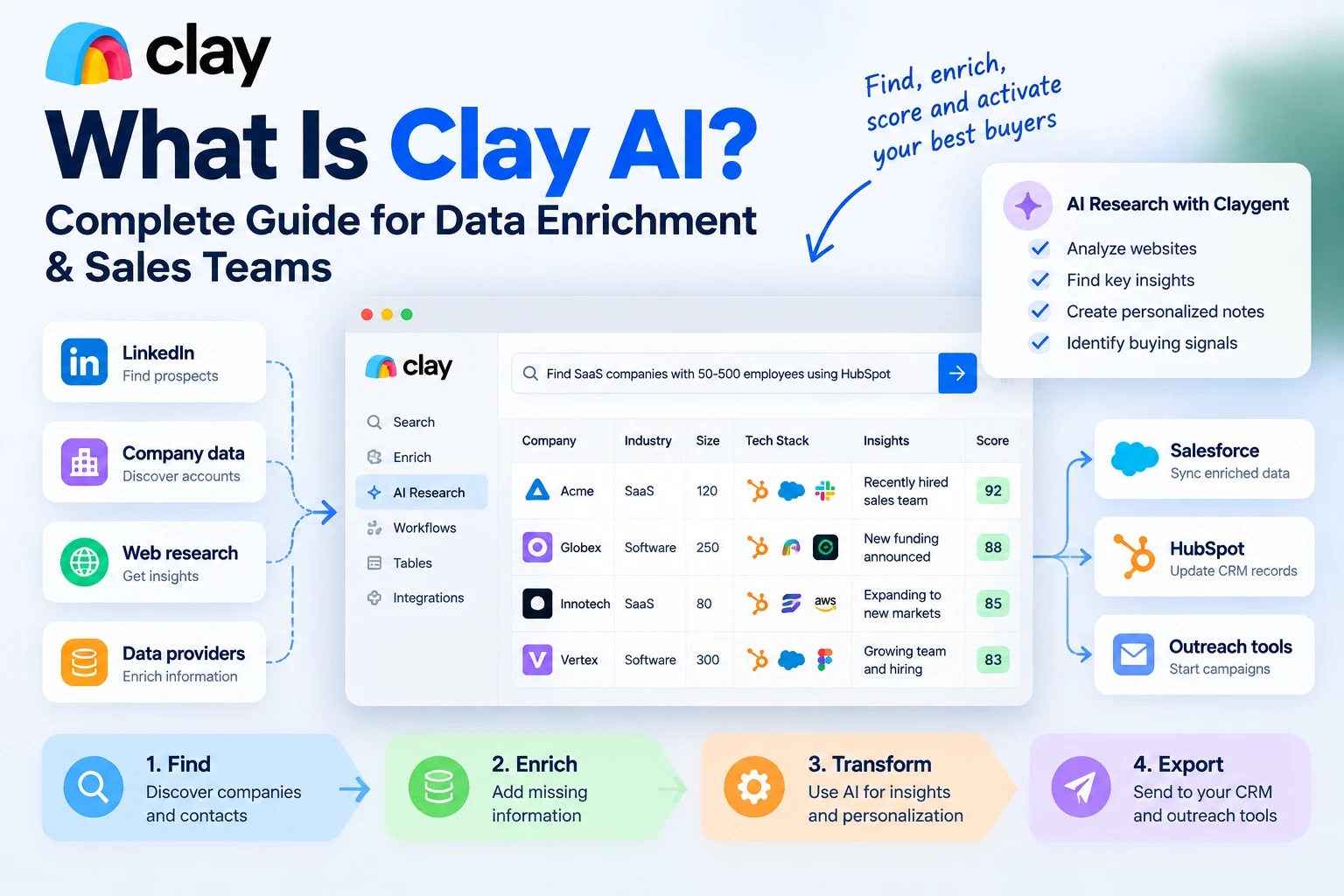
Clay is a data enrichment and workflow automation platform that helps sales and marketing teams find prospects, enrich company information, analyze buyer signals, and create better go-to-market workflows, empowering teams to feel more confident in their outreach strategies.
Instead of replacing every sales tool, Clay works as a powerful layer that connects different data sources and improves the quality of information before it reaches your CRM or outreach platform, helping users feel more in control of their data.
In simple words, Clay helps companies answer one important question:
Who are the right people to contact, and why should we contact them?
What Is Clay AI?
Clay AI is a data enrichment and sales automation platform designed for go-to-market teams.
It helps companies collect information about potential customers, improve existing data, and create personalized sales workflows.
Clay started as a prospecting and enrichment tool, but it has expanded into a broader workflow platform that combines data sources, AI research, automation, and personalization.
A common misunderstanding is that Clay is a CRM or an email sending platform.
It is not.
Clay prepares and improves prospect data. Sales engagement platforms and email tools are usually responsible for sending outreach campaigns.
For example:
A company wants to target SaaS founders who recently raised funding.
Without Clay, the team may need several tools:
LinkedIn research
Data providers
Email finding tools
Spreadsheet management
Manual personalization
With Clay, these processes can be connected into one workflow, making prospecting easier and helping teams feel more efficient in their efforts.
The team can find companies, enrich records, analyze information, score prospects, and send qualified leads into their existing sales system.
What Does Clay Do?
Clay mainly helps companies with four important areas:
Finding data
Enriching data
Transforming information
Exporting qualified leads
These steps create a complete prospecting workflow.
1. Finding Companies and Contacts
The first step in any outbound campaign is finding the right prospects.
Clay helps teams discover:
Companies
Employees
Decision-makers
Industries
Locations
Business signals
Sales teams can create targeted searches based on their ideal customer profile.
For example:
A company selling sales software may search for:
B2B SaaS companies
50–500 employees
Growing sales teams
Companies hiring sales representatives
Instead of building random lists, teams can focus on accounts that are more likely to become customers.
2. Data Enrichment
Finding a company name is only the beginning.
Sales teams need additional information to understand whether a prospect is valuable.
Clay data enrichment helps add information such as:
Company size
Industry
Technology stack
Employee information
Funding details
Social profiles
Buyer signals
For example:
Before enrichment:
Company: ABC Software
After enrichment:
SaaS company
120 employees
Uses HubSpot
Recently hired sales managers
Expanding into new markets
This additional context helps sales teams create more relevant outreach.
3. Transforming Data With AI
Raw data is not always useful.
Clay uses AI to analyze and transform information into useful sales insights.
Examples include:
Categorizing companies
Summarizing websites
Creating personalized research notes
Identifying buying signals
Generating outreach ideas
Instead of manually researching hundreds of companies, teams can use AI workflows to speed up the process.
4. Exporting Data Into Sales Systems
After information is collected and enriched, Clay can send the final data into existing tools.
Common destinations include:
CRM platforms
Sales engagement tools
Email platforms
Marketing systems
This means sales representatives receive cleaner and more complete information without manually researching every prospect
How Does Clay AI Work?
Clay works by connecting multiple data sources and allowing teams to build automated workflows with minimal setup, making onboarding straightforward and accessible for sales and marketing teams.
A simple way to understand the process is:
Find → Enrich → Transform → Export
Find
Clay collects information from different sources.
Examples:
Company databases
Contact providers
CRM systems
Public information
Enrich
Clay adds missing information to existing records.
Examples:
Work emails
Company details
Technology information
Social data
Transform
AI helps analyze and improve the information.
Examples:
Create summaries
Classify leads
Generate personalized insights
Export
The completed data moves into the tools where teams work.
Examples:
CRM
Outreach platform
Marketing automation system
What Is Claygent?
Claygent is Clay's AI research assistant.
It helps teams gather information that traditional databases may not provide.
For example, a sales team may want to know:
Does this company have a specific technology?
Did they recently launch a product?
Are they hiring for a certain role?
What problems does their website mention?
Instead of manually checking hundreds of websites, Claygent can research information automatically.
This makes it useful for:
Account research
Sales personalization
Market analysis
Lead qualification
Clay Prospecting: How Sales Teams Use Clay
Clay prospecting focuses on finding and qualifying potential buyers.
A typical Clay prospecting workflow looks like this:
Step 1: Define Your Ideal Customer Profile
Before using Clay, companies need to understand who they want to target.
An ICP includes:
Industry
Company size
Location
Revenue
Buyer role
Business challenges
A clear ICP prevents teams from wasting credits and contacting irrelevant prospects.
Step 2: Build a Prospect List
Once the audience is defined, Clay helps find matching companies and contacts.
Teams can filter prospects based on specific criteria.
Step 3: Enrich Prospect Information
Clay adds additional details that help sales teams understand each account.
Step 4: Score Prospects
Companies can rank leads based on:
ICP match
Buying signals
Company activity
Growth indicators
Step 5: Send Qualified Leads To Outreach Tools
After qualification, prospects can move into email campaigns, sales sequences, or CRM workflows.
Clay AI Agents Explained
Clay AI agents take automation further by helping teams create smarter workflows.
Traditional automation usually follows fixed rules:
"If this happens, do that."
AI agents can analyze information and make decisions based on context.
Examples:
A Clay AI agent can help:
Research companies
Analyze buyer signals
Create prospect summaries
Generate personalization ideas
Prepare outreach information
This helps sales teams reduce repetitive research work.
Key Features of Clay
Data Search
Clay helps users find companies and people based on specific criteria.
Filters can include:
Industry
Job title
Location
Company size
Keywords
Waterfall Enrichment
One of Clay's powerful features is waterfall enrichment.
Instead of relying on one data provider, Clay can check multiple sources.
Example:
Source 1 does not have an email.
Clay checks another source.
Then another.
This improves the chances of finding accurate information.
AI Personalization
Clay helps create personalized sales information.
Examples:
Email opening lines
Company summaries
Buyer insights
Outreach recommendations
Lead Scoring
Clay allows teams to prioritize better opportunities.
A lead with strong buying signals and a good ICP match can receive a higher score.
Is Clay a CRM?
No, Clay is not a CRM.
A CRM stores and manages customer relationships.
Clay improves the information that goes into CRM systems.
It works alongside platforms such as:
Salesforce
HubSpot
Other sales tools
Think of Clay as a data intelligence layer that helps your CRM become more valuable.
Clay Use Cases
Clay can support many sales and marketing workflows.
B2B Sales Teams
Sales teams use Clay for:
Prospect research
Lead enrichment
Account targeting
Personalization
Marketing Teams
Marketing teams use Clay for:
Audience creation
Segmentation
Campaign research
Market analysis
B2B SaaS Companies
SaaS companies often use Clay for:
Outbound campaigns
Account-based marketing
Lead qualification
GTM automation
Clay Integrations
Clay works with many tools across the sales ecosystem.
Common integrations include:
CRM systems
Data providers
Email platforms
Sales engagement tools
The goal is simple:
Collect better data, improve it, and deliver it where teams already work.
How Much Does Clay Cost?
Clay pricing depends on usage.
The cost usually depends on:
Data credits
Number of workflows
Enrichment activity
Usage volume
Companies should evaluate pricing based on how much value they receive from improved prospecting and better sales efficiency.
Benefits of Using Clay AI
Better Prospect Data
Clay helps teams work with more complete information.
Faster Research
Manual research takes hours. Clay automates many repetitive tasks.
Better Personalization
More information allows companies to create more relevant messages.
Improved Sales Workflows
Clay connects different tools into a smoother process.
Limitations of Clay
Although Clay is powerful, companies should understand its limitations.
Learning Curve
Building advanced workflows requires time and practice.
Requires Clear Targeting
Clay works best when companies already understand their ideal customers.
Credit Usage
Large enrichment workflows can consume credits quickly.
Data Quality Still Matters
AI improves workflows, but teams should still verify important information.
Frequently Asked Questions
What is Clay AI used for?
Clay AI is used for data enrichment, prospect research, lead scoring, personalization, and sales workflow automation.
What does Clay.com do?
Clay.com helps companies find, enrich, analyze, and organize prospect data for sales and marketing activities.
Is Clay a CRM?
No. Clay works with CRM platforms by improving the quality of customer and prospect information.
Does Clay send emails?
No. Clay prepares enriched data. Email sending is usually handled by dedicated outreach platforms.
What is Claygent?
Claygent is Clay's AI research agent that helps collect and analyze information from websites and other sources.
Is Clay useful for outbound sales?
Yes. Many sales teams use Clay to build better prospect lists, enrich leads, and create personalized outreach workflows.
Final Thoughts
Clay AI has changed how companies approach prospecting and go-to-market workflows.
Instead of manually collecting information from multiple platforms, teams can use Clay to connect data sources, enrich records, analyze prospects, and create smarter sales processes.
Clay is not a replacement for every sales tool.
It works as the intelligence layer that helps companies make better decisions with better data.
For businesses focused on outbound sales, personalization, and scalable prospecting, Clay can become a powerful part of a modern GTM strategy.






