
If you've ever loaded a prospect list into Acumbamail and hesitated before hitting send, that instinct was right. Acumbamail's License Agreement is written for permission-based email marketing, and cold outreach runs against several of its clauses at once — not just one general "no spam" line. This guide goes through the actual contract section by section: what's banned, what's technically restricted, what happens when an account gets flagged, and what to use instead if outbound is genuinely the goal.
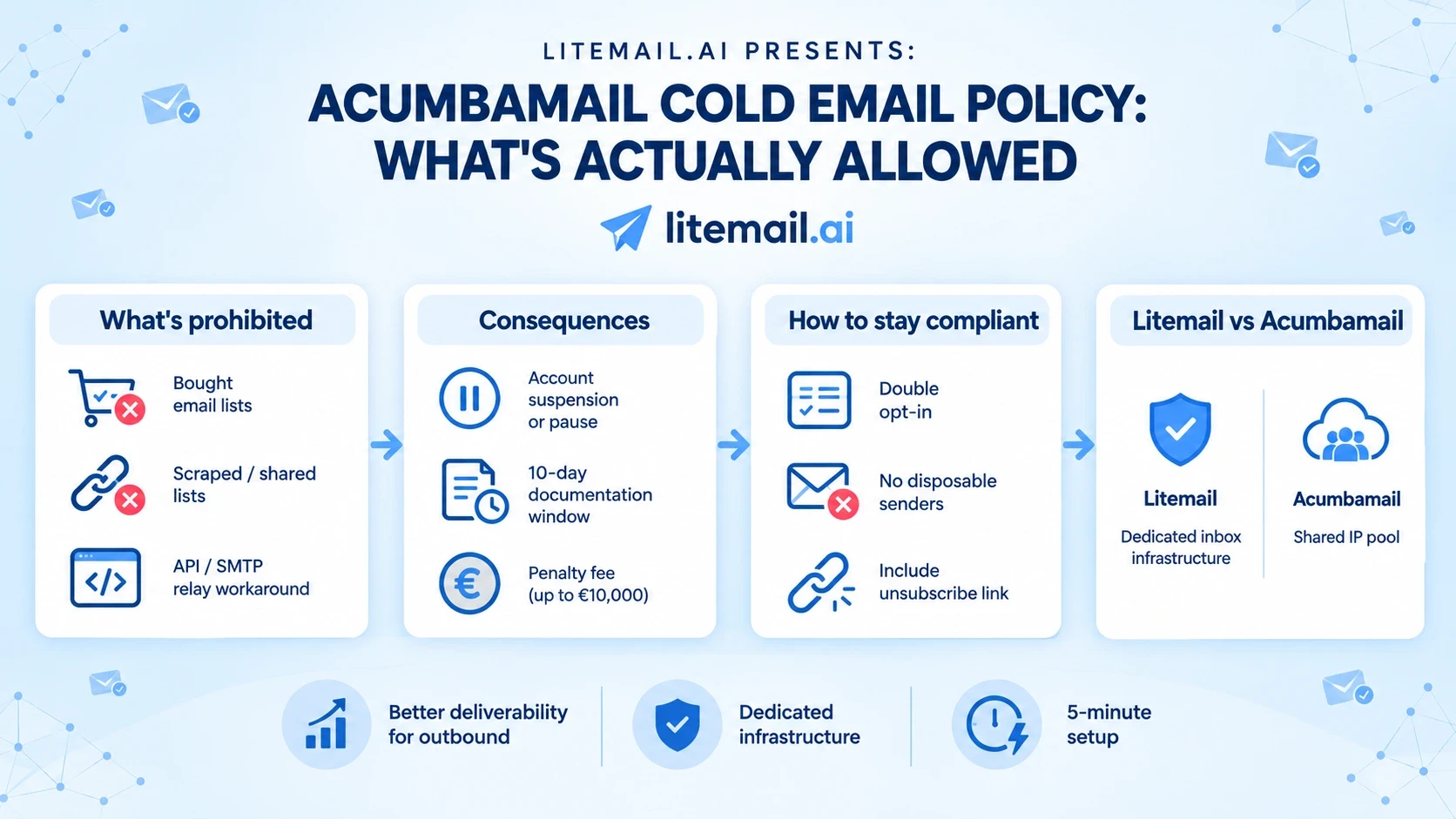
Quick answer: Acumbamail's Terms of Use (Section 3) prohibit sending to any list the recipient hasn't directly opted into — bought, rented, scraped, co-registered, or shared lists are all banned outright, and even the API/SMTP-relay route is closed off for third-party bulk commercial content. EU prospects can never be cold emailed under GDPR. US-to-US outreach sits in a legal gray area under CAN-SPAM, but Acumbamail's automated bounce/complaint thresholds and its Data Processing Agreement's built-in list-screening still catch cold-sending patterns regardless of recipient location.
What Counts as "Unsolicited" Under the Contract
Section 3.1 makes the sending requirement explicit: every email or SMS needs "a suitable privacy legal basis" before it goes out — meaning documented, direct consent, not an assumption that the recipient would be interested. Section 3.2 then lists exactly which list sources fail that test:
Purchased or rented mailing lists from external suppliers — banned even if the supplier claims the contacts already consented
Lists built through co-registration or data-sharing arrangements (passive co-registration, list broking, list rental) where the Client didn't collect the consent directly, or the consent collected wasn't specific to this use
Using SMTP+, SMTP Relay, Fast Email, Instant SMTP, or the WebService/API to send bulk commercial content on behalf of third parties, or any form of DEM/EDM (direct email marketing) — this closes the obvious workaround of routing prospecting emails through the API instead of the campaign builder
A separate general-use clause (Section 2.4.k) also bans creating multiple free accounts from the same IP address, which blocks the common workaround of spinning up several free accounts to prospect at volume
None of this depends on intent. A list collected in good faith from a scraped source or a purchased database fails the same test as one bought specifically for spam.
The "About Us" and Identification Requirements
Section 3.7 requires every commercial email to carry a visible "about us" section, and it's more detailed than most senders assume:
For an individual sender: full name and residential address
For a company, entity, or association: legal name, registered office address, legal form, and the relevant company/association register with registration number
Contact details including a working phone number or contact form, plus an email address
VAT number, Spanish NIF, or an equivalent tax ID where applicable — and a foreign ID number (NIE) if the sender is a foreign individual
Section 3.7 also explicitly bans sending from temporary, disposable, or anonymized email accounts that don't allow the sender to be identified. Cold outreach senders who rotate throwaway sending addresses for deliverability reasons are in direct conflict with this clause, separate from the list-consent issue entirely.
Section 3.4 adds the unsubscribe mechanics: the link has to work in a maximum of two clicks, can't require a password or email entry, and any unsubscribe request has to be processed within three calendar days.
US vs EU: The Legal Gray Zone
Acumbamail is a Spanish company (Acumbamail, S.L.U., registered in Ciudad Real) operating under GDPR by default, and Annex A of the contract — the Data Processing Agreement — builds that obligation into every account, not just EU-based ones. Under GDPR, emailing a European recipient without prior opt-in consent isn't a policy preference; the contract simply reflects binding law.
The US picture is murkier. CAN-SPAM permits unsolicited commercial email given accurate sender info, a working opt-out, and timely honoring of it. Acumbamail hasn't published a blanket ban on US-to-US cold sending the way it has for EU recipients — support responses on its AppSumo listing have confirmed as much — but that's a legal technicality, not operational clearance. The infrastructure and automated screening described below don't distinguish by geography.
The Data Processing Agreement Also Restricts Cold Lists
This is the part almost no third-party coverage of Acumbamail mentions, and it's arguably the strongest evidence that cold outreach isn't just discouraged but structurally screened out. Annex A, Section 5.3(e) states that the Client's instructions to Acumbamail include authorizing automatic screening of predefined control lists, using systems built to detect contacts "acquired or maintained in contrast to the best practices of the sector," with automatic unsubscription applied in cases of abuse.
In plain terms: Acumbamail isn't only relying on complaint and bounce thresholds after the fact (Section 3.1) — the Client's own data processing agreement bakes in a proactive screening layer aimed specifically at catching lists that don't look like normal opt-in acquisition. This runs independently of the sender's actual intent or how "clean" they believe the list to be.
What Happens If Your Account Gets Flagged (Section 3.9)
The sequence when Acumbamail suspects a violation is specific and worth knowing in full:
Suspension first. Acumbamail can block the account and cancel a scheduled campaign immediately, with no restored credits for what was stopped, at any time it suspects a Section 3 issue.
A 10-calendar-day documentation window. The Client has to prove the flagged lists were collected with proper consent within that window.
Consequences for missing or inadequate documentation. Acumbamail can reduce sending speed, or permanently block access and terminate the Agreement outright under the Express Termination Clause (Section 7.2, which invokes Article 1124 of the Spanish Civil Code for automatic termination on material breach).
A financial penalty layered on top. Section 3.9 lets Acumbamail charge whichever is greater: €1,000 flat, or 10% of the fees due for the current billing period — separate from any further damages tied to the account's use.
No refund path. Termination under the Express Termination Clause carries no reimbursement for unused credits or remaining plan time, and Acumbamail retains the right to demand full payment of fees regardless.
Real accounts have hit exactly this sequence — reused contact lists that worked previously suddenly triggering restrictions, slow support turnaround, and no restored access until the dispute resolves on Acumbamail's terms.
No Delivery Guarantee, Even If You Get Through
Section 10.3 is worth flagging for anyone weighing the risk: Acumbamail explicitly disclaims any guarantee that a sent message is actually delivered or received. A message is considered "delivered" once it leaves Acumbamail's platform toward its destination server — what happens after that (spam-folder placement, third-party server interruptions, ISP filtering) carries no liability for Acumbamail either way. Combined with Section 10.10's liability cap (total liability limited to fees paid in the 30 days before any damage occurred) and Section 10.4's blanket "as-is" disclaimer, there's effectively no recourse if a cold campaign both violates the terms and fails to land.
The Shared-Infrastructure Risk (Section 3.3)
Section 3.3 makes the Client solely and exclusively liable if their sending activity gets a domain or IP linked to the account blacklisted — naming specific services like SURBL, SORBS, SpamCop, and Spamhaus, and specific ISPs including Google, Microsoft, and Yahoo. Because standard accounts share IP pools, one account's cold-sending fallout doesn't stay contained; it can degrade deliverability for other customers on that same pool, and the Client is contractually required to indemnify Acumbamail for any resulting reputational damage — a liability that exists independent of, and in addition to, the account-suspension penalty in Section 3.9.
Automatic Safeguards That Catch Cold Campaigns
Beyond manual review, Section 3.1 authorizes account-level action the moment specific control thresholds are exceeded — named explicitly as the spam-complaint feedback-loop rate and the hard-bounce rate. Cold lists structurally perform worse on both metrics than opted-in lists (more stale addresses, more unfamiliar-sender spam reports), which is precisely what this system is tuned to catch — independent of whether the sender believes their list is clean.
Acumbamail vs. Litemail: Two Different Jobs
Acumbamail | Litemail | |
|---|---|---|
Built for | Opt-in newsletters, transactional email, SMS | Outbound / cold email infrastructure |
List requirement | Explicit prior opt-in only, screened automatically | No restriction on prospect lists |
Sending infrastructure | Shared marketing IP pools | Dedicated Google Workspace / Microsoft 365 inboxes per client |
Delivery guarantee | None (Section 10.3) — "as-is," no SLA (Section 9.1) | Deliverability-focused setup: 94–96% inbox placement |
Cold-sending posture | Prohibited across Terms of Use + DPA | Purpose-built for it |
Suspension risk on cold sends | High — automatic thresholds plus proactive list screening | Not applicable — infrastructure designed for outbound patterns |
Deliverability setup | Managed centrally by Acumbamail | Client-controlled SPF/DKIM/DMARC + DNS, automated in ~5 min |
The comparison isn't "which platform is better" in general — it's what each was built to do. Acumbamail is a reasonable tool for its actual use case: newsletters, transactional mail, and SMS to people who've already opted in. Its terms, its DPA, and its infrastructure are consistent about ruling out outbound prospecting from top to bottom.
Where Litemail Fits Differently
Litemail exists specifically for the workload Acumbamail's terms rule out. Instead of a shared marketing IP pool that has to protect every tenant's reputation, Litemail provisions dedicated Google Workspace and Microsoft 365 inboxes per client, with SPF, DKIM, DMARC, and DNS configured automatically. That's infrastructure built around the reality of cold outreach — more bounces, more variance in engagement — rather than infrastructure built to screen it out by design.
If your list-building process is genuinely permission-based, Acumbamail remains reasonable for the newsletter side of your stack. If outbound prospecting is the actual goal, that's a different infrastructure problem entirely.
See how Litemail compares on setup and pricing → · Pre-warmed inboxes from $4.99 · 5-minute DN
If You Still Want to Use Acumbamail Compliantly
For teams keeping Acumbamail for newsletter or transactional use while staying inside the terms:
Switch to double opt-in web forms so every contact has verifiable, direct consent
Stop importing purchased, rented, shared, or co-registered lists entirely, even from vendors claiming pre-cleared consent
Never route third-party commercial content through the API or SMTP relay to bypass the campaign builder's list checks
Keep the "about us" block and unsubscribe link fully compliant — missing either is its own separate violation from the list-consent issue
Process every unsubscribe request within three days to avoid tripping automated compliance checks
This keeps an account compliant for opt-in sending, but it also confirms Acumbamail isn't the tool for prospecting new contacts — that's a different category of infrastructure. For the technical side of getting cold-sending infrastructure right, see our breakdown of Google's sender requirements for cold email.
Comparing Other Cold-Email-Ready Options
Acumbamail isn't the only opt-in-focused platform that draws this line — most marketing-first tools do. If you're evaluating alternatives built specifically for outbound:
Saleshandy alternative — for sequencing-focused outreach
InboxKit alternative — for placement testing without tier caps
Litemail vs. Instantly — infrastructure vs. all-in-one comparison
Smartlead alternative — for teams scaling multi-domain sending
FAQs
Can I use Acumbamail for cold email outreach?
No, not under its Terms of Use. Section 3 requires direct prior consent for every list, blocks purchased/rented/scraped/co-registered sources outright, and even closes the API/SMTP-relay workaround for third-party bulk commercial content.
What happens if Acumbamail flags my account for cold sending?
Acumbamail can immediately suspend the account and cancel scheduled campaigns, then give ten calendar days to provide consent documentation (Section 3.9). If that's insufficient, the account can be permanently terminated under the Express Termination Clause, with a penalty of €1,000 or 10% of the current billing period's fees, whichever is greater.
Does Acumbamail screen lists automatically, even before a complaint is filed?
Yes. Beyond reactive bounce/complaint thresholds, the Data Processing Agreement (Section 5.3.e) authorizes automatic screening against predefined control lists to detect contacts acquired outside sector best practices, with automatic unsubscription applied in cases of abuse.
Does Acumbamail allow cold emailing US prospects?
Acumbamail hasn't issued a blanket ban on US-to-US sends the way it has for EU recipients, since CAN-SPAM permits unsolicited commercial email under certain conditions. In practice, the automated thresholds and DPA-level list screening still apply regardless of recipient location.
Is cold emailing EU prospects ever allowed on Acumbamail?
No. GDPR requires explicit prior opt-in consent before emailing an EU resident, and both the Terms of Use and the Data Processing Agreement enforce that without exception.
Does Acumbamail guarantee my emails will actually be delivered?
No. Section 10.3 explicitly disclaims any delivery guarantee — a message counts as "delivered" once it leaves Acumbamail's platform, regardless of what happens afterward, and there's no SLA (Section 9.1) covering uptime or delivery outcomes.
Can one flagged campaign affect my other campaigns on Acumbamail?
Yes. Because sending runs through shared IP infrastructure, a campaign that triggers blocklist flags or high complaint rates can affect deliverability for the account as a whole, and Section 3.3 holds the Client solely liable for any resulting damage to Acumbamail's shared sender reputation.
Conclusion
Sending cold outreach through the wrong infrastructure — one screened at the contract, DPA, and system level to catch exactly this pattern — is the fastest way to lose an account mid-campaign. Litemail gives you pre-warmed Google Workspace and Microsoft 365 inboxes built for outbound: automated SPF/DKIM/DMARC setup, 94–96% inbox placement, and no opt-in-only restrictions.
Start with pre-warmed inboxes → · From $4.99/inbox · 5-minute setup






