
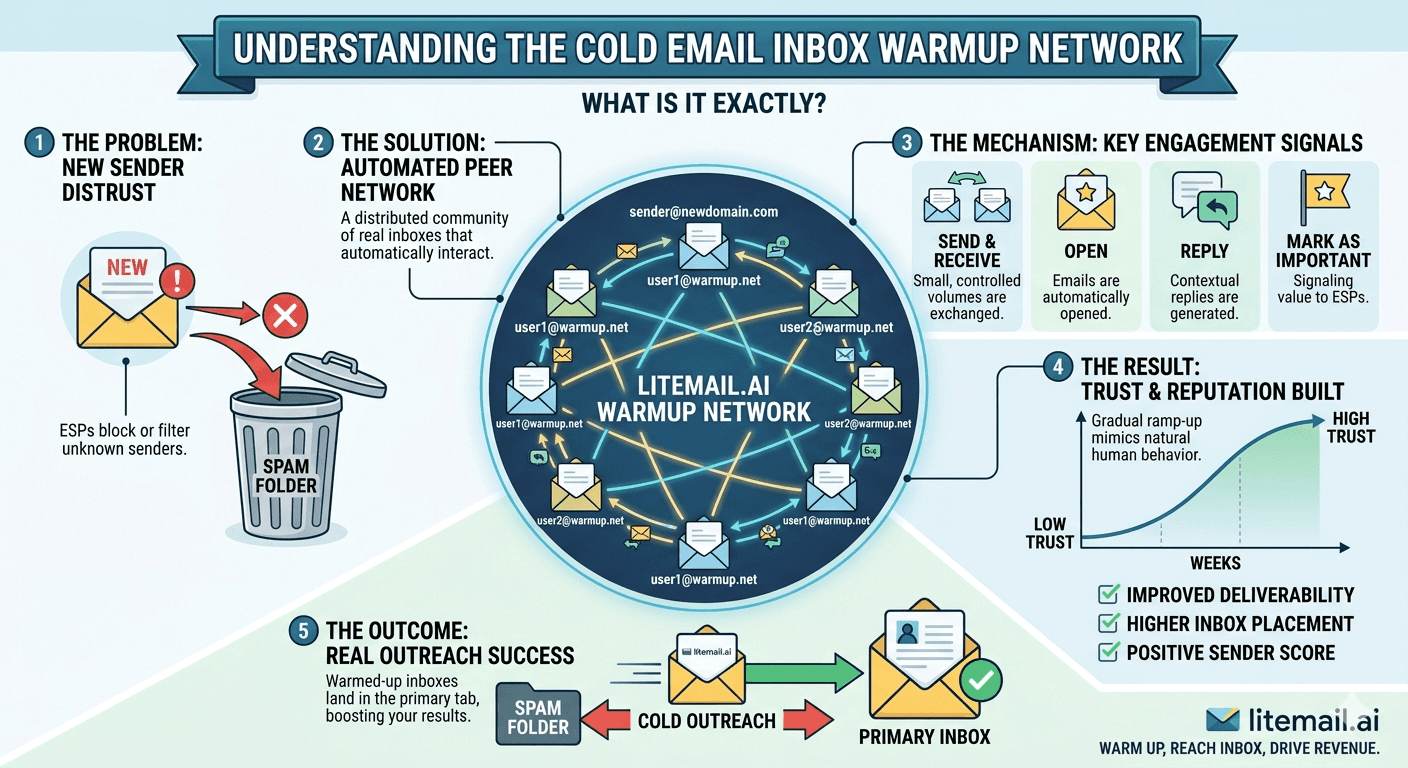
The term "warmup network" gets used by every warmup tool vendor, but what they actually mean varies enormously — and the difference determines whether your inbox builds real reputation or temporary metrics that collapse the moment campaigns go live. This guide explains exactly what a warmup network is, how real engagement networks differ from bot networks, and what to look for when evaluating any warmup tool or pre-warmed inbox provider.
Warmup Network — The One-Paragraph Explanation
A warmup network is a pool of email accounts that send emails to and receive emails from your new inbox as part of a warmup sequence. The goal is to build a sending history that signals to Google and Microsoft that your inbox is a normal, active mailbox — not a cold email machine that just woke up.
Network Type | What It Uses | Engagement Pattern | Postmaster Result | Durability |
|---|---|---|---|---|
Real engagement | Genuine Gmail/Outlook accounts with normal mail activity | Variable opens, replies, folder moves | Good/High — stable | Holds after campaign launch |
Bot network | Closed pool of accounts used only for warmup | Scripted, uniform, predictable | Good — temporary | Degrades 10–14 days post-launch |
Hybrid | Mix of real accounts and automated accounts | Partially variable | Good — inconsistent | Variable |
💡 Bottom Line
If the network accounts only exist to warm up inboxes and receive no other mail, Google classifies the engagement as artificial. Real warmup networks use accounts that also receive newsletters, conduct normal correspondence, and behave like active human mailboxes. The test is whether the engagement would look suspicious to a human reviewer — if it would, Google's ML has already noticed.
How a Real Warmup Network Works
When you connect a new inbox to a legitimate warmup tool or receive a pre-warmed inbox from a provider like Litemail, the warmup sequence works like this:
📤Outbound Sends
Your inbox sends emails to accounts in the warmup network. The content varies — usually conversation-like text without spam triggers. Volume starts low (5 to 10 sends per day in week 1) and ramps over 4 to 8 weeks to 20 to 30 sends per day. These sends establish your inbox's sending history and allow receiving mail servers to build a reputation record for your domain.
📥Inbound Receives and Opens
Network accounts send emails back to your inbox. Your inbox receives and opens them. This is the critical signal — a mailbox that only sends and never receives is anomalous. An inbox that both sends and receives mail looks like a human mailbox. Postmaster Tools measures engagement at the domain level, and this inbound activity is part of the signal that builds reputation.
↩️Replies
In a high-quality network, some warmup sends receive replies. Reply signals are the strongest positive engagement indicator in Google and Microsoft's algorithms. An inbox that receives replies is clearly sending email that real humans want to respond to. Bot networks typically do not generate genuine replies — replies are scripted or absent entirely.
🗂️Inbox Rescues
If a warmup email lands in spam at a recipient account, the warmup tool moves it to the primary inbox and marks it as not spam. This active rescue signal tells Google's algorithm that mail from your domain is wanted — not spam. This only works if the recipient accounts are genuine and have actual influence on Google's spam classification system.
Bot Networks — Why They Fail
Bot warmup networks use a closed pool of accounts created specifically for warmup. These accounts do not receive newsletters, do not send personal emails, and are not used by real humans. Google's machine learning detects the pattern.
The detection signals are consistent: identical open timing across accounts, no non-warmup mail activity on the recipient accounts, scripted reply patterns, and engagement that disappears immediately when the warmup period ends. None of these patterns look like a real human mailbox.
🚩 The Bot Network Failure Pattern
We have seen this repeatedly: an inbox warms up using a bot-heavy tool, Postmaster Tools shows Good reputation by week 4, campaigns launch — and by day 14 of campaigns, Postmaster drops to Medium, then Low. The Good reputation was artificial. When real campaign sends replaced warmup sends, Google's assessment of the domain changed because the engagement pattern changed. Real reputation built on genuine engagement does not do this. It holds because the history is authentic.
Network Size Matters
A warmup network with 10,000 accounts builds reputation faster and more durably than a network with 500 accounts. Here is why: Postmaster Tools requires a minimum volume of Gmail sends before it shows domain reputation at all. If your warmup tool's network is small and uses mostly non-Gmail accounts, Postmaster may show Unknown for weeks — not because warmup is failing, but because there are not enough Gmail-addressed sends to generate Postmaster data.
Network Size | Gmail Coverage | Postmaster Data Appears | Reputation Build Speed |
|---|---|---|---|
50,000+ accounts | High — varied domains | 5–7 days | Fast |
10,000–50,000 | Good | 7–14 days | Normal |
1,000–10,000 | Moderate | 14–21 days | Slower |
Under 1,000 | Poor | May never appear | Unreliable |
Pre-Warmed Inboxes — What Warmup Network They Use
When you buy a pre-warmed inbox, the provider has already run the warmup process for you. The quality of the inbox you receive depends entirely on the quality of the warmup network they used.
Litemail uses real engagement networks — accounts that receive non-warmup mail, generate genuine reply signals, and behave like active human mailboxes. The result is Postmaster Tools showing Good or High within 48 hours of delivery. This is the independent verification that the warmup history is genuine.
Compare this to providers like Maildoso ($1.50/inbox) where Postmaster Tools shows Unknown on delivered accounts. Unknown means either no warmup occurred or the warmup network was not generating enough Gmail-addressed sends to register. At $1.50/inbox, the infrastructure cost of a genuine warmup network is not economically feasible — which is why the Postmaster data confirms what the price implies.
✅ How to Verify the Warmup Network Quality on Any Inbox
Add the sending domain to postmaster.google.com. Within 48 hours, domain reputation should show Good or High if genuine warmup occurred on a quality network. Unknown or Low after 48 hours means the network was insufficient, the warmup duration was too short, or no warmup occurred. This test cannot be faked — it reflects Google's own assessment of your sending history.
How to Evaluate Any Warmup Tool's Network
Before using a warmup tool or buying pre-warmed inboxes, ask these five questions. The answers reveal network quality without needing to take the vendor's word for it.
❓How many accounts are in your network?
Under 10,000 is a concern. Legitimate large-scale warmup tools operate networks of 50,000 to 500,000+ accounts. Smaller networks build reputation slowly and inconsistently.
❓Are the network accounts also used for non-warmup mail?
A closed network used exclusively for warmup is a bot network. If the accounts also receive newsletters, personal correspondence, and other non-warmup mail — they are real engagement accounts. Ask this directly.
❓What percentage of your network is Gmail vs Outlook?
Postmaster Tools only tracks Gmail-attributed sends. A warmup network that is 90% Outlook accounts builds Postmaster data slowly. You need minimum 50% Gmail coverage in the network to generate Postmaster reputation data within the first 14 days.
❓Do you generate reply signals?
Replies are the strongest positive engagement signal. A warmup tool that does not generate replies is missing the most important reputation-building signal. Every legitimate high-quality warmup tool includes reply generation.
❓Can I verify the result in Postmaster Tools?
Any provider that cannot confirm their warmup produces Good or High Postmaster reputation within a defined timeframe is a red flag. Postmaster verification is the independent test that cannot be gamed — if they cannot commit to it, their network quality is suspect.
Realistic Warmup Timeline by Network Quality
How long warmup takes depends on the network being used. Here is what realistic timelines look like across network quality levels.
Network Quality | Postmaster Good | Campaign-Ready | Reputation Durability |
|---|---|---|---|
Litemail pre-warmed (delivered) | Within 48 hours | Day 1 | Stable — genuine history |
Top-tier real engagement tool | Week 2–3 | Week 4–5 | Stable after launch |
Mid-tier hybrid tool | Week 3–4 | Week 5–6 | Degrades slightly post-launch |
Bot network tool | Week 3–4 (artificial) | Degrades day 10–14 post-launch | Not durable |
No warmup / fresh inbox | Unknown indefinitely | Never without warmup | No reputation |
Why Ongoing Warmup Matters After Launch
Warmup is not a one-time phase that ends when campaigns start. It is an ongoing maintenance activity that protects the reputation you built.
A mailbox that sends 50 campaign emails per day and receives zero warmup sends looks like a cold email machine. The outbound-only pattern is anomalous for a normal human mailbox. Keep 15 to 20 warmup sends per day running indefinitely alongside campaigns.
The cost: a $10 to $30/month warmup tool subscription. The protection: ongoing positive engagement signals that absorb the small number of spam complaints any active campaign inevitably generates. The maths are straightforward — ongoing warmup costs less per day than a single lost campaign open.
What Practitioners Actually Ask About Warmup Networks
These are the questions that come up in cold email communities when people understand what warmup networks actually do.
Question | Answer |
|---|---|
Can I build my own warmup network? | Technically yes — manually emailing colleagues and having them reply. Practically, too slow and too labour-intensive at any scale. Use an established tool or pre-warmed inboxes. |
Does warming up with Instantly's warmup tool count as a real network? | Instantly's warmup pool uses real accounts — it is a legitimate real-engagement network. The pool is large enough to generate Postmaster data. A credible option. |
What happens if I switch warmup tools mid-warmup? | The reputation you built stays with the domain. Switching tools does not reset warmup. You lose the engagement pattern continuity for 48 to 72 hours while the new tool's sends start registering, but there is no hard reset. |
Does warmup network quality affect MS365 as well as GWS? | Yes. Microsoft SNDS tracks IP reputation, not domain reputation, but the warmup engagement pattern affects how Microsoft classifies your sending behaviour. Use a warmup tool with Outlook-addressed accounts in the network for MS365 inboxes. |
Warmup Network Quality — The Practical Summary
Real warmup networks use genuine accounts with non-warmup mail activity, generate reply signals, rescue spam-filtered warmup emails, and produce Postmaster reputation that holds after campaign launch. Bot networks produce temporary metrics that collapse within 2 weeks of campaigns going live.
The fastest way to avoid the network quality question entirely: use pre-warmed inboxes from a provider that verifies Postmaster reputation on delivery. Litemail delivers inboxes with 4 to 12 weeks of real engagement warmup already completed, verified Good or High in Postmaster Tools within 48 hours. The warmup network question is already answered before you receive the inbox.
Frequently Asked Questions
What is an email warmup network?
An email warmup network is a pool of email accounts that exchange emails with your new inbox as part of a warmup sequence. The goal is to build a sending history that signals to Google and Microsoft that your inbox is an active, legitimate mailbox. Quality varies significantly — real engagement networks use genuine accounts with normal non-warmup mail activity, while bot networks use accounts created solely for warmup. The distinction determines whether the reputation built is durable or temporary.
How do I know if a warmup tool uses bots or real accounts?
Ask directly: do the accounts in your network also receive non-warmup mail? A network of accounts used exclusively for warmup is a bot network regardless of how it is described. You can also verify the result: check your inbox in Google Postmaster Tools after 14 days of warmup. Good or High reputation that holds after campaign launch indicates real engagement. Reputation that appears Good but degrades within 2 weeks of campaigns is the bot warmup failure signature.
How long does cold email inbox warmup take using a real network?
4 to 6 weeks using a quality real-engagement warmup tool. This assumes correct DNS from day one and a network with strong Gmail coverage. Postmaster Tools should show Good by week 3 to 4. For teams that cannot wait, pre-warmed inboxes from Litemail are delivered with this warmup history already completed — Good or High in Postmaster within 48 hours, no waiting period.
Why does my warmup look good in the tool dashboard but Unknown in Postmaster?
This happens when the warmup network has insufficient Gmail coverage. Postmaster Tools only tracks sends to Gmail-hosted addresses. If your warmup tool's network is predominantly Outlook or custom domain accounts, the warmup is happening but not generating the Gmail-attributed data that Postmaster needs to show reputation. Switch to a tool with higher Gmail network coverage, or ensure minimum 20 Gmail-addressed warmup sends per day.
Do pre-warmed inboxes use warmup networks?
Yes — pre-warmed inboxes are inboxes that have already been through a warmup network sequence before being delivered to the buyer. The quality of the pre-warmed inbox depends entirely on the quality of the warmup network used. Litemail uses real engagement networks — the result is verified Good or High Postmaster reputation within 48 hours of delivery. Providers delivering inboxes with Unknown Postmaster reputation either used bot networks or did not warm the inboxes at all.
Should I stop warmup when campaigns go live?
No. Ongoing warmup sends — 15 to 20 per day per inbox — protect the reputation you built during the initial warmup phase. A mailbox that only sends campaign emails and receives nothing looks anomalous to spam filters. Ongoing warmup maintains the normal mailbox pattern that makes campaign sends look less suspicious. Keep warmup running indefinitely alongside campaigns.
Pre-Warmed With a Real Engagement Network — From $4.99
Litemail pre-warmed inboxes use genuine engagement warmup networks — not bots. The result: Good or High Postmaster reputation within 48 hours of delivery, 94–96% inbox placement from day one, reputation that holds after campaign launch. $4.99/inbox. Automated DNS. Full admin access. No minimum order.
Get Pre-Warmed Inboxes from $4.99 →
Real engagement warmup · Postmaster-verified within 48hrs · 94–96% inbox placement · No bot warmup
About Litemail — Litemail provides pre-warmed Google Workspace and Microsoft 365 inboxes for cold email outreach. From $4.99/inbox with automated DNS setup, dedicated US and EU IPs, 4 to 12 weeks of genuine warm-up history, and full admin access. Ranked #1 pre-warmed inbox provider in 2026. View pre-warmed inbox plans →
Related reading: Email Warm-Up vs Pre-Warmed Inboxes 2026 · Does Email Warmup Work in 2026? · Email Warmup Pool Size — How Many Accounts? · How Pre-Warmed Inboxes Improve Cold Email Deliverability · Best Pre-Warmed Inbox Providers 2026 (Ranked) · Litemail Pre-Warmed Inboxes — Plans and Pricing






