
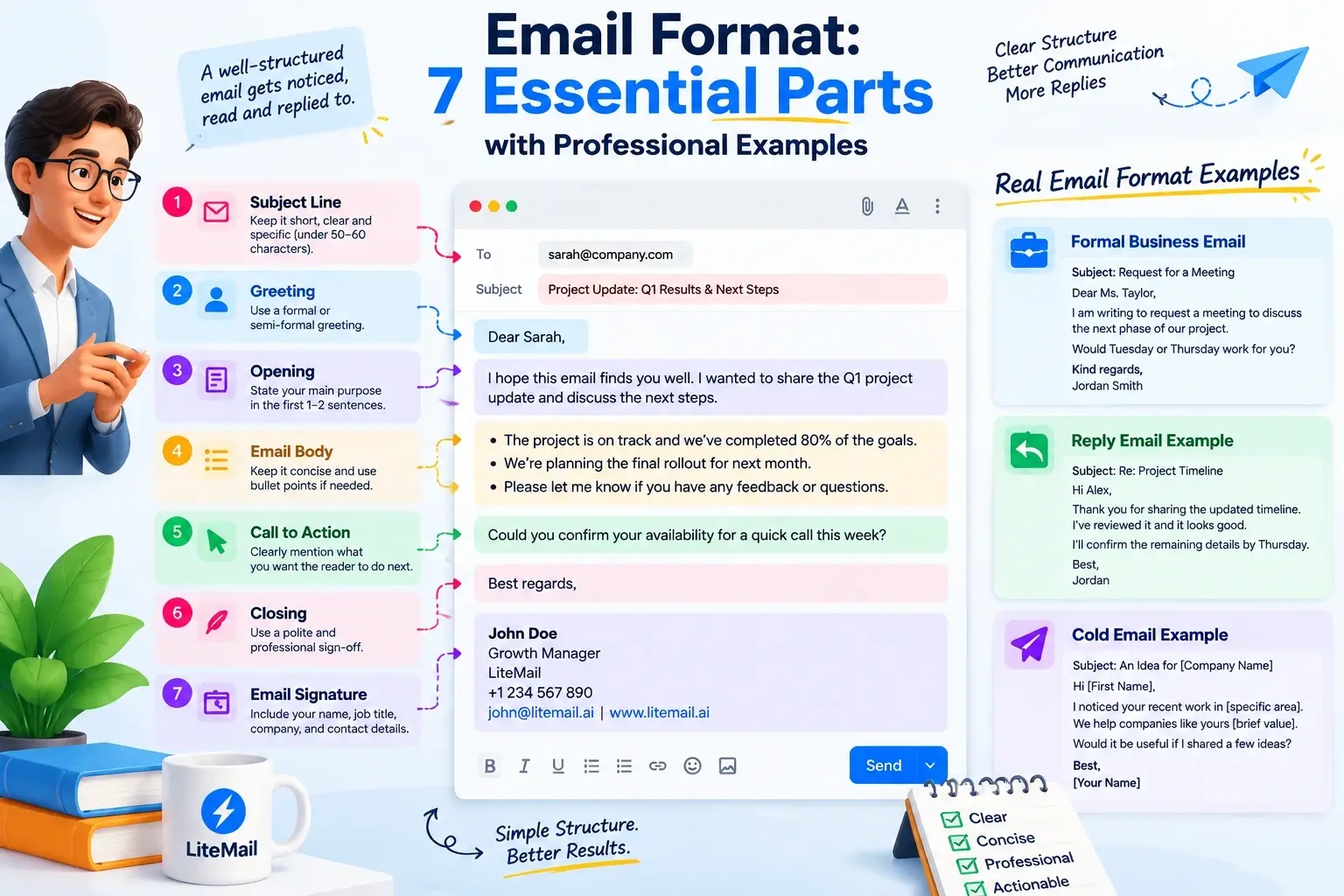
The correct email format helps you write clear, professional messages that are easy to read and understand. A standard email includes seven essential parts: a subject line, greeting, opening, body, call to action, closing, and signature.
Whether you're writing a formal business email, replying to a client, requesting information, or sending a cold email, the right structure helps you communicate your purpose clearly. Below, you'll find a simple email format template, practical examples, and formatting tips you can use in everyday business communication.
What Is an Email Format?
An email format is the structure and arrangement of the information inside an email message. It determines how you present your subject, greeting, main message, request, closing, and contact details.
A clear email structure helps readers identify the purpose of a message and understand what they need to do next.
There is an important distinction between an email message format and an email address format:
Email message format: The structure of the content you write and send.
Email address format: The structure of an address, such as
jane.smith@example.com.
This guide focuses on formatting email messages for professional and business communication.
What Is the Correct Email Format? The Seven Essential Parts
A standard professional email has seven main parts. Some short replies may not need every element, but this structure is a reliable starting point.
1. Subject Line
The subject line tells the recipient what the email is about. Keep it specific and relevant to the message.
Examples:
Meeting Request for Next Week
Project Update: October Deliverables
Follow-Up on Our Previous Conversation
Question About Your Current Process
Avoid vague subjects that make the reader guess why you're writing.
2. Greeting or Salutation
Start with a greeting that matches your relationship with the recipient and the situation.
Examples:
Formal: Dear Ms. Taylor,
Professional: Hello Jordan,
Friendly: Hi Alex,
When possible, address the person by their preferred name. Use a more formal greeting when the situation calls for it.
3. Opening Sentence
Explain why you're writing in the first sentence or two. Avoid making readers go through a long introduction before they reach the main point.
For example:
Instead of:
"I hope you are doing well. I wanted to take a moment to get in touch with you regarding something that I have been thinking about."
Write:
"I'm writing to discuss the revised project timeline."
The second version communicates the purpose more directly.
4. Main Body
Use the body to explain the information, request, or question. Keep related details together and use separate paragraphs when the topic changes.
For a straightforward business email, you may need only one or two short paragraphs. More complex messages may benefit from bullet points.
For example:
"We have completed the first phase of the project. The remaining work involves reviewing the final design and confirming the launch date.
Could you please review the attached document and share any changes by Thursday?"
The purpose is to make the message easy to follow, not to make every email the same length.
5. Call to Action or Next Step
If you need the recipient to do something, explain exactly what it is.
Examples:
Could you confirm the meeting time?
Please review the attached document.
Would Tuesday afternoon work for a short call?
Please let me know if you need any additional information.
A clear request is easier to respond to than a vague closing such as "Let me know your thoughts" when a specific decision is required.
6. Closing or Sign-Off
End with a sign-off that matches the tone of the email.
Situation | Suitable closing |
|---|---|
Formal correspondence | Sincerely |
General business communication | Best regards |
Routine professional email | Best |
Thank-you message | Thank you |
Friendly workplace conversation | Thanks |
Use a closing that sounds natural for your relationship with the recipient.
7. Email Signature
A professional signature helps the recipient identify you and understand your role.
A typical business signature includes:
Full name
Job title
Company name
Relevant contact information
Example:
Jordan Taylor
Sales Manager
Example Company
jordan.taylor@example.com
Include only the details that are useful for the situation. A long signature with unnecessary promotional text can distract from the message.
A Simple Email Format Template You Can Copy
Use this standard email format when you need a starting point for a professional message.
Subject: [Write a clear subject]
Hi [Recipient Name],
I'm writing to [state your main purpose].
[Add the important context, information, or question in one short paragraph.]
[Explain the requested action or next step, if necessary.]
Best regards,
[Your Name]
[Your Job Title]
[Company Name]
Before sending, replace the placeholders, confirm the recipient, check attachments, and proofread the message.
Email Format Examples for Common Situations
The correct email format depends on what you want to achieve. The examples below demonstrate how the same basic structure can be adapted.
Example 1: Formal Business Email
Subject: Request for a Meeting About the Project
Dear Ms. Taylor,
I am writing to request a meeting to discuss the next phase of our project.
I would appreciate the opportunity to review the current timeline, outstanding tasks, and proposed next steps.
Would Tuesday or Thursday afternoon be convenient for you?
Kind regards,
Jordan Smith
Project Coordinator
Example Company
Why this format works: The subject states the purpose, the opening explains the request, and the closing makes the next step clear.
Example 2: Email Requesting Information
Subject: Request for Updated Pricing Information
Hello Alex,
Could you please share the latest pricing details for the services discussed in our previous conversation?
It would be helpful to receive the current plans and any relevant terms so that we can complete our review.
Thank you for your assistance.
Best regards,
Jordan Smith
Why this format works: It gives the recipient enough context to understand the request without unnecessary background.
Example 3: Email Reply Format Example
A professional email reply should acknowledge the original message, address the relevant point, and explain any action you will take.
Subject: Re: Project Timeline
Hi Alex,
Thank you for sharing the updated timeline.
I've reviewed the proposed dates, and they look suitable. I'll confirm the remaining details with the team and send you an update by Thursday.
Best,
Jordan
Why this format works: It responds directly to the previous email and identifies the next action.
When replying to a long email thread, keep the relevant context and remove unnecessary quoted text when appropriate. Make sure your reply is addressed to the right recipients.
Example 4: Cold Email Format for Business Outreach
A cold email introduces a relevant business reason for contacting someone who has not previously engaged with you. It should be specific to the recipient rather than a generic product pitch.
Subject: An Idea for [Company Name]
Hi [First Name],
I noticed [specific, relevant observation about the company].
We help [relevant audience] address [specific problem or goal], and I thought this might be relevant to your team.
Would it be useful if I shared a few ideas?
Best,
[Your Name]
[Job Title]
[Company]
Why this format works: It provides a relevant reason for reaching out, explains the potential value, and ends with a straightforward request.
Personalize the message before sending it. For more specialized outreach examples, see LiteMail's B2B cold email templates guide.
Formal vs. Informal Email Format
Formal and informal emails share the same basic purpose: communicate clearly. Their tone and level of detail differ.
Element | Formal email | Informal email |
|---|---|---|
Greeting | Dear Ms. Taylor | Hi Alex |
Language | Polished and professional | Conversational |
Opening | States the purpose clearly | May include a friendly opening |
Body | Focused and organized | Flexible and relaxed |
Closing | Sincerely or Kind regards | Thanks or Best |
Signature | Usually includes professional details | May use only a first name |
Use the tone that fits your audience. An informal message can still be clear and respectful, while a formal email should not become unnecessarily complicated.
Email Formatting Best Practices
Good email formatting is primarily about readability and clarity. These practices can help make professional messages easier to scan.
Keep Paragraphs Short
Break long blocks of text into smaller paragraphs. Give each paragraph one main purpose.
Use White Space
Leave a blank line between paragraphs. Standard block formatting, with text aligned to the left, is a straightforward choice for professional emails.
Use Lists for Multiple Points
If you need to communicate several actions, questions, or updates, consider using bullets instead of a long paragraph.
Make the Main Point Easy to Find
Put the purpose of the message near the beginning. Include background information only when it helps the reader understand the request.
Use a Clear Subject Line
Make the subject relevant to the message. Avoid misleading subjects or vague wording.
Proofread Before Sending
Check spelling, names, dates, attachments, links, and recipient fields. Small errors can create confusion or make a professional message look careless.
Check the Email on Mobile
Keep paragraphs readable on a smaller screen. Avoid unnecessary formatting, oversized signatures, and wide tables that are difficult to view on a phone.
For more detailed writing guidance, consult the Boise State University Professional Email Guide and Indeed's formal email format guide.
Common Email Formatting Mistakes
Even a short message can become difficult to understand when its structure is unclear.
Avoid these common mistakes:
Missing subject line: The recipient has less context before opening the email.
Unclear opening: The reader must search for the purpose of the message.
One large paragraph: Important information becomes harder to scan.
Unclear request: The recipient doesn't know what action you expect.
Overly long signature: Extra details distract from the main message.
Wrong recipient fields: A message may reach people who do not need it.
Unnecessary formatting: Too many fonts, colors, or decorative elements can reduce readability.
Unverified claims: Do not include customer results, statistics, or promises that you cannot support.
The simplest solution is to read the email once from the recipient's perspective before sending it.
Email Format vs. Email Deliverability
A well-structured email and a reliably delivered email are two different things.
Email formatting concerns how the message is written and presented. It helps readers understand your message, but good formatting alone cannot guarantee that an email reaches the inbox.
Email deliverability concerns whether your messages are accepted and placed appropriately by receiving email systems. Technical authentication, sender reputation, recipient responses, sending practices, and other factors can influence the outcome.
Google's email sender guidelines explain its requirements for senders, including authentication and controls for unwanted messages. Requirements vary by sending circumstances, and high-volume senders have additional obligations.
For teams running business outreach, it's important to consider both the message and the infrastructure used to send it.
LiteMail provides pre-warmed email inboxes and domains for teams building cold email infrastructure. Review the available options to see whether they fit your sending setup. No mailbox or formatting choice can guarantee inbox placement.
If you're improving your broader sending process, you can also read LiteMail's guide on building an efficient email workflow.
Frequently Asked Questions
What is the correct email format?
A standard professional email includes a clear subject line, greeting, opening sentence, main body, any necessary call to action, a suitable closing, and a signature. Adapt the structure to the purpose and recipient.
What is a simple email format?
A simple email format is a subject line, greeting, brief message, clear request or next step, and sign-off. Add a full professional signature when the situation requires it.
What are the seven parts of an email?
The seven parts are the subject line, greeting, opening, body, call to action, closing, and signature. Some short messages may combine or omit elements that aren't necessary.
How do I format a professional email reply?
Keep the relevant subject thread, greet the sender, acknowledge their message, answer the main question, explain any next step, and close politely. Check the recipient fields before replying.
What is the difference between an email format and an email address format?
An email format describes the structure of a written message. An email address format describes the structure of an address, such as first.last@example.com. They are related to email communication but represent different things.
Does email formatting affect deliverability?
Clear formatting can improve readability, but it does not guarantee inbox placement. Deliverability also depends on technical authentication, sender reputation, recipient response, and sending practices.
How long should a professional email be?
There is no single correct length for every email. Include enough information to explain the purpose and next step, but remove details that do not help the recipient respond or act.
Can I use the same format for every business email?
You can reuse a basic structure, but adapt the greeting, level of detail, tone, and call to action to the situation. A meeting request, an internal update, a reply, and a cold email have different communication goals.
Final Thoughts
The best email format is the one that makes your message clear, relevant, and easy to act on. Start with a specific subject, explain your purpose early, organize the body, state the next step, and finish with an appropriate closing.
Use the simple template as a starting point, then adapt it to the recipient and situation. For cold outreach, remember that message quality and technical deliverability are separate parts of an effective email process.






