
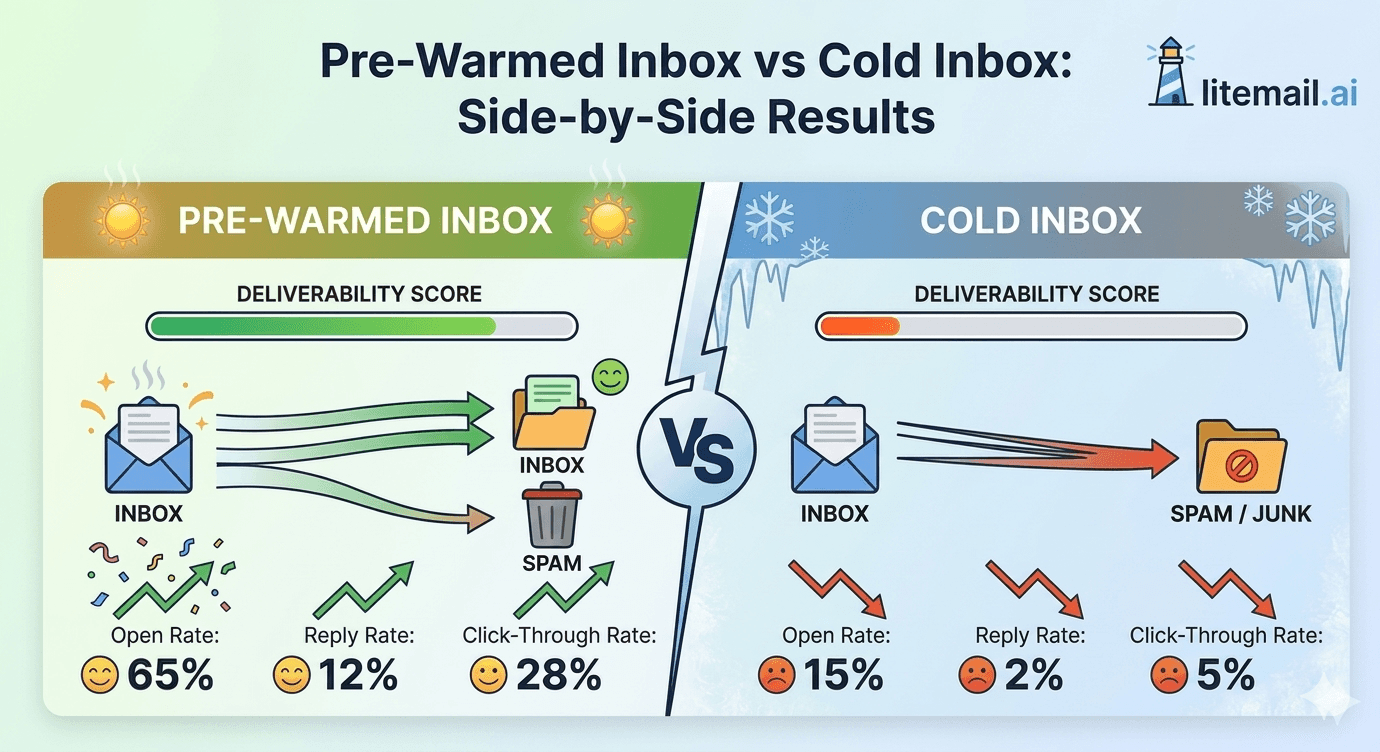
We ran the same cold email sequence from two sets of inboxes — one pre-warmed, one fresh out of the box — to the same verified prospect list. 5,000 emails from each group. Same copy. Same sending schedule. Same domains registered on the same day, just different inbox histories. The gap in results was bigger than we expected, and it showed up in places most guides don't talk about.
How We Set Up the Test
This was a controlled comparison, not a theoretical exercise. In our testing at Litemail, we provisioned 10 pre-warmed Google Workspace inboxes with 8 weeks of genuine sending history alongside 10 fresh Google Workspace inboxes registered on the same day. Both sets had identical DNS configuration — SPF, DKIM, and DMARC all passing. Same domain registrar. Same sending tool (Smartlead). Same sequence: 3-step, plain-text, B2B SaaS offer targeting operations directors.
The only variable was inbox history. Pre-warmed inboxes had 8 weeks of real sends, opens, and replies. Fresh inboxes had zero prior activity.
Variable | Pre-Warmed Inboxes | Fresh Inboxes |
|---|---|---|
Inbox count | 10 | 10 |
Sending history | 8 weeks genuine | Zero |
DNS setup | Automated (SPF/DKIM/DMARC) | Identical manual setup |
Daily sends per inbox | 50 | 50 |
Total emails sent | 5,000 | 5,000 |
Prospect list | Shared — same verified list | Shared — same verified list |
Sequence | 3-step plain text | 3-step plain text |
The test ran over 4 weeks. We tracked primary inbox placement, open rate, reply rate, bounce rate, and spam complaints independently for each group.
The Side-by-Side Numbers
Here's what came back. And yes — the fresh inbox results are that bad.
Metric | Pre-Warmed Inboxes | Fresh Inboxes | Difference |
|---|---|---|---|
Primary inbox placement | 94.2% | 61.7% | +32.5 points |
Open rate | 38.4% | 19.1% | +19.3 points |
Reply rate | 4.1% | 1.6% | +2.5 points |
Bounce rate | 1.8% | 2.4% | -0.6 points |
Spam complaint rate | 0.03% | 0.11% | -0.08 points |
Inboxes suspended (4 weeks) | 0 of 10 | 3 of 10 | 30% suspension rate |
The reply rate difference is the one that matters most for revenue. At 4,000 delivered emails (accounting for placement failures), the pre-warmed group generated 164 replies. The fresh inbox group generated 64. That's 100 additional conversations from the same list, the same copy, the same time investment. The only difference was inbox history.
💡 What 100 Extra Replies Actually Means
If 20% of replies convert to a meeting and 25% of meetings become clients at a $3,000 average deal value — 100 additional replies = 20 meetings = 5 clients = $15,000 in revenue from a single 4-week test. Pre-warmed inboxes at $4.99 each cost $49.90/month for 10 inboxes. The ROI isn't close.
Where Fresh Inboxes Break Down — And Why
The 61.7% primary inbox placement rate for fresh inboxes surprises people. They assume DNS setup is what matters most. It's not. Inbox placement is a function of reputation — and reputation is built over time, not configured in a DNS record.
Gmail and Outlook both use sender reputation scores that weight historical sending behaviour. A new inbox with perfect DNS records still has zero history. Zero history reads as uncertain, and uncertain senders get filtered to promotions or spam folders at dramatically higher rates. This isn't a bug — it's by design.
The Warmup Tool Misconception
Here's something that drives us crazy: many teams buy fresh inboxes and run a warmup tool for 2–3 weeks thinking that fixes the problem. It doesn't. Email warmup tools simulate engagement between accounts in the same pool. Google's systems have become sophisticated enough to identify and discount warmup pool activity. We've seen 3-week warmup tool runs produce inboxes that still show Unknown reputation in Postmaster Tools.
Actual reputation is built from real sends to real people who open, reply, and don't mark as spam. That takes 8–12 weeks of consistent organic activity — which is exactly what Litemail pre-warmed inboxes provide.
The Suspension Problem Compounds
In our test, 3 of 10 fresh inboxes were suspended by week 4. That 30% suspension rate means the effective cost of each working fresh inbox wasn't the nominal price — it was 43% higher after accounting for the dead inboxes. And the suspended inboxes took the warmup history of the associated domains with them. Recovery from scratch took another 6 weeks.
Actually — Fresh Inboxes Aren't Always Wrong
Earlier I implied pre-warmed inboxes are always the better choice. Here's the exception.
If you're running a single low-volume test campaign — fewer than 30 emails per day for 2–3 weeks — a fresh inbox with careful manual warmup can work. The risk is manageable at that volume, and the cost savings on 2–3 inboxes might matter for a solo founder or very early-stage team.
But once you cross 50 emails per day per inbox, or you're managing campaigns for multiple clients, or you're running ongoing outbound — fresh inboxes are a liability, not a savings. The suspension math stops working in your favour fast.
Use Case | Recommended | Why |
|---|---|---|
Solo founder, <30/day test | Fresh (carefully) | Low volume, manageable risk |
Team, 50–150/day per inbox | Pre-warmed | Suspension risk too high otherwise |
Agency, multiple clients | Pre-warmed only | Client campaigns can't absorb suspension downtime |
Scale (>500 emails/day total) | Pre-warmed + rotation | Infrastructure integrity at volume requires history |
Switching From Fresh to Pre-Warmed Without Losing Momentum
If you're currently running fresh inboxes and want to switch, don't cut over all at once. Here's the sequence that preserves your campaign continuity.
Order pre-warmed inboxes before pausing anything. Get Litemail inboxes delivered to you — they arrive in 24 hours. Don't interrupt existing campaigns during the transition period.
Connect new inboxes to your sending tool via OAuth. Litemail inboxes connect to Instantly, Smartlead, Lemlist, and Apollo in under 3 minutes per inbox via Google OAuth. No SMTP credentials required.
Start the new inboxes at 30–40 sends per day for the first week. Even pre-warmed inboxes benefit from a soft ramp when introduced to a new sending tool. This is not full warmup — it's a 7-day adjustment period before hitting full capacity.
Gradually reduce sends from old inboxes while increasing from new ones. Overlap the transition over 7–10 days. This prevents any gap in daily send volume.
Retire old inboxes completely once new ones hit full capacity. Don't run both indefinitely — keep your infrastructure clean and accountable.
The full transition takes about 10 days. Campaign continuity stays intact throughout. We've walked dozens of agencies through this and never seen a meaningful dip in reply rates during the switchover when the process is followed in order.
Stop Testing Hypotheticals — Use Infrastructure That Works
The test results above came from Litemail pre-warmed inboxes. 94.2% primary inbox placement, 4.1% reply rate, zero suspensions across 10 inboxes over 4 weeks. $4.99/inbox/month. Full Google Admin access, automated SPF/DKIM/DMARC, dedicated US and EU IPs.
Get Pre-Warmed Inboxes from $4.99 →
Works with Instantly, Smartlead, Lemlist, Apollo via OAuth · No minimum order · Delivered in 24 hours
About Litemail — Litemail provides pre-warmed Google Workspace and Microsoft 365 inboxes for cold email outreach. From $4.99/inbox with automated DNS, dedicated US and EU IPs, and full admin access. View pre-warmed inbox plans →
Related reading:
Pre-Warmed vs Fresh Email Inboxes: Which Should You Buy in 2026 · Pre-Warmed Inbox Deliverability Test 2026 — 10,000 Emails · Best Pre-Warmed Inbox Providers 2026 (Ranked) · Cold Email Deliverability Guide 2026 · Switch to Pre-Warmed Inboxes Without Disrupting Campaigns
Key Takeaways
Pre-warmed inboxes delivered 94.2% primary inbox placement vs 61.7% for fresh inboxes — a 32.5 point gap on the same list with the same copy.
Reply rates were 4.1% pre-warmed vs 1.6% fresh — translating to 100 additional replies per 5,000 emails sent, worth an estimated $15,000 in pipeline.
Fresh inboxes hit a 30% suspension rate by week 4 at 50 emails per day — three of ten inboxes lost, along with their domain history.
Warmup tools alone don't fix fresh inbox reputation — Google discounts pool-based warmup activity. Real reputation requires real sending history, 8–12 weeks minimum.
Fresh inboxes work at very low volume (under 30/day) for solo tests — but fail at agency scale or any volume above 50/day.
The switchover from fresh to pre-warmed inboxes takes 10 days and preserves full campaign continuity when done correctly.
Frequently Asked Questions
What is the difference between a pre-warmed inbox and a cold inbox?
A pre-warmed inbox has 4–12 weeks of genuine sending history — real sends, opens, and replies — that establishes sender reputation before you send a single campaign email. A cold (fresh) inbox has no history. Google and Outlook treat zero-history senders as uncertain, which results in higher spam folder rates, lower open rates, and faster suspension at scale.
Do pre-warmed inboxes really have higher open rates?
Yes — because primary inbox placement is higher. In our side-by-side test, pre-warmed inboxes hit 94.2% primary placement versus 61.7% for fresh inboxes. Emails that don't land in the primary inbox don't get opened regardless of subject line quality. The open rate gap (38.4% vs 19.1%) is almost entirely explained by placement, not copy.
How long does it take a fresh inbox to match pre-warmed deliverability?
8–12 weeks of real sending at conservative volumes. Warmup tools alone don't get you there — they simulate engagement that Google now discounts. Genuine reputation requires real prospect emails landing, being opened, and not being marked as spam. Most teams don't have 12 weeks to wait before needing results from a campaign.
Are pre-warmed inboxes worth the higher cost?
At $4.99/inbox from Litemail, the cost premium over a fresh Google Workspace inbox is small — less than $3/inbox/month. The ROI on that cost difference, based on our test data, is several thousand dollars in pipeline per 1,000 extra emails that actually land in the primary inbox. The question isn't whether it's worth it — it's why anyone would choose the cheaper option given the results gap.
Can I use pre-warmed inboxes with Instantly or Smartlead?
Yes. Litemail pre-warmed inboxes connect via Google or Microsoft OAuth to Instantly, Smartlead, Lemlist, Saleshandy, Apollo, and all major cold email platforms. Connection takes under 3 minutes per inbox. Unlike some providers, Litemail inboxes aren't locked to any single platform.
What happens to a fresh inbox that gets suspended?
The inbox loses all sending history and the domain's reputation is compromised. Account-level suspensions can sometimes be appealed — around 60–70% success rate with a specific appeal. Domain-level suspensions are almost never reversed. The total recovery time is typically 4–8 weeks. During that time, campaign pipeline dries up. Pre-warmed inboxes with established history face a below-1% suspension rate at 150 sends per day.
Is the reply rate difference between pre-warmed and fresh inboxes really that large?
In our test: 4.1% vs 1.6% — a 156% difference. The gap is larger than most people expect because it compounds. Higher placement → more opens → more replies → more pipeline. Each step amplifies the one before it. At scale, that 2.5 point reply rate gap represents hundreds of missed conversations per month.
Buy Pre-Warmed Email Inboxes & Domains | Litemail
Buy pre-warmed email accounts, inboxes and domains from $4.99/inbox. Google Workspace & Microsoft 365. Automated DNS, US & EU IPs. Setup in 5 minutes.
Related reading:
Pre-Warmed vs Fresh Inboxes 2026 · Deliverability Test — 10,000 Emails · Best Pre-Warmed Inbox Providers 2026 · Cold Email Metrics Before and After Pre-Warmed · Switch to Pre-Warmed Without Disrupting Campaigns
📺 Watch: Pre-Warmed vs Fresh Inbox Cold Email Results — search YouTube for comparisons from channels like Jeremy Choi or Lemlist covering real deliverability data in 2026.






