Most SMTP warmup guides teach you a six-week process that pre-warmed inbox providers exist specifically to make unnecessary. That's not a reason to skip warmup — if you're sending from your own SMTP server, warmup is not optional. But it is a reason to understand exactly what you're signing up for before you commit six weeks of ramping to it.
This guide covers the full process: the DNS prerequisites you need before you send a single email, the day-by-day ramp schedule, the mistakes that get IPs blacklisted mid-warmup, and — because it matters more than most guides admit — when skipping manual warmup for a pre-warmed inbox is actually the better call.
Stop Losing Emails to Spam — Get Pre-Warmed Inboxes Ready to send from day 1. No warm-up wait. No extra tools needed. Find Your Sending Domains → · 100,000+ mailboxes · US & EU IPs · From $4.99/inbox
What SMTP Warmup Actually Is
SMTP warmup is the process of gradually increasing sending volume from a new IP address or domain so mailbox providers like Gmail and Outlook build a positive reputation for it before you rely on it for real volume.
Mailbox providers don't trust new senders by default — a brand-new IP suddenly sending thousands of emails looks identical to a spammer's first move, regardless of your actual intent. Warmup solves this by teaching the mailbox provider's filters, gradually, that this sender is legitimate: low initial volume, high engagement, consistent patterns, clean bounce rates.
It's worth separating two reputation layers that warmup builds, because they're evaluated differently:
IP reputation — tied to the sending IP itself, which is why shared IPs inherit the sending history of everyone else on them (good or bad), while dedicated IPs start from zero and are entirely your own responsibility to build.
Domain reputation — tied to your sending domain, which persists even if you change IPs or SMTP providers, and is what DMARC alignment is actually protecting.
Both need to be warmed. A new domain on an old, well-reputed shared IP still needs domain-level warmup; a new dedicated IP on an established domain still needs IP-level warmup. Most guides collapse these into one "warmup" number, which is part of why so many warmup schedules that "should have worked" don't.
Before You Start: DNS Prerequisites
Skipping this step is the single most common reason a warmup schedule fails partway through — not because the ramp was too aggressive, but because the infrastructure underneath it was never fully authenticated in the first place.
SPF, DKIM, and DMARC — with alignment
Having all three records published isn't enough. Mailbox providers check for alignment: does the domain in your DKIM signature match your visible From domain, and does your SPF record's domain match it too. A DKIM signature signed by a third-party ESP's default domain instead of yours will pass DKIM but fail alignment, which is functionally the same as having no DKIM at all in Gmail's and Microsoft's bulk sender programs.
A valid PTR record
Your sending IP needs a reverse DNS pointer that resolves to a hostname matching your sending domain's pattern. Missing PTR records are treated as a red flag by most mailbox providers independent of everything else you get right.
Google Postmaster Tools set up before you send
Postmaster Tools only starts reporting data once you're sending, but you want the domain registered and verified before day one so you're not flying blind for the first week of your own ramp.
Microsoft's separate onboarding step
This is the part most SMTP warmup guides skip entirely, and it's a real gap: Microsoft requires bulk senders to register through its Smart Network Data Services (SNDS) program and, for higher volumes, its Junk Email Reporting Program (JMRP), separately from anything you do for Gmail. Warming up cleanly for Gmail does not automatically warm you up for Outlook.com and Hotmail addresses — treat them as two parallel tracks, not one.
Dedicated vs. Shared IP: Decide This First
Almost every SMTP warmup schedule you'll find online assumes you've already chosen your IP setup — most haven't told you how to choose it, and it changes the ramp itself.
Shared IP — you inherit the reputation of everyone else on that IP pool. Faster to get sending, but a single bad sender on the same IP can tank your deliverability regardless of how clean your own sends are. Reasonable for lower, steadier volume where you don't control the infrastructure (most transactional ESPs default here).
Dedicated IP — entirely your own reputation to build, from zero. Warmup takes longer and is less forgiving of mistakes early on, but once established it's fully under your control and isn't affected by other senders. Generally only worth the warmup investment above roughly 50,000–100,000 emails/month — below that, a dedicated IP's reputation gets built too slowly on too little volume to ever fully mature.
If you're not sure which you're on, this decides everything below — a dedicated IP warmup needs the conservative end of the schedule; a shared IP correcting for a specific domain reputation problem can move faster because the underlying IP trust is already there.
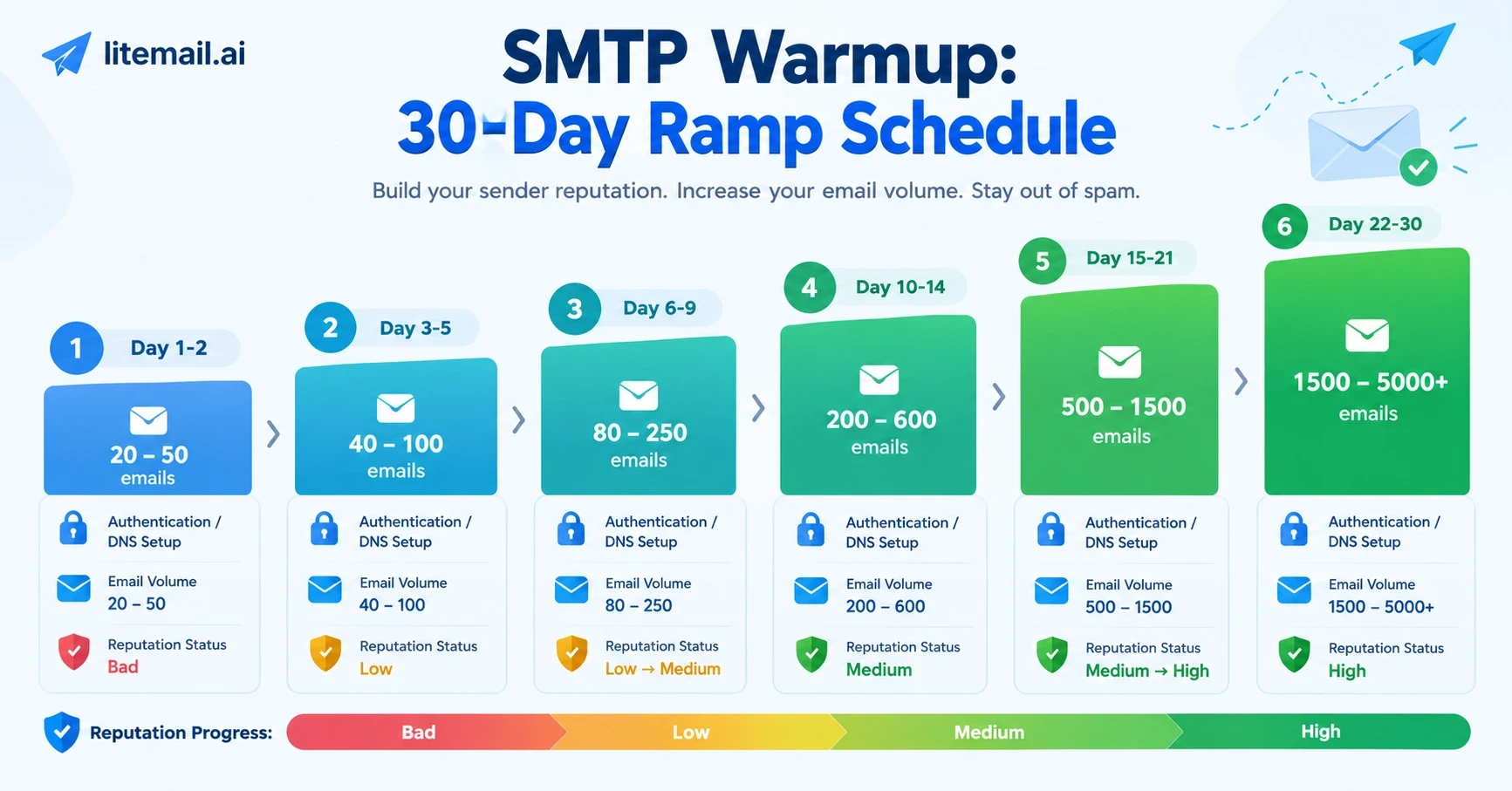
The SMTP Warmup Schedule
This is the core ramp, adjusted per the dedicated/shared decision above.
Day | Dedicated IP | Shared IP (new domain) | Notes |
|---|---|---|---|
1–2 | 20–30 emails/day | 40–50 emails/day | Front-load to your most engaged contacts |
3–5 | 40–60 | 80–100 | Don't more than double any single step |
6–9 | 80–150 | 150–250 | Watch Postmaster daily, not weekly |
10–14 | 200–400 | 300–600 | First real test of complaint rate at volume |
15–21 | 500–1,000 | 800–1,500 | Spread sends across the full business day |
22–30 | 1,500–3,000+ | 2,000–5,000+ | Approaching target volume, if reputation holds |
A few rules that matter more than the exact numbers in this table:
Never more than double volume in a single step. A 2x jump is the practical ceiling filters tolerate as organic growth; anything higher reads as a volume spike.
Weekday-only sending, spread across hours. A morning blast followed by silence looks automated. Distributing sends across the business day mimics how a real mailbox actually behaves.
Front-load engaged contacts first. Opens and replies in the first sends of a warmup matter disproportionately — they're the earliest engagement signal filters have to work with.
A working suppression list from day one. Hard bounces should never get retried. A single hard bounce during early warmup carries more reputation weight than the same bounce at full volume, because the sample size is so small.
Ramping on a fixed calendar instead of watching Postmaster data. If your spam rate ticks up on day 12, day 13 is not the day to double volume again regardless of what the schedule says.
No suppression list, so hard bounces get retried. This alone stalls more warmups than aggressive ramping does.
Ignoring the complaint rate until it's already a problem. Keep it under roughly 0.1%, and treat 0.3% as a hard ceiling you should already be pulling back from, not a wall you hit.
Sending only to Gmail addresses and assuming that covers Outlook too. As noted above, Microsoft evaluates your sending behavior independently through SNDS — a clean Gmail warmup with zero Outlook sends leaves you starting from scratch the first time real Outlook volume hits.
Treating warmup as a one-time event. An IP that goes quiet for two or three weeks — a paused campaign, a dormant domain — loses reputation and needs a scaled-down re-warm, not a jump straight back to full volume.
SMTP Warmup vs. Warmup Tools vs. Pre-Warmed Inboxes
Manual SMTP warmup, as described above, is one of three ways to solve this problem — and they're not interchangeable.
Manual SMTP warmup | Warmup tool (network-based) | Pre-warmed inbox | |
|---|---|---|---|
Timeline | 4–6 weeks | 4–8 weeks | Ready in 24 hours |
Cost | Your time + infra | $15–$49/inbox/month | From $4.99/inbox, one-time |
Control | Full | Partial (network-dependent) | Full admin access |
Risk if done wrong | High — blacklisting, restart from zero | Low-medium | None — reputation already verified |
Best for | Teams needing full infrastructure control | Ongoing tool subscription users | Anyone who needs to send now |
Network-based warmup tools work by connecting your inbox to a pool of other accounts that exchange and reply to emails, simulating engagement at a scale you couldn't generate manually. They're a reasonable middle ground if you want to keep your own infrastructure but don't want to hand-manage the ramp. For a full breakdown of how these tools compare to each other, see our best email warmup tools comparison.
If you've already decided a warmup tool is your path and just need the reply-rate and cadence settings dialed in correctly, our warmup sequence settings guide covers that in detail — including why higher reply rates aren't actually better.
When Manual SMTP Warmup Still Makes Sense
To be direct about where Litemail doesn't fit: if you're running your own mail infrastructure for reasons beyond cold outreach — an in-house transactional email system, a compliance requirement to control your own IPs end-to-end, or an existing dedicated IP investment you're not walking away from — manual warmup is the correct path, and no pre-warmed inbox replaces that. This guide's schedule and prerequisites apply fully to that use case.
Where pre-warmed inboxes make more sense is narrower and specific: outbound sending infrastructure — cold email, sales outreach, lead generation — where the six-week wait is pure opportunity cost with no compliance or architectural reason to eat it.
Litemail at a Glance
Need Pre-Warmed Inboxes Instead of a Six-Week Wait? Litemail's Google Workspace and Microsoft 365 inboxes arrive with 4–12 weeks of genuine warm-up history already built, full admin access, and automated SPF/DKIM/DMARC setup — verified Good or High in Postmaster Tools before you ever send a campaign email. Check Available Domains → · From $4.99/inbox · 24-hour delivery · US & EU IPs
For a full cost and timeline comparison against building this yourself, see our DIY warmup vs. pre-warmed inbox pricing breakdown.
Monitoring Progress the Right Way
Google Postmaster Tools reports domain and IP reputation as one of four states: Bad, Low, Medium, High (Google's own labeling; some documentation refers to the top state as "Good" instead of "High" — treat them as the same target). Most SMTP warmup guides tell you to "check Postmaster Tools" without explaining what you're actually looking at:
Bad/Low — expected in the first 1–2 weeks of a new IP or domain. Not a signal to panic, but a signal to hold volume steady rather than ramp further.
Medium — the state most warmups plateau at if ramped too aggressively. Recoverable, but requires slowing down, not pushing through.
High/Good — the target state before you rely on the IP or domain for full production volume.
For Microsoft, the equivalent signal lives in SNDS, reported as IP status colors rather than Google's tiered labels — green being the target state, matching High/Good on the Google side
FAQs
How long does SMTP warmup take?
Typically 4–6 weeks for a dedicated IP to reach full target volume safely, faster for domain-only warmup on an already-reputable shared IP.
Is SMTP warmup free?
The process itself costs nothing beyond your time and existing infrastructure — no software is required to warm up manually by hand-managing send volume. Warmup tools that automate the process for you typically run $15–$50/inbox/month.
Can I skip SMTP warmup entirely?
Not if you're sending from a new IP or domain with your own SMTP server — mailbox providers will throttle or spam-folder unwarmed senders regardless of your list quality. The only way to skip the wait is to start from an inbox that's already warmed, which is what pre-warmed inbox providers deliver.
What's a good starting volume for SMTP warmup?
20–50 emails per day on a dedicated IP, 40–50 on a shared IP with a new domain, doubling roughly every 2–3 days as reputation holds.
Does warming up for Gmail also warm me up for Outlook?
No. Microsoft evaluates sender reputation through its own SNDS program independent of Google Postmaster Tools — you need sends and monitoring on both if your list includes both providers.
What happens if I pause sending mid-warmup?
Reputation decays during extended inactivity. A pause of two to three weeks or longer generally means restarting at a reduced volume rather than resuming where you left off.
Skip the Six Weeks — Start Sending Today 100,000+ mailboxes delivered with genuine warm-up history already built in. Find Your Sending Domains → · US & EU IPs · From $4.99/inbox







