
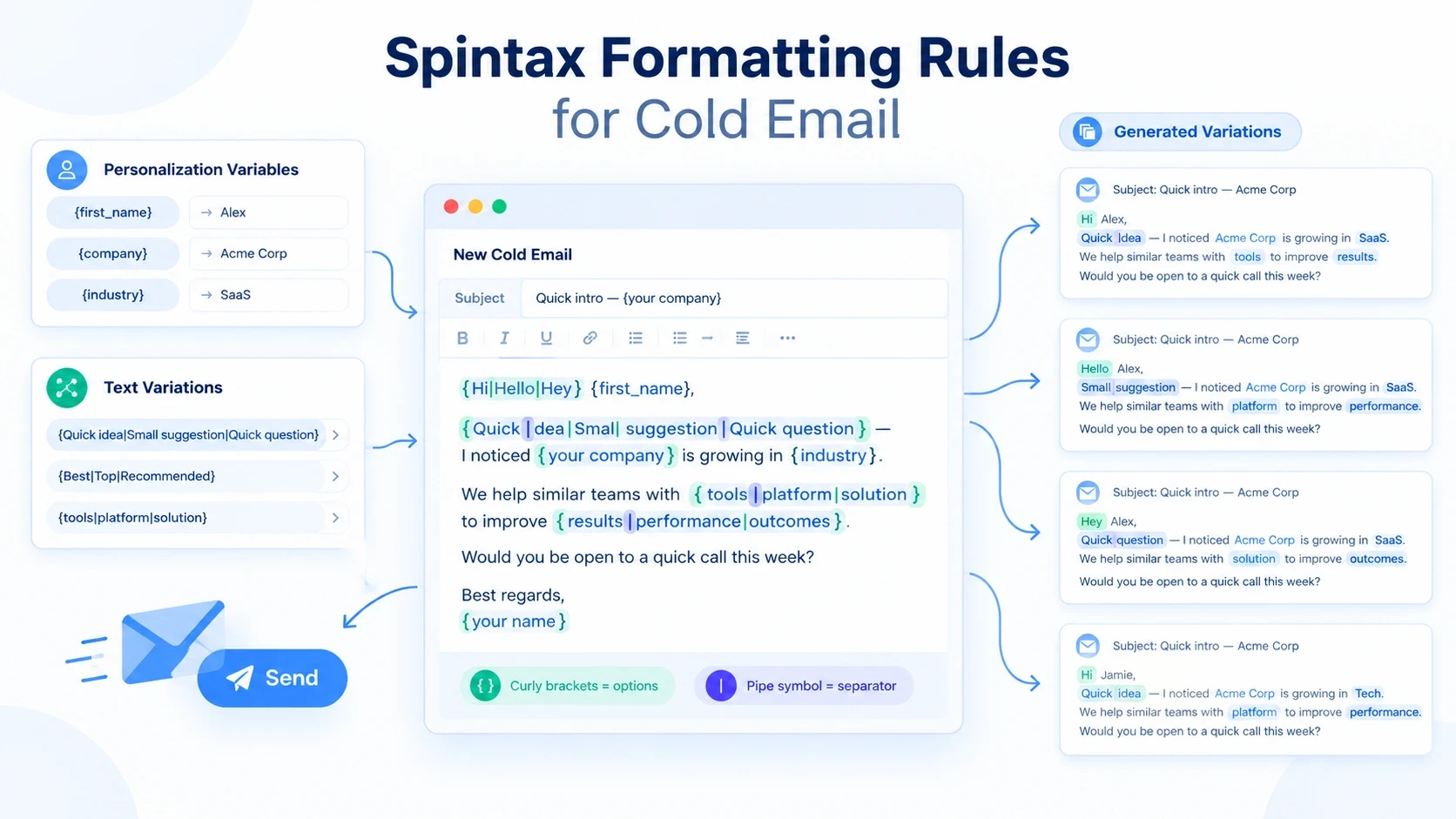
Spintax makes it possible to create multiple variations of the same email without manually writing every version. It is commonly used in cold email to vary greetings, phrases, CTAs, and other parts of a message.
However, Spintax only works correctly when the formatting and syntax are valid. A misplaced bracket, missing pipe, or grammatically incompatible option can produce broken or unnatural emails.
In this guide, you'll learn the essential Spintax text formatting rules, how Spintax syntax works, where to use it in cold email, common mistakes to avoid, and practical examples you can use in your campaigns.
What Is Spintax?
Spintax is a text-formatting method that lets you create multiple versions of a sentence or message from a single template.
A basic Spintax format looks like this:
The system randomly selects one option from the curly brackets.
For example, the email could generate:
or:
or:
The goal is to create natural textual variation while keeping the core message consistent.
What Is the Correct Spintax Format?
Standard Spintax uses three main components:
1. Use Curly Brackets
Spintax options are enclosed in single curly brackets:
The opening { tells the system where the Spintax block begins, while } tells it where the block ends.
Correct:
Incorrect:
2. Separate Options With a Pipe
Each alternative is separated by the pipe character |.
Here, there are three possible options:
Hi
Hello
Hey
Without the pipe, the system cannot identify separate alternatives.
3. Close Every Opening Bracket
Every opening curly bracket must have a corresponding closing bracket.
Correct:
Incorrect:
A missing bracket can cause the Spintax block to fail or generate unexpected text.
4. Keep Options Grammatically Compatible
Every option should work naturally with the words surrounding it.
Good:
All three options fit the sentence.
Bad:
The alternatives don't perform the same grammatical function.
5. Keep the Meaning Consistent
Spintax variations should communicate approximately the same idea.
Good:
Each option has the same basic intent.
Avoid combinations where one option changes the meaning dramatically.
6. Avoid Empty or Broken Options
Don't create unnecessary empty choices:
Instead, give every option a meaningful alternative:
7. Don't Spin Every Word
More Spintax does not automatically mean better email copy.
Avoid templates like:
This can quickly create unnatural combinations.
Use Spintax selectively on phrases where variation sounds natural.
8. Preview Your Generated Variations
Before sending a campaign, generate multiple versions of the email and check them manually.
Review at least several variations for:
Grammar
Meaning
Tone
Personalization
Broken brackets
Awkward combinations
Missing spaces
Unnatural CTAs
A valid Spintax syntax does not automatically guarantee good copy.
Where Should You Use Spintax in a Cold Email?
Spintax can be applied to different parts of a cold email.
Subject Line
Greeting
Opening Line
Value Proposition
Call to Action
Sign-Off
The key is to use variation where it sounds natural rather than turning the entire email into a collection of random alternatives.
Word-Level vs. Section-Level Spintax
There are two common ways to use Spintax.
Word-Level Spintax
This changes individual words.
It's simple and useful for small variations.
Phrase-Level Spintax
This changes a complete phrase.
Phrase-level Spintax can often produce more natural variations because the complete thought changes together.
For cold email, phrase-level variation is generally easier to control than spinning individual words throughout every sentence.
How to Use Spintax With Personalization Variables
Spintax and personalization are different concepts.
Spintax creates alternative text:
A personalization variable inserts recipient-specific information:
You can combine them:
Possible output:
The exact variable syntax depends on the email platform you're using — see our comparison of cold email tool pricing if you're still choosing a platform — so always follow that platform's supported personalization format
Important Formatting Difference
Don't confuse:
with:
The first is standard Spintax syntax.
The second is commonly used for a personalization variable.
Spintax Examples for Cold Email
Here are practical examples you can adapt.
Example 1: Greeting
Example 2: Opening
Example 3: Introduction
Example 4: Value Proposition
Example 5: CTA
Example 6: Follow-Up
Example 7: Complete Short Email
Each Spintax block can generate a different variation while maintaining the same overall message.
How Many Variations Can Spintax Create?
The number of possible combinations depends on how many choices each Spintax block contains.
For example:
has 3 variations.
If your email contains three independent blocks with three options each:
That means the template can theoretically generate 27 different combinations.
If you have four blocks:
However, more variations don't necessarily mean better emails.
Quality matters more than the number of combinations. If the options don't work together naturally, hundreds of variations can still produce poor messages.
Common Spintax Formatting Mistakes
Mistake 1: Missing Closing Bracket
Correct it to:
Mistake 2: Using the Wrong Brackets
Use:
Mistake 3: Forgetting the Pipe
Correct:
Mistake 4: Grammatically Incompatible Options
The options don't serve the same grammatical role.
A better version would be:
Mistake 5: Excessive Spinning
Overspun templates can also trigger spam filters when combinations read as unnatural or machine-generated — see our guide on why cold emails get filtered for more on this.
Instead of:
Use a complete phrase:
Mistake 6: Not Testing Generated Emails
A template can look correct while individual combinations sound unnatural.
Always preview generated variations before launching the campaign.
Spintax vs. Personalization vs. A/B Testing
These three approaches serve different purposes.
Method | Main Purpose |
|---|---|
Spintax | Create multiple textual variations |
Personalization | Customize content for individual recipients |
A/B Testing | Compare different versions to measure performance |
Spintax
Example:
Personalization
Example:
A/B Testing
You might test two different subject lines:
Version A:
Version B:
Spintax creates variations, while A/B testing measures which predefined version performs better.
Does Spintax Improve Cold Email Deliverability?
Spintax should not be treated as a guaranteed deliverability technique. Its primary purpose is to create variations of email copy. Inbox placement depends on several other factors — including sender reputation, email authentication, domain and mailbox health, recipient engagement, and list quality.
Its primary purpose is to create variations of email copy. Inbox placement depends on many other factors, including:
Sender reputation
Email authentication
Domain and mailbox health
Recipient engagement
List quality
Sending practices
Email content
Targeting
Spam complaints
Using Spintax alone won't guarantee that emails reach the inbox.
The best approach is to combine natural copy with responsible sending practices and proper email infrastructure.
Best Practices for Using Spintax in Cold Email
Follow these practices when creating Spintax templates:
1. Keep Variations Natural
Every generated version should sound like it was written by a real person.
2. Spin Phrases, Not Everything
Focus on meaningful variations rather than changing every word.
3. Maintain the Same Intent
Each variation should communicate the same basic message.
4. Combine Spintax With Personalization
Use Spintax for variation and personalization for recipient-specific information.
5. Test Your Output
Preview multiple combinations before sending.
6. Check Grammar
Make sure every possible combination is grammatically correct.
7. Keep Your Tone Consistent
Don't mix extremely casual and highly formal alternatives unless that difference is intentional.
8. Don't Rely on Spintax for Deliverability
Spintax is a copy variation technique, not a substitute for good email infrastructure and sending practices.
Complete Cold Email Spintax Example
Here's a complete example:
Before using a template like this, generate several complete variations and read each one as if you were the recipient.
How to Check Spintax Before Sending
Use this simple process:
Step 1: Check every opening {.
Step 2: Make sure every opening bracket has a matching }.
Step 3: Check that alternatives are separated with |.
Step 4: Read every option with the surrounding sentence.
Step 5: Generate multiple complete variations.
Step 6: Check grammar and personalization.
Step 7: Remove combinations that sound unnatural.
Step 8: Send a test email before launching the campaign.
If your email platform provides a preview or Spintax testing feature, use it before sending at scale.
Spintax Text Formatting Rules Checklist
Before launching your campaign, check:
Every Spintax block starts with
{Every Spintax block ends with
}Alternatives are separated by
|Options are grammatically compatible
Options have consistent meaning
There are no empty options
Personalization variables are formatted correctly
Spintax isn't overused
Multiple variations have been previewed
Generated emails sound natural
Subject lines have been tested
The final email has been test-sent
Frequently Asked Questions
What are the basic Spintax formatting rules?
The basic format is:
Use curly brackets around the alternatives and pipe symbols between each option.
What brackets are used for Spintax?
Standard Spintax uses single curly brackets:
What does the | symbol mean in Spintax?
The pipe symbol separates alternative choices inside a Spintax block.
For example:
contains three possible options.
Can I use Spintax with personalization?
Yes. Spintax and personalization can be combined:
The exact personalization syntax depends on your email platform.
How many Spintax variations should I use?
There is no universal number. Use enough variation to keep the copy natural, but don't sacrifice quality just to create more combinations.
Does Spintax guarantee better email deliverability?
No. Spintax does not guarantee inbox placement. Deliverability depends on multiple factors, including sender reputation, authentication, engagement, list quality, and sending practices.
Should I spin every word in a cold email?
No. Overusing Spintax can make emails sound unnatural. Phrase-level variations are often easier to control and review.
Should I test Spintax before sending?
Yes. Generate multiple variations and check them for grammar, meaning, personalization, formatting, and overall readability before launching your campaign.
Conclusion
Understanding Spintax text formatting rules is essential if you want to create reliable and natural email variations.
The basic structure is simple:
Use curly brackets to contain the alternatives and pipe symbols to separate them. More importantly, make sure every variation is grammatically correct, maintains the intended meaning, and sounds natural when combined with the rest of the sentence.
Spintax works best when used selectively alongside personalization and a strong cold email strategy. Always preview your generated variations before sending, and remember that Spintax itself does not guarantee better deliverability.
If you're working on cold email campaigns, understanding these formatting rules can help you build cleaner, more flexible email templates without manually writing every variation






