
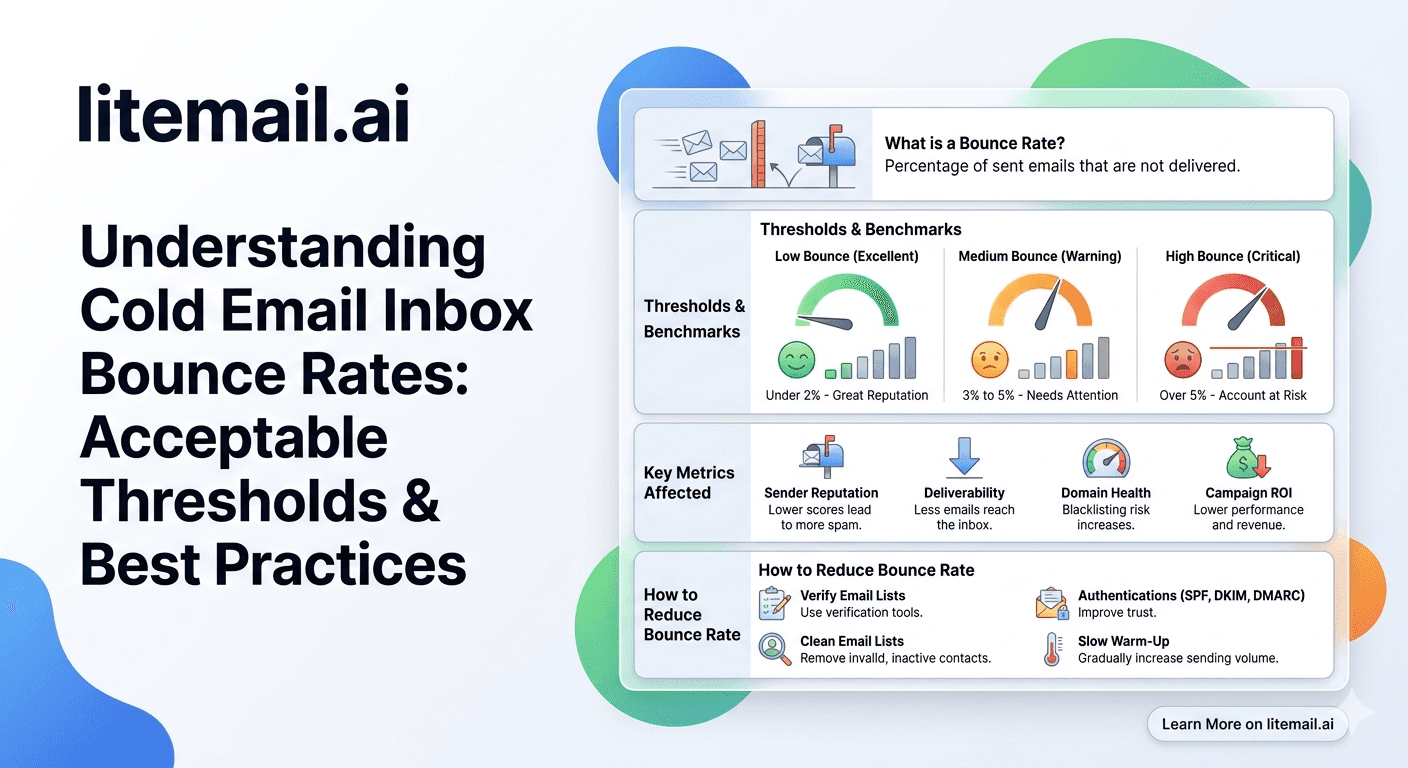
Bounce rate is one of the most important metrics that determines cold email deliverability, yet many teams only pay attention after their sender reputation starts declining. A high bounce rate signals poor list quality, invalid email addresses, or technical configuration issues that can reduce inbox placement across providers like Google and Microsoft.
In 2026, maintaining a healthy cold email bounce rate requires more than just removing failed emails after a campaign ends. Email verification, proper list management, domain authentication, and monitoring hard and soft bounces are essential to protect your sending reputation.
This guide explains acceptable cold email bounce rate thresholds, why bounce rates increase, and the proven strategies you can use to reduce cold email bounces, improve deliverability, and keep your outreach campaigns running successfully.
Bounce Rate Thresholds — The Numbers That Matter
Three thresholds govern cold email bounce rate management. Stay below all three and reputation stays clean. Cross any one and you are in damage control.
Threshold | Rate | What Happens If Crossed | Action Required |
|---|---|---|---|
Safe zone | Under 2% hard bounces | No reputation impact — normal operation | Continue monitoring |
Warning zone | 2–5% hard bounces | Postmaster reputation begins degrading within 48–72 hours | Pause sends, clean list immediately |
Danger zone | Above 5% hard bounces | Blacklist risk, Postmaster Low, active spam filtering | Stop all sends, full list audit required |
💡 Bottom Line
Keep hard bounce rate under 2% per campaign. Verify every list with NeverBounce or ZeroBounce before the first send. Never retry hard bounces — the address is invalid and additional attempts deepen the reputation damage. Pre-warmed inboxes from Litemail start with Good or High Postmaster reputation, giving your infrastructure a buffer — but bounce rate management is your responsibility after delivery.
Hard Bounces vs Soft Bounces — Why the Distinction Matters
Not all bounces are equal. Hard bounces and soft bounces have different causes, different impacts on reputation, and require different responses.
Bounce Type | Cause | Reputation Impact | Response |
|---|---|---|---|
Hard bounce | Invalid address, domain does not exist, address permanently rejected | High — each hard bounce signals you are sending to unverified lists | Remove immediately, never retry |
Soft bounce | Mailbox full, server temporarily unavailable, message too large | Low — temporary delivery failure, not a list quality signal | Retry after 24–48 hours, remove if persistent after 3 attempts |
The 2% threshold applies specifically to hard bounces. A 2% soft bounce rate on a given send day is not a reputation problem — it is a transient delivery issue that resolves itself. A 2% hard bounce rate on a 1,000-email campaign means 20 addresses in your list are invalid. That is 20 hard bounce signals sent to mail servers that are actively maintaining reputation scores for your sending domain.
Why Hard Bounces Damage Sender Reputation
Mail servers use hard bounce rate as a direct signal of list quality — and by extension, sender legitimacy. Here is the logic from the receiving server's perspective.
A legitimate business sender builds their email list through opt-ins, customer records, or sourced prospect databases. Their contact data is relatively current, and invalid addresses are rare. A hard bounce rate above 2% signals that the sender is using old, purchased, or scraped lists — the kind of lists that produce high bounce rates because they include abandoned addresses, spam trap addresses, and email formats that were never valid.
Google's spam infrastructure tracks hard bounce rates per sending domain. As the rate climbs, Postmaster Tools domain reputation degrades. Above 5%, active filtering begins — emails from that domain are routed to spam more aggressively, not just for the recipient whose address bounced but for all recipients from that domain.
🚩 The Spam Trap Connection
High bounce rate lists almost always contain spam trap addresses alongside the invalid addresses. Spam traps are email addresses maintained by blocklist organisations to identify senders using scraped or purchased lists. A single spam trap hit can trigger a Spamhaus DBL listing — an immediate blacklist event that affects primary inbox placement across all major mail providers. The list quality that causes high bounce rates is the same list quality that causes spam trap hits.
List Verification — The Only Reliable Prevention
The only reliable way to keep bounce rate under 2% is to verify every contact list before the first send. This is not optional for any cold email operation that cares about deliverability.
🔧NeverBounce
NeverBounce verifies email addresses by checking deliverability at the mail server level without sending an actual email. Results: Valid (safe to send), Invalid (remove), Catchall (risky — send cautiously or skip), Unknown (insufficient data). At $0.003 to $0.008 per address, verifying a 5,000-contact list costs $15 to $40. The reputation protection that buys is worth orders of magnitude more.
🔧ZeroBounce
ZeroBounce offers comparable verification with additional spam trap detection and email activity scoring. The activity score (1 to 10) indicates how recently the address was active — a low score means the address exists but has not been used recently, which correlates with lower engagement and higher spam complaint risk. ZeroBounce's spam trap detection adds a second layer of protection beyond basic validity checking.
Verify every list before the first send — not just once when the list is created. Contact data degrades at approximately 2 to 3% per month. A list verified 6 months ago may have accumulated 12 to 18% invalid addresses. Re-verify any list that has not been sent to in the last 90 days before reactivating it.
The Catch-All Address Problem
Catch-all domains accept all incoming email regardless of whether the specific address exists. This means verification tools return "Valid" or "Catchall" for these addresses even when the specific mailbox does not exist — and sending to them produces hard bounces.
Catch-all addresses are common at smaller businesses and older corporate domains. They account for a significant portion of hard bounces on B2B prospecting lists because they look valid during verification but bounce on send.
The conservative approach: skip all catch-all addresses on cold email campaigns. The aggressive approach: send to catch-alls but track bounce rate per segment and suppress the catch-all segment if bounce rate exceeds 3% for that segment specifically. For most operations, skipping catch-alls is the safer choice — the incremental reach from these addresses is not worth the bounce rate risk.
Monitoring Bounce Rate Per Campaign
Bounce rate should be monitored per campaign and per inbox, not just as an aggregate. A 1.5% aggregate bounce rate that is entirely concentrated on one inbox and one list segment is a different problem from a 1.5% rate distributed evenly across your pool.
📊Check After Every Campaign Launch
In your cold email platform, check bounce rate within 24 hours of the first campaign send. Early bounce data reveals list quality issues before significant reputation damage accumulates. A 4% bounce rate in the first 200 sends should trigger immediate campaign pause, list audit, and verification before continuing.
📊Track Per Inbox
Most platforms show bounce rate per inbox or per email account. An inbox with a 4% bounce rate while others show under 1% means that inbox received a disproportionate share of the bad addresses from a list segment. Investigate the list segment assigned to that inbox before the next send cycle.
📊Cross-Reference With Postmaster Tools
Google Postmaster Tools shows delivery errors — a metric that reflects bounce rate at the Google infrastructure level. If Postmaster delivery errors are rising while your platform bounce rate looks acceptable, it means soft bounces are being undercounted in your platform. Check both data sources together for a complete picture.
Recovering From a High Bounce Rate Event
If bounce rate has already spiked and Postmaster reputation has degraded, recovery follows a specific sequence. Skipping any step results in re-degradation within days of resuming sends.
Stop all sends immediately — Do not send another email from the affected inbox or domain until the root cause is identified and fixed.
Audit the list — Identify the specific list segment or source that produced the high bounce rate. Remove all invalid, unknown, and catch-all addresses. If the entire list is problematic, retire it.
Re-verify the remaining list — Run the cleaned list through NeverBounce or ZeroBounce again. The initial verification may have missed addresses that degraded since verification.
Check Postmaster and blacklists — Review Postmaster reputation (postmaster.google.com) and MXToolbox blacklist status. If any blacklist listings are present, submit removal requests only after fixing the root cause.
Resume at low volume — Restart sends at 20 emails per inbox per day. Monitor bounce rate daily. Only return to full campaign volume after 7 consecutive days of under 1% bounce rate.
How Pre-Warmed Inboxes Relate to Bounce Rate
Pre-warmed inboxes protect against bounce rate damage more effectively than fresh inboxes — but they do not prevent it. Here is the precise relationship.
A pre-warmed inbox with Good or High Postmaster reputation has a reputation buffer. When a campaign generates hard bounces, the reputation signal from those bounces is weighted against the existing positive sending history. A 2% bounce rate event on an inbox with 8 weeks of positive warmup history causes less reputation degradation than the same event on a fresh inbox with zero history.
This does not mean pre-warmed inboxes are immune. A 5% bounce rate will damage any inbox regardless of warmup quality. The warmup history provides a buffer for small mistakes — not a license for sending to unverified lists. In our testing at Litemail, pre-warmed inboxes that received a 3% bounce rate event recovered to Good Postmaster reputation within 5 to 7 days of list cleanup and reduced sends. Fresh inboxes at the same bounce rate took 3 to 4 weeks to recover, assuming they recovered at all.
Bounce Rate by List Source — What the Data Shows
Not all list sources produce the same bounce rates. Understanding which sources create bounce risk lets you target verification effort appropriately.
List Source | Typical Bounce Rate (Unverified) | After Verification | Risk Level |
|---|---|---|---|
LinkedIn Sales Navigator (recent) | 1–3% | Under 1% | Low |
Apollo.io (current data) | 2–4% | Under 1.5% | Low-Medium |
ZoomInfo | 3–6% | 1–2% | Medium |
Purchased lists (third-party) | 8–20% | 3–8% | High |
Scraped without verification | 10–25% | 4–10% | Very High |
Old lists (12+ months) | 8–15% | 2–5% | High — re-verify always |
The Bounce Rate Management Checklist
Run this checklist before every campaign launch and after every campaign that exceeds 1.5% bounce rate.
☐Verify list with NeverBounce or ZeroBounce before first send ☐Remove all Invalid and Unknown results from verification ☐Decide on catch-all policy — skip or send cautiously with tight monitoring ☐Check bounce rate within 24 hours of first campaign send ☐If bounce rate exceeds 2% — pause campaign immediately ☐Never retry hard bounced addresses ☐Re-verify any list not sent to in the last 90 days before reactivating ☐Cross-reference Postmaster delivery errors weekly against platform bounce data
Frequently Asked Questions
What is an acceptable bounce rate for cold email in 2026?
Under 2% hard bounce rate per campaign is the safe threshold. Between 2 and 5% is a warning zone where Postmaster reputation begins degrading and list cleanup is required before continuing sends. Above 5% is a danger zone requiring immediate campaign pause, full list audit, and re-verification before any further sends. These thresholds apply to hard bounces specifically — soft bounces have a much lower reputation impact and are managed differently.
What is the difference between a hard bounce and a soft bounce?
A hard bounce is a permanent delivery failure — the address does not exist, the domain does not exist, or the receiving server has permanently rejected the address. Remove hard bounced addresses immediately and never retry them. A soft bounce is a temporary delivery failure — mailbox full, server temporarily unavailable, message size too large. Soft bounces can be retried after 24 to 48 hours and should be removed if they persist after 3 retry attempts.
How do I reduce cold email bounce rate?
Verify every list before sending using NeverBounce or ZeroBounce. Remove invalid, unknown, and risky addresses. Be cautious with catch-all addresses — they verify as valid but often produce hard bounces on send. Re-verify any list older than 90 days before reactivating it. Never retry hard bounces. Source lists from high-quality, current databases (LinkedIn Sales Navigator, Apollo) rather than purchased or scraped lists, which have significantly higher baseline bounce rates.
Does bounce rate affect Google Postmaster reputation?
Yes. Hard bounce rate is a direct signal of list quality that Google's infrastructure tracks per sending domain. As hard bounce rate increases, Postmaster domain reputation degrades. Above 5%, active spam filtering typically begins — not just for the bounced recipient but for all recipients from that domain. Postmaster's delivery errors tab shows bounce data at the Google level, which can be cross-referenced against your platform's bounce rate reporting.
Can pre-warmed inboxes handle higher bounce rates than fresh inboxes?
Yes — with important limits. Pre-warmed inboxes with Good or High Postmaster reputation have a reputation buffer that absorbs small bounce rate events better than fresh inboxes. A 2 to 3% bounce rate that would take a fresh inbox to Unknown reputation typically causes only a minor dip on a pre-warmed inbox with established history. Above 5%, even pre-warmed inboxes suffer significant reputation damage. The warmup history provides a buffer for mistakes — not immunity from poor list quality.
What should I do if my cold email bounce rate exceeds 5%?
Stop all sends immediately from the affected inbox and domain. Audit the list to identify the source of invalid addresses. Re-verify the entire list with NeverBounce or ZeroBounce. Check Postmaster Tools and MXToolbox for reputation damage and blacklist events. Fix all issues before resuming. Restart at 20 sends per inbox per day and monitor bounce rate daily. Return to full volume only after 7 consecutive days of under 1% bounce rate.
How does catch-all email affect cold email bounce rate?
Catch-all domains accept all incoming email regardless of whether the specific address exists — verification tools classify these as Valid or Catchall, but sending to them produces hard bounces when the specific mailbox does not exist. Catch-all addresses are one of the most common causes of unexpectedly high bounce rates on verified B2B lists. The safest approach is to skip catch-all addresses entirely. If you choose to send to catch-alls, monitor that segment separately and suppress the catch-all list if bounce rate exceeds 3% for those addresses specifically.
Start With a Clean Reputation — Pre-Warmed Inboxes from $4.99
Litemail pre-warmed inboxes arrive with Good or High Postmaster reputation — a buffer that absorbs minor bounce rate events without immediate reputation damage. Automated DNS, dedicated US and EU IPs, full admin access. $4.99/inbox, no minimum order. Your list quality still matters — but you start from the best possible position.
Get Pre-Warmed Inboxes from $4.99 →
Good/High Postmaster from day one · Reputation buffer for minor events · Dedicated US and EU IPs · No minimum order
About Litemail — Litemail provides pre-warmed Google Workspace and Microsoft 365 inboxes for cold email outreach. From $4.99/inbox with automated DNS setup, dedicated US and EU IPs, 4 to 12 weeks of genuine warm-up history, and full admin access. Ranked #1 pre-warmed inbox provider in 2026. View pre-warmed inbox plans →
Related reading: Cold Email Deliverability Guide 2026 · Pre-Warmed Inbox Blacklist Check Daily Routine · Cold Email Inbox Deliverability Test: Best Free Tools 2026 · Email Sender Reputation: How to Fix and Improve It · How Pre-Warmed Inboxes Improve Cold Email Deliverability · Litemail Pre-Warmed Inboxes — Plans and Pricing






