
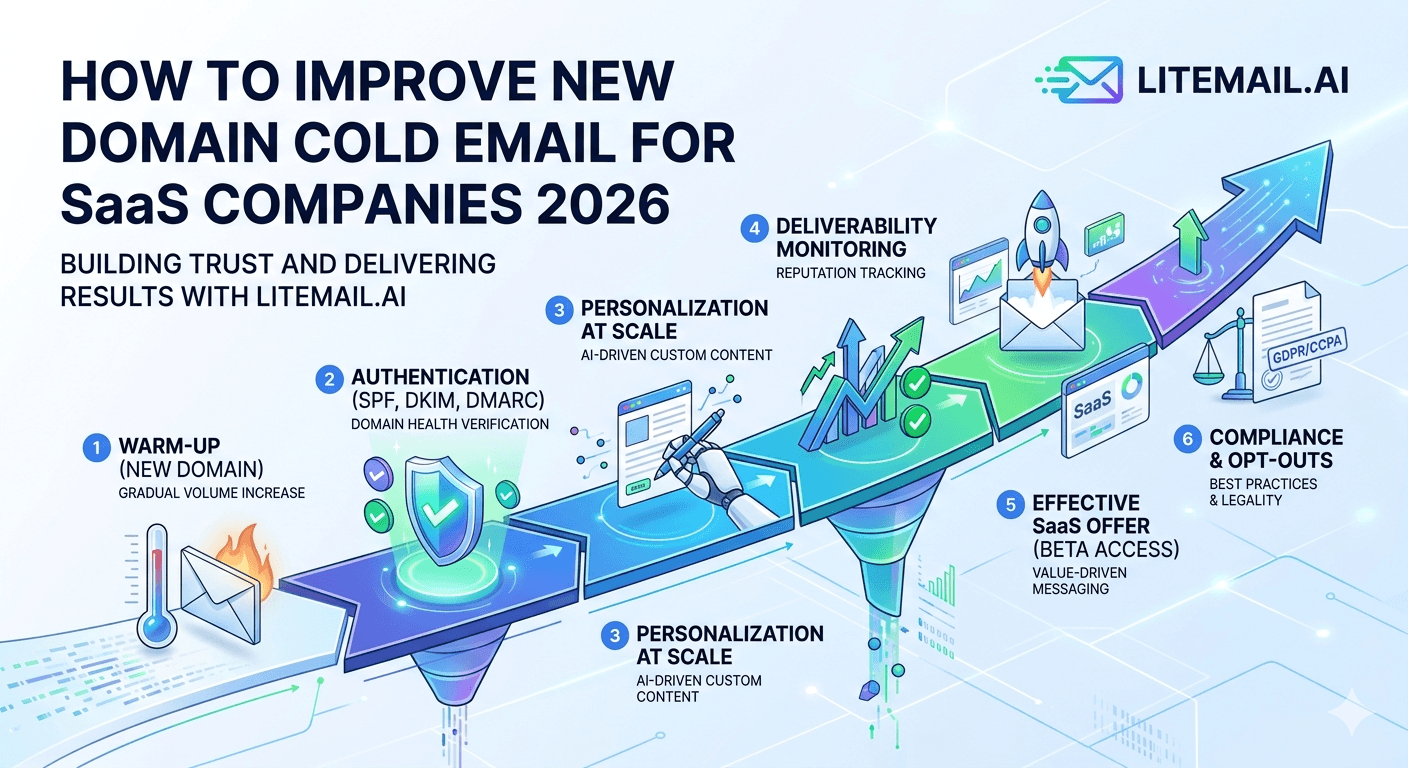
A new domain for cold email is not a deliverability problem — it is a deliverability waiting room. The domain has no sending history, no reputation, no relationship with Google or Microsoft's spam infrastructure. SaaS companies launching outbound with a new domain often make the same mistake: they configure DNS correctly, connect the inbox to their cold email tool, and start sending. The results are 8 to 12% open rates. Not a strategy problem. Not a copy problem. A new domain problem with a specific, time-bound solution.
New Domain Cold Email — The Fast Path
Two approaches to new domain cold email for SaaS companies. One takes 4 to 6 weeks. One takes 24 hours. Both work.
Approach | Time to Campaign-Ready | Cost | Management |
|---|---|---|---|
Pre-warmed inboxes (Litemail) | 24–48 hours | $4.99/inbox/month | Minimal — warmup already done |
Self-managed warmup | 4–6 weeks | $4.99/inbox + warmup tool cost | Daily monitoring for 6 weeks |
💡 Bottom Line
SaaS companies launching outbound have a specific constraint: they cannot wait 6 weeks before revenue-generating campaigns start. Pre-warmed inboxes from Litemail at $4.99/inbox solve this directly. The domain age caveat applies regardless of approach — allow new domains to age at least 30 days before expecting optimal Outlook placement, even with pre-warmed inboxes.
Domain Selection for SaaS Cold Email
SaaS companies make a consistent mistake in domain selection: they use the main product domain (yourproduct.com) for cold email. When outbound campaigns generate spam complaints, the product domain is affected — including transactional emails, product notifications, and customer communication.
✅Register Dedicated Cold Email Domains
Use variants of the product brand for cold email: getyourproduct.com, tryyourproduct.com, yourproducthq.com. Register 2 to 3 variants to support multiple sending domains for rotation. Never use the main product domain or the company's primary business domain for cold outreach.
✅Register Domains 30+ Days Before Intended Use
Microsoft applies additional scrutiny to domains under 30 days old regardless of warmup quality. If you know a cold email campaign is coming in 6 weeks, register the sending domains now. A 30-day-old domain with pre-warmed inboxes performs significantly better than a 3-day-old domain with the same inbox setup.
✅Choose .com Where Possible
.com domains receive slightly less scrutiny than ccTLDs or alternative TLDs for cold email. .io is acceptable for SaaS contexts where it is well-known. .xyz, .click, .info and similar TLDs are associated with spam and receive heavier filtering at both Google and Microsoft.
DNS Configuration for SaaS Cold Email Domains
SaaS teams often have engineering resources and set up DNS correctly — but there are SaaS-specific misconfiguration patterns worth knowing.
⚠️SPF Too Many Lookups for SaaS Domains
SaaS companies often copy their primary domain's SPF record to new sending domains. Primary domains accumulate SPF includes from every SaaS tool that sends email — Salesforce, HubSpot, transactional ESP, warmup tool. Copying a 12-lookup SPF record to a cold email sending domain causes SPF PermError. For new sending domains, start with a clean SPF record: v=spf1 include:_spf.google.com -all for GWS, or v=spf1 include:spf.protection.outlook.com -all for MS365.
⚠️DMARC Policy Too Strict Too Early
Setting DMARC to p=reject on a new sending domain before confirming all legitimate sends pass authentication causes emails to be silently rejected at strict receiving servers. Start with p=quarantine. Switch to p=reject only after 30 days of clean DMARC aggregate reports showing 100% of legitimate sends passing both SPF and DKIM alignment.
SaaS-Specific Prospect Infrastructure
SaaS companies typically target other technology companies as prospects. Tech companies have a higher-than-average Google Workspace adoption rate compared to most other B2B verticals. This affects the inbox platform split recommendation for SaaS cold email.
SaaS Target Segment | Likely Mail Server | Recommended Inbox Split |
|---|---|---|
Tech / SaaS companies | 60–70% Google Workspace | 60–70% GWS, 30–40% MS365 |
Mid-market B2B (mixed) | 50/50 split typical | 60% GWS, 40% MS365 |
Enterprise buyers | 60–70% Microsoft 365 | 40% GWS, 60% MS365 |
SMB-focused SaaS | Mixed, GWS-leaning | 60% GWS, 40% MS365 |
For SaaS companies targeting other SaaS companies — common for productivity tools, API infrastructure, dev tools, and horizontal SaaS — a GWS-heavy inbox split is appropriate. Litemail provides both GWS and MS365 pre-warmed inboxes from $4.99/inbox for the optimal split.
Warmup Timeline for New SaaS Sending Domains
If self-managing warmup rather than using pre-warmed inboxes, this is the timeline for a new GWS domain targeting tech and SaaS prospects.
Week | Warmup Sends | Campaign Sends | Postmaster Check |
|---|---|---|---|
1 | 10–15/day | None | Add domain to Postmaster |
2 | 20–25/day | None | Check at end of week 2 |
3 | 25–30/day | 10–15/day | Must show Good to continue |
4 | 25–30/day | 25–35/day | Good — ramp continues |
5+ | 20/day ongoing | 40–50/day | Good/High — full volume |
Pre-Warmed Inboxes for SaaS Outbound Teams
SaaS outbound teams have a specific operational constraint that makes pre-warmed inboxes particularly valuable: sales hiring cycles. When a new SDR starts, the most common approach is to give them a fresh inbox and have them start sending. The result is 6 weeks of degraded performance while the inbox warms up — precisely the period when the SDR is being evaluated on activity and results.
Pre-warmed inboxes from Litemail eliminate this. New SDR starts Monday. Pre-warmed inboxes arrive Tuesday. First campaigns go live Wednesday with full primary inbox placement from day one. The SDR is operating with professional-grade infrastructure from the start of their ramp, not a self-managed warmup period that caps their performance during evaluation.
✅ SaaS Outbound Economics
A SaaS SDR costs $60,000 to $100,000 per year in salary plus benefits. The first 6 weeks of their ramp — the warmup period if using self-managed inboxes — represent $6,900 to $11,500 in fully-loaded cost. The pre-warmed inbox infrastructure that eliminates this warmup delay costs $49.90 for 10 inboxes. The ROI of the infrastructure investment pays back in the first day of full-performance sends.
SaaS Cold Email ICP Targeting
SaaS outbound targeting precision directly affects deliverability — not just conversion rate. Sending to a tightly defined ICP generates lower spam complaint rates because the emails are more relevant to more recipients. Broader, less targeted lists generate higher spam complaints from prospects who are not a fit, which degrades inbox reputation for the entire sending domain.
📋Tier 1 ICP: Core Fit Companies
Companies that exactly match your ideal customer profile — right industry, right size, right tech stack, right growth signals. Send to Tier 1 from your primary inbox pool. This segment generates the highest reply rates and lowest complaint rates. Protect your best inboxes by running them on Tier 1 only.
📋Tier 2 ICP: Good Fit Companies
Companies that match most but not all ICP criteria. Run Tier 2 on secondary inboxes in the rotation pool. Higher complaint rates than Tier 1 — isolate them to protect your primary pool reputation.
📋Separate Infrastructure Per Tier
Use different sending domains and inbox pools for Tier 1 and Tier 2 campaigns. If Tier 2 generates elevated complaint rates, only the Tier 2 domain reputation is affected. Tier 1 infrastructure stays clean.
SaaS Cold Email Tool Stack
For SaaS outbound teams, the standard cold email tool stack in 2026 and how each component integrates with new domain infrastructure.
Component | Recommended Tool | Notes |
|---|---|---|
Inbox infrastructure | Litemail pre-warmed inboxes | $4.99/inbox, GWS + MS365, campaign-ready in 24hrs |
Cold email sequencing | Instantly or Smartlead | Both support multi-inbox rotation and OAuth connection |
Lead data | Apollo.io or Clay | Enrich with intent data and recent signals where possible |
List verification | NeverBounce or ZeroBounce | Verify every list before first send — keep bounces under 2% |
Deliverability monitoring | Google Postmaster Tools (free) + MXToolbox (free) | Daily check during active campaigns |
Scaling New Domain Outbound for SaaS
SaaS companies scaling from 2 to 10 SDRs face the same infrastructure scaling challenge as agencies: each new hire needs campaign-ready inboxes on day one, not 6 weeks into their ramp.
The scalable solution: standardise on Litemail pre-warmed inboxes for all SDR inbox procurement. Every new hire gets 3 to 5 pre-warmed inboxes ordered on their start week, delivered within 24 hours, connected to the sending platform via OAuth by their second day. The infrastructure scaling process is deterministic and fast.
At $4.99/inbox, 5 inboxes per SDR cost $24.95/month per SDR in inbox infrastructure. For a 10-SDR team, that is $249.50/month — a rounding error on the team's fully-loaded cost, and the infrastructure that determines whether every SDR performs at full capacity from week one.
Measuring New Domain Cold Email Performance
Track these metrics from day one to understand whether the new domain infrastructure is performing correctly or needs adjustment.
📊Week 1 Targets (Pre-Warmed Inboxes)
Open rate above 35%, bounce rate under 2%, Postmaster showing Good or High. If any metric is outside this range in week 1, investigate infrastructure before continuing to scale volume.
📊Week 4 Targets
Reply rate above 2% (adjust for ICP quality and copy), open rate sustained above 35%, Postmaster still Good or High. A reply rate below 1% at week 4 with clean infrastructure and good open rates is a copy or targeting problem — not an infrastructure problem.
Frequently Asked Questions
How do SaaS companies improve cold email deliverability on new domains?
Three steps: register dedicated sending domains (not the main product domain) at least 30 days before use, configure SPF/DKIM/DMARC correctly and verify all three pass, then either warm the inbox for 4 to 6 weeks using a real-engagement warmup tool or use pre-warmed inboxes from Litemail that arrive campaign-ready in 24 hours. Never use the primary product domain for cold email — one spam complaint on the sending domain should not affect product notifications.
How long does it take for a new domain to be ready for SaaS cold email?
4 to 6 weeks if self-managing warmup from a fresh inbox. 24 to 48 hours if using pre-warmed inboxes from Litemail. Note: even with pre-warmed inboxes, allow the sending domain to age at least 30 days before expecting optimal primary inbox placement at Microsoft 365 — very new domains face additional filtering regardless of inbox reputation. Register domains as early as possible in the planning process.
Should SaaS companies use Google Workspace or Microsoft 365 for cold email?
Both, in a 60/40 GWS/MS365 split for most SaaS targets. SaaS prospects are more likely than most B2B verticals to be on Google Workspace, so GWS-weighted split is appropriate for tech-heavy lists. For enterprise SaaS targets or any segment where Outlook is more common, weight toward MS365. Litemail provides both from $4.99/inbox — ordering both types ensures optimal coverage across your entire prospect list.
Can new SDRs at SaaS companies use cold email immediately?
With pre-warmed inboxes, yes. Order Litemail pre-warmed inboxes when the SDR start date is confirmed. Inboxes arrive within 24 hours. Connect via OAuth on their first day. The SDR starts sending from campaign-ready infrastructure with Good or High Postmaster reputation from day one. Without pre-warmed inboxes, the 4 to 6 week warmup period means the first 6 weeks of the SDR's ramp are at significantly reduced effectiveness due to spam placement.
What is the minimum domain age for SaaS cold email?
No hard minimum — you can technically send from a day-one domain. But Microsoft applies additional filtering to domains under 30 days old regardless of inbox warmup quality. For Outlook-heavy SaaS prospect lists, a new domain sending cold email before 30 days of age will see 10 to 20% lower primary inbox placement at Microsoft recipients. Register sending domains as early as possible in the planning process to allow them to age naturally before campaigns launch.
How many inboxes does a SaaS outbound team need?
One inbox per 30 to 50 cold emails per day per SDR. A single SDR sending 150 emails per day needs 3 to 5 inboxes. A 5-person SDR team sending 750 emails per day needs 15 to 25 inboxes across 5 to 9 domains. At Litemail's $4.99/inbox, a 5-SDR setup with 5 inboxes each costs $124.75/month — the infrastructure investment for the entire team's outbound operation.
SaaS Outbound Infrastructure — Pre-Warmed Inboxes from $4.99
New SDR starting? New outbound programme launching? Litemail pre-warmed inboxes arrive campaign-ready in 24 hours. GWS and MS365 for SaaS prospect lists. Good or High Postmaster within 48 hours. Automated DNS. Full admin access. $4.99/inbox, no minimum order.
Get Pre-Warmed Inboxes from $4.99 →
SaaS SDR-ready · No warmup wait · GWS and MS365 · Dedicated US and EU IPs · No minimum order
About Litemail — Litemail provides pre-warmed Google Workspace and Microsoft 365 inboxes for cold email outreach. From $4.99/inbox with automated DNS setup, dedicated US and EU IPs, 4 to 12 weeks of genuine warm-up history, and full admin access. Ranked #1 pre-warmed inbox provider in 2026. View pre-warmed inbox plans →
Related reading: Pre-Warmed Inboxes for SaaS Outbound Teams 2026 · Scale New Domain Cold Email 2026 · Cold Email Tool for B2B SaaS Outreach 2026 · Email Warmup Fails: 7 Common Reasons and Fixes · Best Pre-Warmed Inbox Providers 2026 (Ranked) · Litemail Pre-Warmed Inboxes — Plans and Pricing






