
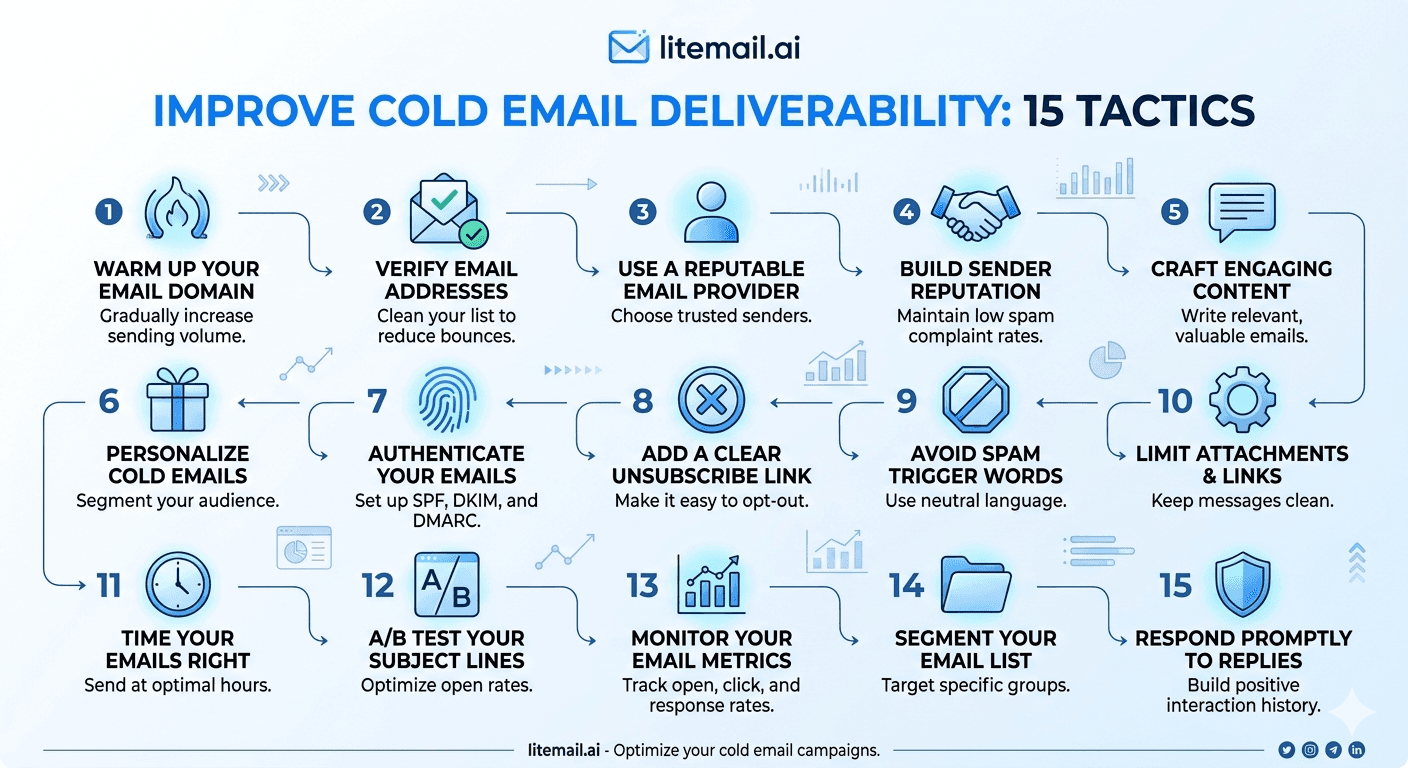
A new domain registered today is the most deliverability-vulnerable sending environment possible — zero sending history, no Postmaster reputation data, no trust signals in any receiving server's records. New domains that launch cold email campaigns immediately produce 45–55% primary inbox placement — barely better than flipping a coin on whether each email reaches a human. The correct approach: treat new domain setup as a 6–8 week process, not a same-day configuration task.
New Domain Cold Email Deliverability — The Complete Setup Process
💡 TL;DR
A new cold email sending domain needs: DNS authentication configured immediately (SPF, DKIM, DMARC — all three before any send), an age period of at least 14 days before any cold email sends (domain age matters to spam filters independently of sending history), inbox warm-up for 5–8 weeks before campaigns launch, or alternatively — pre-warmed inboxes from Litemail ($4.99/inbox) that deliver Good/High Postmaster reputation on a new domain within 48 hours of inbox delivery. The pre-warmed inbox approach eliminates the 5–8 week warm-up wait; the domain age signal continues building in the background regardless of approach.
Here's the complete new domain setup process — what to configure, the timeline to follow, and the specific steps that determine whether a new sending domain builds reputation correctly or stays stuck at poor placement rates.
Day 1 Configuration — Before Any Send
Configure all three authentication records immediately after domain registration — before creating any email accounts or sending any email. Order matters: SPF first (fastest to propagate), then DKIM (requires inbox admin console access), then DMARC (references SPF and DKIM records and should be published after both are confirmed passing).
SPF Record (Day 1)
Add a TXT record at the root of the new sending domain. For Google Workspace inboxes: v=spf1 include:_spf.google.com -all. For MS365 inboxes: v=spf1 include:spf.protection.outlook.com -all. Verify with MXToolbox SPF check — must show PASS before proceeding to DKIM.
DKIM Record (Day 1–2)
For GWS: generate in Google Admin Console → Gmail → Authenticate Email. Publish the TXT record in DNS. Enable DKIM signing in Admin Console (two separate steps — both required). For MS365: generate CNAME records in Microsoft 365 Defender → Email Authentication → DKIM. Publish both CNAME records. Enable DKIM in Defender. Verify via MXToolbox DKIM check.
DMARC Record (Day 1–2)
Add TXT record at _dmarc.yoursendingdomain.com: v=DMARC1; p=none; rua=mailto:postmaster@yoursendingdomain.com. p=none for new domains — monitoring only, no enforcement. Progress to p=quarantine at day 30, p=reject at day 60 after confirming clean sends.
Days 1–14: The Domain Age Waiting Period
New domain age is an independent trust signal from sending history — and it's one that warm-up tools and even pre-warmed inboxes don't fully override in the first 2 weeks. A domain registered this morning at Google's spam filter still looks like a domain registered this morning — regardless of what DNS records are configured.
Most deliverability guides skip this because warm-up tool marketing doesn't mention it. But domains registered less than 14 days ago receive additional scrutiny from Gmail and Outlook spam filters during this window. Sending campaigns immediately on new domains — even with correct DNS and pre-warmed inboxes — produces lower placement rates in the first 2 weeks than after 14 days of domain age have accumulated.
The recommendation: if using pre-warmed Litemail inboxes on a new domain, allow 14 days of domain age accumulation before launching full campaign volume. During this period, send very low volume (5–10 emails per day per inbox maximum) to begin establishing domain sending patterns. This accelerates the domain's trust-building with receiving servers while the 14-day age milestone passes.
Warm-Up Phase: Traditional vs Pre-Warmed Inboxes on New Domains
Traditional Warm-Up on a New Domain
Using a warm-up tool on fresh inboxes on a new domain: 5–8 weeks of warm-up tool sends + 14 days domain age wait = approximately 7–9 weeks before campaign-ready placement. Warm-up tool cost: $15–$29/inbox/month during the wait. Total time cost: 2 lost months of campaign opportunity. Total direct cost at 10 inboxes: $300–$580 in warm-up tool subscription during the waiting period.
Pre-Warmed Inboxes on a New Domain
Litemail pre-warmed inboxes on a new domain: inboxes arrive with 4–12 weeks of genuine sending history and Good/High Postmaster reputation. New domain age still accumulates in the background — but the inbox reputation signal is already Good. Campaigns can launch at low volume (10–15/inbox/day) after 14 days of domain age, scaling to full volume after 30 days. Total wait: 14–30 days versus 7–9 weeks. No warm-up tool subscription cost.
Monitoring Postmaster on a New Domain
Add the new sending domain to Google Postmaster Tools on day 1. Postmaster requires sufficient email volume to Gmail-hosted recipients before it establishes a reputation rating — a new domain shows Unknown until enough sends have been made. With pre-warmed inboxes, Postmaster typically shows Good or High within 24–48 hours of the first sends because the sending history establishes the reputation quickly. With fresh inboxes and warm-up tools, Postmaster shows Unknown for weeks while the warm-up pool builds the required data.
Set up Postmaster email alerts for reputation changes on the new domain immediately. For a new domain, the first 30 days of Postmaster data are the most critical — this is when the domain's reputation baseline is being established, and catching any negative events early prevents reputation damage from compounding.
New Domain Email Deliverability — Start Right
Pre-warmed inboxes from $4.99/inbox — Good/High Postmaster reputation on new domains within 48 hours, genuine sending history that establishes domain reputation 3–4× faster than warm-up tools, automated DNS configured on delivery.
Get Pre-Warmed Inboxes from $4.99 →
Good/High Postmaster on new domains within 48hrs · Automated DNS · No minimum order · Delivered in 24 hours
About Litemail — Litemail provides pre-warmed Google Workspace and Microsoft 365 inboxes for cold email outreach. From $4.99/inbox with automated DNS, dedicated US and EU IPs, and full admin access. View pre-warmed inbox plans →
Related reading:
Scale a New Domain for Cold Email 2026 · Buy Pre-Warmed Domains — Setup Guide 2026 · How Long Does Email Warmup Take in 2026? · Cold Email Domain Setup Guide 2026 · Best Pre-Warmed Inbox Providers 2026 (Ranked)
Key Takeaways
New domains receive additional spam filter scrutiny for the first 14 days after registration — regardless of DNS configuration or inbox warm-up status. Allow 14 days of domain age accumulation before launching full campaign volume on any new sending domain.
Configure SPF, DKIM, and DMARC on day 1 — before creating email accounts or sending any email. DNS records should be published and verified passing before any sends occur on the new domain.
Start DMARC at p=none for new domains, progress to p=quarantine at day 30, p=reject at day 60 — only after confirming SPF and DKIM both pass reliably across all sends.
Traditional warm-up on a new domain: 7–9 weeks total (14 days domain age + 5–8 weeks warm-up). Pre-warmed inboxes on a new domain: 14–30 days total, campaigns at full volume by day 30. Pre-warmed inboxes establish Postmaster reputation 3–4× faster on new domains than warm-up tools.
Add the new domain to Postmaster Tools on day 1. Set up email alerts for reputation changes immediately. The first 30 days of Postmaster data on a new domain establish the baseline reputation that determines long-term deliverability trajectory.
Frequently Asked Questions
How long before I can send cold email from a new domain?
With a warm-up tool on fresh inboxes: 7–9 weeks (14 days domain age + 5–8 weeks warm-up). With pre-warmed inboxes from Litemail: 14–30 days total — 14 days of domain age at low volume (5–10 emails/day per inbox), then scale to full volume by day 30. The 14-day domain age accumulation cannot be skipped regardless of inbox quality — it's an independent trust signal from sending history.
Why does domain age matter for cold email deliverability?
Google and Microsoft's spam filter algorithms treat very new domains (under 14 days old) as inherently higher-risk senders — because domain registration is cheap and spam campaigns frequently use disposable new domains. This is a separate trust signal from inbox reputation or DNS authentication. A pre-warmed inbox on a 3-day-old domain will still receive additional scrutiny during the first 14 days that the same inbox on a 60-day-old domain wouldn't experience.
Should I buy aged domains for cold email?
Only if the domain's sending history is genuinely clean — an aged domain with previous spam or blacklist history is worse than a new domain. Legitimate aged domain providers who can document a clean sending history are useful but uncommon. For most teams, the 14-day wait with a new domain and pre-warmed inboxes produces equivalent results to an aged domain at significantly lower cost and risk.
New Domain Deliverability Done Right — Pre-Warmed Inboxes, Good Reputation in 48 Hours
Litemail pre-warmed inboxes — $4.99/inbox, Good/High Postmaster reputation on new domains within 48 hours of delivery, automated SPF/DKIM/DMARC, dedicated US and EU IPs. New domain deliverability established 3–4× faster than warm-up tools. No minimum order. Delivered in 24 hours.
Get Pre-Warmed Inboxes from $4.99 →
No minimum order · Good/High Postmaster within 48hrs on new domains · Automated DNS · US and EU IPs included
About Litemail — Litemail provides pre-warmed Google Workspace and Microsoft 365 inboxes for cold email outreach. From $4.99/inbox with automated DNS setup, dedicated US and EU IPs, 4 to 12 weeks of genuine warm-up history, and full admin access. View pre-warmed inbox plans →
Related reading: Scale a New Domain for Cold Email 2026 · How Long Does Email Warmup Take in 2026? · Best Pre-Warmed Inbox Providers 2026 (Ranked)






