
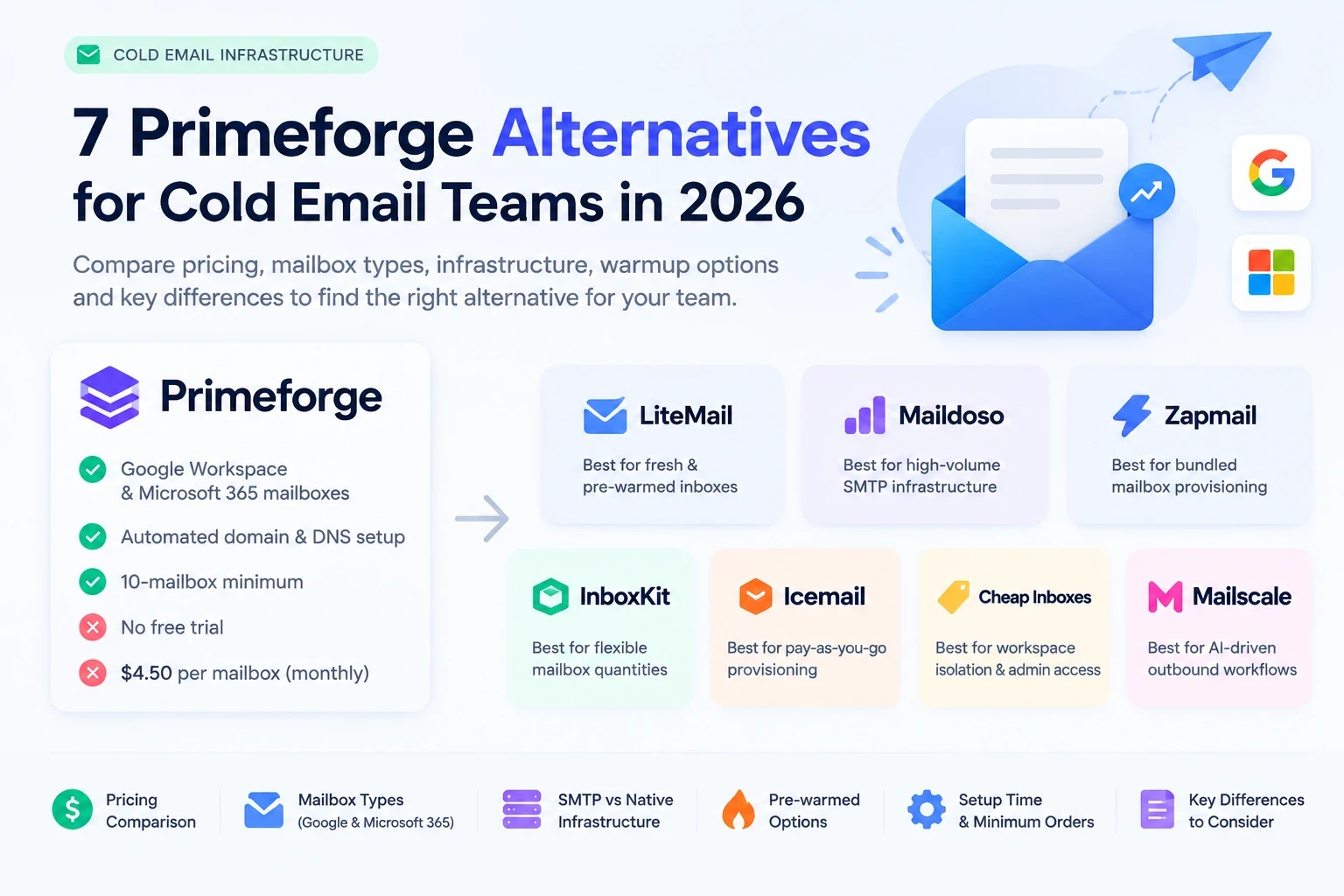
Primeforge is a useful option for teams that need Google Workspace or Microsoft 365 mailboxes without managing every DNS record manually. However, its 10-mailbox minimum, mailbox-slot billing, and lack of a free trial can make it less attractive for smaller teams or buyers who want to compare providers before committing.
The best Primeforge alternative depends on what you need to change. You might want a lower cost per inbox, more flexible purchasing, pre-warmed mailboxes, a different infrastructure model, or a platform that handles more of your outbound workflow.
This guide compares seven alternatives: LiteMail, Maildoso, Zapmail, InboxKit, Icemail, Cheap Inboxes, and Mailscale. We examine mailbox types, pricing, setup, warmup, minimum orders, and trade-offs so you can choose based on your actual requirements rather than headline prices alone.
Disclosure: LiteMail is our product. We include it in this comparison and explain where it may fit, but the right choice depends on your mailbox requirements, budget, and preferred sending workflow.
Quick answer: The 7 best Primeforge alternatives
LiteMail — Best for teams comparing fresh and pre-warmed Google Workspace or Microsoft 365 inboxes. The requested benchmark prices are $2.50 per fresh inbox and $4.99 per pre-warmed inbox. [VERIFY current purchasable pricing and minimum orders.]
Maildoso — Best for high-volume, budget-focused SMTP infrastructure. Its published plans include 30 mailboxes for $75/month and 300 for $225/month.
Zapmail — Best for teams wanting bundled Google Workspace and Microsoft 365 mailbox provisioning. Its standard plans start at $39/month for 10 mailboxes.
InboxKit — Best for teams wanting flexible mailbox quantities and administrative control. Monthly mailbox pricing starts at $3, with lower pricing on annual billing.
Icemail — Best for flexible, pay-as-you-go mailbox provisioning. Its pricing page advertises a limited $2.50 mailbox rate against a $3.50 standard rate.
Cheap Inboxes — Best for teams prioritizing workspace isolation, account administration, and tiered pricing. Published mailbox rates decrease with volume.
Mailscale — Best for teams considering a broader, AI-driven outbound platform rather than a mailbox-only service. Its current pricing requires a sales conversation.
These recommendations reflect published product information, not a controlled, independent deliverability test.
1. LiteMail — Best for comparing fresh and pre-warmed inboxes
Overview
LiteMail provides Google Workspace and Microsoft 365 inbox infrastructure for outbound teams. Its offering includes automated DNS configuration, administrative access, and options for fresh and pre-warmed mailboxes.
The main reason to consider LiteMail is that your mailbox provider does not have to be the same company as your cold email sequencer. You can evaluate infrastructure separately and connect compatible inboxes to your existing workflow.
Best for
Agencies, growing sales teams, and businesses that want to compare fresh inboxes with pre-warmed options before choosing a setup.
Pricing
The pricing brief for this article specifies $2.50 per fresh inbox and $4.99 per pre-warmed inbox.
[VERIFY before publication]: LiteMail's public pages also show bundled plans at $37 for 10, $97 for 30, $297 for 100, and $849 for 300 fresh inboxes. Its pre-warmed offering has a separate starting plan. Confirm the applicable product, billing period, and minimum order before publishing the unit-price comparison.
Pros
Fresh and pre-warmed inbox options.
Google Workspace and Microsoft 365 support.
Automated SPF, DKIM, and DMARC setup.
Administrative access and compatibility with supported external sending platforms.
An opportunity to separate mailbox infrastructure from campaign software.
Cons
Public pricing pages need to be reconciled before buyers can make a straightforward cost comparison.
Warmup history, account type, and included domain services should be verified for the exact plan being purchased.
Pre-warmed inventory should not be assumed to be identical to a fresh inbox with a warmup add-on.
Who should NOT choose it?
LiteMail may not be the right fit if your team specifically needs a proprietary SMTP platform, a dedicated private-server architecture, or a complete prospecting and outreach system in one product.
How LiteMail can help: If your current concern is mailbox cost or waiting for fresh accounts to become campaign-ready, compare the available LiteMail plans against your actual sending requirements. Start by confirming the mailbox type, warmup history, included domains, and recurring price.
Explore LiteMail's pre-warmed inbox guide to understand the practical differences before switching.
2. Maildoso — Best for high-volume SMTP infrastructure
Overview
Maildoso offers proprietary SMTP-based mailboxes with automated provisioning, IP rotation, reputation measurements, and API access. It is a different product model from a provider focused primarily on native Google Workspace and Microsoft 365 accounts.
Its low advertised price at higher volumes can appeal to agencies managing many sending accounts. The trade-off is that you must evaluate the SMTP infrastructure, sending limits, reputation management, and warmup process rather than comparing mailbox prices alone.
Best for
High-volume outbound teams that prioritize infrastructure economics and are comfortable evaluating SMTP-based sending.
Pricing
Maildoso's official pricing page lists:
30 mailboxes: $75/month, or $2.50 per mailbox.
300 mailboxes: $225/month, or $0.75 per mailbox.
1,000 mailboxes: $499/month, or approximately $0.50 per mailbox.
Its help center also describes custom volume tiers. Confirm the price for your exact quantity at checkout.
Pros
Lower advertised unit costs at higher volumes.
API and MCP access.
Automated provisioning and IP rotation.
A 30-day money-back guarantee advertised on its pricing page.
Cons
SMTP infrastructure is not equivalent to native Google Workspace or Microsoft 365 accounts.
Warmup and sending limits need to be checked for the specific plan.
Public reviews are mixed. G2 displays a 4.6/5 rating from more than 200 reviews, while some reviewers have reported domain or support problems. Individual complaints are not proof of typical performance.
Who should NOT choose it?
Avoid choosing Maildoso solely because it has the lowest advertised price. Teams that specifically require native Google or Microsoft administration should verify the account type before purchasing, and teams that cannot tolerate operational troubleshooting should test a small batch first.
3. Zapmail — Best for bundled mailbox provisioning
Overview
Zapmail provides Google Workspace and Microsoft 365 mailbox provisioning, domain and DNS management, and integrations with cold email tools.
It is worth considering if you prefer bundled plans instead of a purely per-mailbox purchasing model. However, standard mailbox plans and pre-warmed inventory should be compared separately.
Best for
Freelancers and agencies that want a managed mailbox setup with defined package sizes.
Pricing
According to the official Zapmail pricing page:
Starter: $39/month for 10 mailboxes.
Growth: $99/month for 30 mailboxes.
Pro: $299/month for 100 mailboxes.
Additional mailboxes: $3.50, $3.25, or $3.00 respectively, depending on the plan.
The published pre-warmed product has separate pricing and renewal terms. Check these before comparing pre-warmed costs with another provider's fresh-inbox rate.
Pros
Google Workspace and Microsoft 365 options.
Bundled mailbox provisioning and DNS management.
Clear entry-level plan sizes.
API access on the Pro plan.
Cons
A $39 minimum monthly plan is less flexible than purchasing a single mailbox.
The base plan price does not automatically tell you the cost of pre-warmed inventory.
Billing-cycle discounts and renewal terms should be included in any long-term cost calculation.
Who should NOT choose it?
Zapmail may not be the best fit if you need only one or two inboxes, want a fully unbundled per-mailbox model, or need the lowest possible SMTP infrastructure cost.
4. InboxKit — Best for flexible mailbox quantities
Overview
InboxKit provides Google Workspace and Microsoft 365 mailboxes, automated DNS, administrative access, API support, and integrations with multiple sequencers.
Its main distinction is the ability to purchase regular mailboxes without a fixed minimum package. It also offers pre-warmed inventory separately from standard mailbox subscriptions.
Best for
Teams that want administrative control, a flexible starting quantity, and options to scale without committing to a large mailbox bundle.
Pricing
The official pricing page lists regular mailboxes at $3 per mailbox per month, or $2.50 with annual billing. There is no mailbox minimum.
Warmup is available as a $3-per-mailbox monthly add-on. Pre-warmed inventory is priced separately at $6, $7, or $9 per mailbox according to the published warmup-age tiers, plus a domain-transfer fee.
Do not treat that pre-warmed inventory price as a recurring mailbox subscription unless the checkout explicitly states that it is recurring.
Pros
No minimum quantity for regular mailboxes.
Google Workspace and Microsoft 365 support.
Automated DNS and API access.
Separate choices for regular, self-warmed, and pre-warmed inbox workflows.
Cons
Warmup can materially increase recurring costs.
Pre-warmed inventory has a different pricing model from regular mailboxes.
Wallet funding, renewals, and account-recovery procedures deserve attention before scaling.
Who should NOT choose it?
InboxKit may not suit a team that needs a single all-inclusive price for mailboxes, warmup, and pre-warmed inventory without calculating separate components
5. Icemail — Best for flexible, pay-as-you-go provisioning
Overview
Icemail offers Google Workspace and Microsoft 365 mailboxes, automated DNS configuration, mailbox exports, and additional infrastructure options, including Azure and private SMTP services.
That variety makes it important to choose the correct product before comparing prices. A Google Workspace mailbox and a private SMTP server are not interchangeable.
Best for
Teams that want flexible provisioning, support for different infrastructure types, and a pay-as-you-go purchasing model.
Pricing
Icemail's official pricing page advertises Google Workspace and Microsoft 365 mailboxes at a limited $2.50-per-mailbox monthly rate, against a $3.50 standard rate.
The same page lists separate prices for Azure and private IMAP/SMTP infrastructure. Pre-warmed pricing is also separate. Confirm the promotion's availability and the applicable renewal price before making a long-term comparison.
Pros
Pay-as-you-go positioning without a conventional subscription commitment.
Google Workspace and Microsoft 365 options.
Automated authentication setup and mailbox exports.
Multiple infrastructure models for different requirements.
Cons
Promotional pricing may not be permanent.
Azure, native mailboxes, and SMTP products have different cost structures.
Confirm warmup history and included services rather than assuming every product is pre-warmed.
Who should NOT choose it?
Icemail may not be the best fit for a buyer who wants one simple package and does not want to distinguish between several mailbox or infrastructure models.
6. Cheap Inboxes — Best for workspace isolation and administration
Overview
Cheap Inboxes offers Google and Microsoft inboxes with automated provisioning, DNS setup, OAuth integration, and workspace-level management.
Its public website emphasizes administrative control and keeping separate domains in separate workspaces. It also provides an inbox estimator to help buyers calculate costs.
Best for
Agencies and outbound teams that manage multiple domains or client workspaces and want managed account provisioning.
Pricing
The official Cheap Inboxes website lists these mailbox rates:
1–99 mailboxes: $3.50 per mailbox per month.
100–249: $3.25 per mailbox per month.
250–999: $3.00 per mailbox per month.
1,000 or more: $2.80 per mailbox per month.
Domains are sold separately, with advertised offers starting at $2.50 per year. Verify the final domain price and any account-specific terms before checkout.
Pros
Google and Microsoft mailbox options.
Full administrative access and OAuth integration.
Tiered pricing that decreases at higher volumes.
Publicly advertised support and automated provisioning.
Cons
Domains are a separate cost.
The exact IP model and cancellation/refund terms should be confirmed before purchase.
Verify how pre-warmed status applies to the specific mailbox product you select.
Who should NOT choose it?
It may not be the right fit for teams that need dedicated IP specifications documented upfront or want all recurring and one-time costs displayed as a single fixed package.
7. Mailscale — Best for broader AI-driven outbound workflows
Overview
Mailscale's current website presents an agentic outbound platform that combines prospecting, AI-generated outreach, pre-warmed outreach domains, and automated campaign optimization.
That makes it different from a provider whose main product is mailbox provisioning. It may be worth evaluating if you want to consolidate more of your outbound workflow rather than replacing only the mailbox layer.
Best for
Teams that want a broader managed or AI-driven prospecting and outreach workflow.
Pricing
Mailscale's current public website directs buyers to book a demo for tailored pricing. A reliable current standalone price per mailbox is not publicly established on that page.
[VERIFY]: Request a written breakdown of mailbox quantity, mailbox type, warmup, domains, sending software, prospecting credits, contract duration, and cancellation terms before comparing it with mailbox-only providers.
Pros
Broader outbound workflow than mailbox provisioning alone.
Prospecting and AI-assisted outreach features.
Pre-warmed outreach infrastructure advertised as part of its offering.
Cons
Not a like-for-like mailbox-only comparison.
Public standalone mailbox pricing is unavailable.
Bundled features can make it harder to isolate the infrastructure cost.
Who should NOT choose it?
Mailscale may not be the best fit if you only want to replace Primeforge's mailbox layer while keeping your existing prospecting and sequencing tools.
Comparison table: Primeforge vs. the seven alternatives
Provider | Mailbox type | IP model | Minimum order | Setup time | Warmup | Price per mailbox | Cancellation terms |
Primeforge | Google Workspace / Microsoft 365 | Native provider infrastructure; confirm regional options | 10 slots | About 30 minutes; provider-reported | Pre-warmed options listed; confirm price | $4.50 monthly; annual discount available | Cancel anytime; verify annual refund terms |
LiteMail | Google Workspace / Microsoft 365 | US/EU IPs advertised; confirm exact allocation | About 5 minutes; provider-reported | Fresh and pre-warmed options | $2.50 fresh / $4.99 pre-warmed per brief [VERIFY] | No contracts advertised; verify refund and minimum terms | |
Maildoso | Primarily SMTP; other options may be available | Proprietary IP rotation | 30-mailbox public plan; custom minimum | Minutes advertised; confirm batch timing | Verify pre-warmed status and ramp-up requirements | $2.50 at 30; $0.75 at 300 | 30-day money-back guarantee advertised |
Zapmail | Google Workspace / Microsoft 365 | Confirm exact IP allocation | 10 in Starter | Fast automated setup; exact timing | Separate pre-warmed pricing available | $3.90 Starter average; $3.00 Pro add-ons | Verify refund and cancellation details |
InboxKit | Google Workspace / Microsoft 365 | US-IP accounts advertised | No minimum for regular mailboxes | Under 10 minutes advertised | $3/mailbox/month add-on; pre-warmed inventory separate | $3 monthly / $2.50 annual | Verify refund and renewal details |
Icemail | Google Workspace / Microsoft 365; optional Azure/SMTP | US/EU accounts advertised; SMTP options vary | Separate pre-warmed offering | $2.50 limited deal / $3.50 standard | Pay-as-you-go; confirm exact cancellation terms | ||
Cheap Inboxes | Google / Microsoft inboxes | Calculator supports variable quantities; confirm account minimum | Same-day setup advertised | Pre-warmed options advertised; verify plan | $3.50 to $2.80 by volume | No long-term contracts advertised; verify refunds | |
Mailscale | Broader outbound platform with pre-warmed infrastructure | Pre-warmed infrastructure advertised | Quote-based; no comparable public unit rate | Request written terms |
Setup times and feature descriptions are provider-reported, not independently benchmarked. Check the current pricing and terms directly before purchasing. The IP model refers to the provider's advertised configuration, not a guarantee of inbox placement.
Cost comparison at 30, 100, and 300 mailboxes
The following table compares mailbox charges only, before domains, warmup add-ons, sending software, and other fees. The calculations use each provider's published pricing model, except LiteMail, which uses the unit prices specified in the brief.
Provider | 30 mailboxes/month | 100 mailboxes/month | 300 mailboxes/month |
|---|---|---|---|
Primeforge | $135 monthly; ~$112.50 annualized | $450; ~$375 annualized | $1,350; ~$1,125 annualized |
LiteMail fresh | $75* | $250* | $750* |
LiteMail pre-warmed | $149.70* | $499* | $1,497* |
Maildoso | $75 | ~$250 | $225 |
Zapmail | $99 | $299 | ~$899 |
InboxKit | $90 monthly / $75 annualized | $300 / $250 | $900 / $750 |
Icemail | $75 promo / $105 standard | $250 / $350 | $750 / $1,050 |
Cheap Inboxes | $105 | $325 | $900 |
Mailscale | Quote required | Quote required | Quote required |
*LiteMail calculations use the requested $2.50 fresh and $4.99 pre-warmed rates. They are not verified checkout totals. Reconcile the public LiteMail pricing pages before publication.
Primeforge annualized figures assume two months free at the $4.50 monthly list rate. Domain charges are excluded. Maildoso's 300-mailbox figure reflects its advertised $0.75 volume tier, which applies to the tier's mailbox count. Zapmail's 300-mailbox figure uses the 100-mailbox Pro plan plus 200 additional mailboxes at $3 each.
Important: These figures are not a complete total-cost comparison. InboxKit's warmup add-on is $3 per mailbox per month, while its pre-warmed inventory is priced separately. Zapmail also offers separate pre-warmed plans. For an apples-to-apples decision, compare the same mailbox type, warmup status, domain allowance, and billing period.
What public reviews can—and cannot—tell you
Public reviews can reveal operational risks, but they do not replace a controlled deliverability test.
Maildoso: G2 currently displays a 4.6/5 rating from more than 200 reviews. Reviews include positive reports about provisioning and API workflows, as well as individual complaints about domains, renewals, or support. Read the specific review and date before treating any complaint as representative.
Zapmail: Trustpilot displays a 4.5/5 TrustScore from 104 reviews. Some reviewers praise setup and support, while others describe technical or account-management issues. Its G2 listing appears to mix in an unrelated collaborative-email product, so do not quote that rating as if it were a clean sample of its cold-email infrastructure product.
Primeforge, LiteMail, InboxKit, Icemail, and Cheap Inboxes: Verify the current review profile and sample size before quoting ratings or specific customer complaints. Do not insert an unverified score into the article.
For any provider, test domain health, authentication, connection stability, and sending performance with a small batch. A review rating cannot guarantee that your own domains or campaigns will perform the same way.
Who should stay on Primeforge?
Primeforge may still be the right choice if:
You specifically need native Google Workspace or Microsoft 365 mailboxes.
You value automated DNS, hosting, maintenance, and API access.
You already use the Forge ecosystem and benefit from its workflow.
You need at least 10 mailbox slots and are comfortable paying for that capacity.
Its operational setup and support suit your team.
Switching providers is not automatically an improvement. If your current setup is stable, your campaigns are performing well, and the pricing fits your budget, compare alternatives against a measurable problem before migrating.
How to switch from Primeforge safely
1. Inventory your current setup
List every domain, mailbox, sending platform, authentication record, and active campaign. Record mailbox ownership, renewal dates, DNS configuration, and any existing warmup history.
2. Decide whether to keep or replace domains
Do not assume that moving mailboxes automatically moves domain reputation. If you plan to reuse a domain, confirm that the destination provider supports it and plan the DNS and mail-routing changes carefully.
3. Verify SPF, DKIM, and DMARC
Review authentication before connecting the replacement inboxes. See LiteMail's SPF setup guide and email authentication and deliverability guide.
Avoid publishing duplicate SPF records. If you change mail providers, make sure the existing DNS configuration matches the systems that will actually send mail.
4. Confirm warmup status
For fresh inboxes, establish a conservative warmup and sending plan. For pre-warmed inboxes, ask the provider for the warmup history, the exact mailbox type, and what happens if an inbox fails initial checks.
5. Connect and test before migrating fully
Connect a small batch to your sending tool, verify authentication, check replies, and test mailbox stability. Keep the existing infrastructure available until the replacement has passed your checks.
6. Ramp volume gradually
Do not move every campaign to the new provider and immediately send at full volume. Increase sending gradually, monitor bounces and complaints, and pause expansion if the signals deteriorate.
A migration is complete only when your new infrastructure is configured, tested, and stable—not simply when the mailboxes have been purchased.
Frequently asked questions
1. What is the best Primeforge alternative in 2026?
There is no universal winner. LiteMail is worth comparing for fresh and pre-warmed Google Workspace or Microsoft 365 inboxes; Maildoso for high-volume SMTP infrastructure; and InboxKit for flexible mailbox quantities. Choose according to your account type, total cost, and operational needs.
2. Why do teams leave Primeforge?
Common reasons to investigate include its 10-slot minimum, no traditional free trial, slot-based billing, domain costs, and the desire for different warmup or infrastructure options. These are reasons to compare products, not proof that Primeforge performs poorly.
primeforge's pricing structure includes a 10-mailbox-slot minimum, so smaller teams should compare the total cost against their actual requirements. Check the official Primeforge pricing calculator before making a final decision.
3. Is Maildoso the same as a Google Workspace mailbox provider?
No. Maildoso's core offering is SMTP infrastructure. Its product model, IP handling, and reputation-management requirements differ from native Google Workspace or Microsoft 365 mailboxes. Confirm the exact product before purchasing.
4. Which Primeforge alternatives offer pre-warmed inboxes?
LiteMail, Zapmail, InboxKit, Icemail, and Cheap Inboxes advertise pre-warmed options or inventory. Availability, pricing, warmup duration, and whether warmup is included differ by provider and plan. Confirm the exact terms at checkout.
5. Is the cheapest mailbox provider always the best choice?
No. A low price can exclude domains, warmup, monitoring, or support. Compare mailbox type, account access, authentication setup, sending limits, renewal terms, and the full monthly cost before choosing.
6. How should I test a new mailbox provider?
Start with a small batch. Check account access, SPF/DKIM/DMARC, connection stability, domain health, bounce rates, and inbox placement. Increase volume only when the infrastructure and campaign metrics are stable.
Need an alternative to Primeforge?
If you're comparing mailbox costs, setup requirements, and warm-up options, LiteMail is another provider worth evaluating. It offers fresh and pre-warmed Google Workspace and Microsoft 365 inbox options, with pricing based on the plan you select.
Compare the available options on the LiteMail inbox page and choose the setup that matches your sending volume, budget, and infrastructure requirements.
Compare your options before committing: review mailbox types, warm-up history, access permissions, and total monthly cost—not just the headline price.
Final verdict
The best Primeforge alternative is the one that fits your mailbox requirements, budget, and workflow—not necessarily the provider with the lowest headline price.
If you need native Google Workspace or Microsoft 365 inboxes, compare LiteMail, Zapmail, InboxKit, Icemail, and Cheap Inboxes on equivalent account types and warmup options. If low-cost, high-volume SMTP infrastructure is your priority, investigate Maildoso. If you want a broader outbound system, evaluate Mailscale separately because it is not a direct mailbox-only replacement.
For LiteMail, the strongest conversion opportunity is to help readers make a clear, evidence-based decision: show the exact mailbox type, warmup history, price, and total setup cost. Once the public pricing discrepancy is resolved, invite readers to compare the available LiteMail inbox plans against their current infrastructure.
Ready to compare your inbox options? Explore LiteMail's available inbox plans and confirm which fresh or pre-warmed option fits your team before making the switch.






