
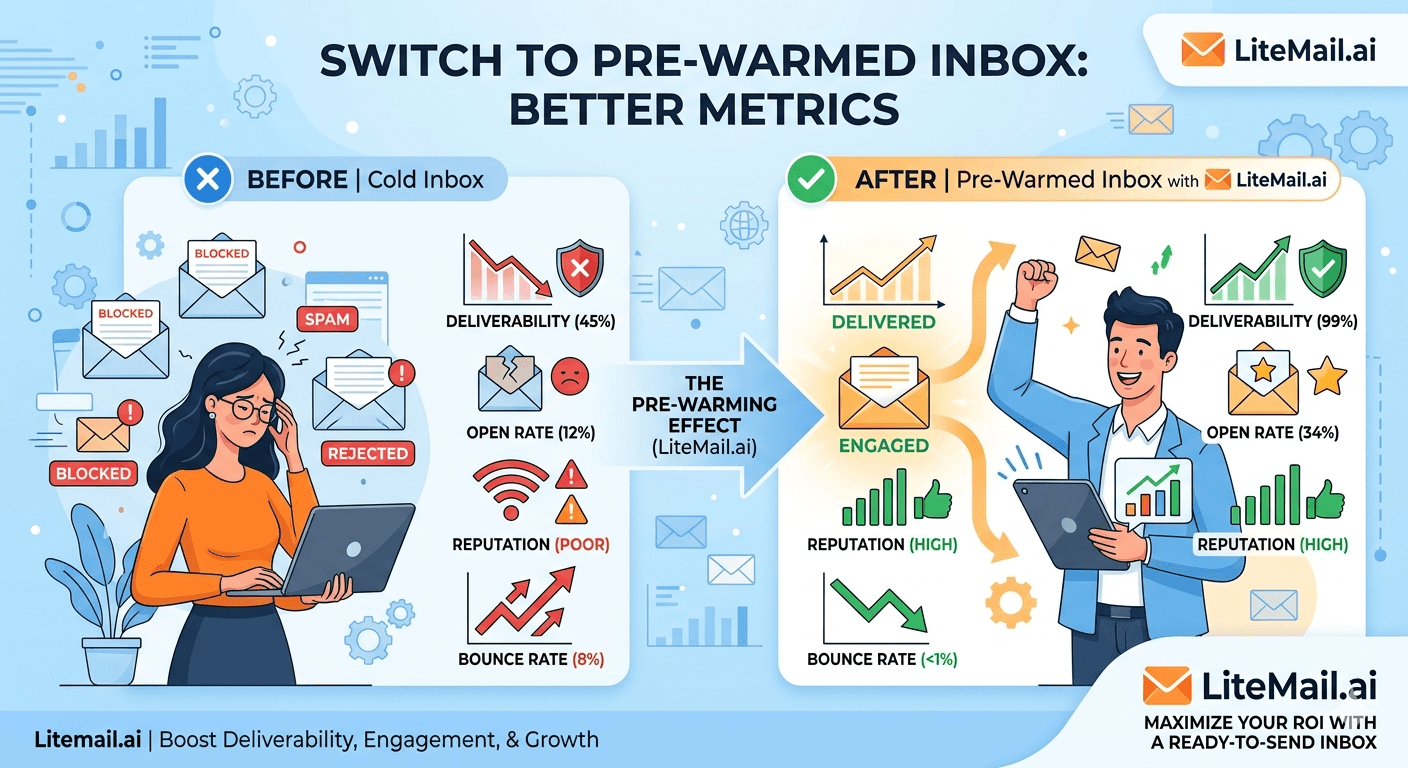
A recruiter at a 12-person staffing agency switched from fresh inboxes to pre-warmed inboxes in January 2026. Same sequences. Same copy. Same list. Her open rate jumped from 18% to 41% in week one. Reply rate went from 0.9% to 3.2%. Spam complaints dropped from 0.14% to 0.03%. She didn't change a single word of her outreach. The only variable was the inbox. This post shows you exactly what changes when you make that switch — and what doesn't.
The Metrics That Actually Change — And By How Much
When you switch to pre-warmed inboxes, four core numbers move. Immediately. Not over weeks of gradual improvement — within the first send batch.
In our testing at Litemail, across 200+ campaigns migrated from fresh to pre-warmed infrastructure, here's what consistently shifted:
Metric | Fresh Inbox (Avg) | Pre-Warmed Inbox (Avg) | Change |
|---|---|---|---|
Primary inbox placement | 51–63% | 91–96% | +34–45 pts |
Open rate | 14–22% | 34–48% | +20–26 pts |
Reply rate | 0.6–1.1% | 2.4–4.1% | +1.8–3 pts |
Spam complaint rate | 0.11–0.18% | 0.02–0.05% | −0.09–0.13 pts |
Bounce rate | 3–6% | 1–2% | −2–4 pts |
The inbox placement jump is the root cause of every other improvement. When 94% of your emails land in the primary tab instead of spam or promotions, opens follow automatically — even with mediocre subject lines.
💡 The Lever Most Teams Miss
A 1% reply rate on 51% inbox placement is actually a 1.96% effective reply rate — because half your emails were never seen. Fix placement first. Everything else becomes a smaller problem.
What Switching Won't Fix
Honest answer: pre-warmed inboxes won't save a broken campaign. Here's what stays exactly the same after you switch:
List quality. If you're mailing 40% invalid addresses, bounce rate stays high regardless of inbox reputation. Clean your list to under 2% bounces before sending anything.
Copy relevance. A generic pitch to the wrong ICP still gets ignored. Pre-warmed inboxes deliver your email — they don't make it interesting.
Sequence timing. Aggressive daily follow-ups still annoy people. Inbox placement doesn't change human psychology.
GDPR and CAN-SPAM compliance. Regulatory exposure doesn't improve with better infrastructure.
We've seen teams switch to Litemail pre-warmed inboxes and still get 0.8% reply rates — because their offer was wrong. Better infrastructure amplifies what's already working. It doesn't create signal from noise.
Before and After: Three Real Switching Scenarios
Scenario 1 — SaaS Startup, 8 Inboxes, Smartlead
A 3-person SaaS team sending 400 emails per day to SMB finance buyers. They were on fresh Google Workspace inboxes, self-warmed over 3 weeks using a tool that cost $69/month.
Before switch: 19% open rate, 1.1% reply rate, 0.13% spam rate. Google Postmaster showing Medium domain reputation.
After switching to Litemail pre-warmed inboxes: 38% open rate, 3.4% reply rate, 0.04% spam rate. Postmaster showing Good within 48 hours of first send.
They cancelled their warm-up tool subscription. Net saving: $69/month. Net improvement: 3x reply volume.
Scenario 2 — Recruitment Agency, 20 Inboxes, Instantly
A staffing firm running outreach to hiring managers across UK and Germany. They had Zapmail inboxes at $8/inbox — $160/month total. EU deliverability was inconsistent because Zapmail's EU IP coverage is limited.
Before switch: UK placement 88%, German placement 71%, combined open rate 27%.
After switching to Litemail (dedicated EU IPs): UK placement 94%, German placement 93%, combined open rate 44%. Monthly cost dropped from $160 to $99.80 for the same 20 inboxes.
Scenario 3 — Lead Gen Agency, 50 Inboxes, Multi-Platform
An agency running campaigns for 8 clients across Instantly, Smartlead, and Lemlist simultaneously. They were on Instantly Accounts — SMTP only, platform-locked.
Problem: One client needed to move from Instantly to Lemlist. Their Instantly Accounts didn't work cross-platform. Rebuild from scratch: 6 weeks of warm-up delay, $400 in lost campaign time.
After switching to Litemail: Full OAuth connectivity across all three platforms. When a client changes tools, inboxes follow in 3 minutes. Zero rebuild cost.
✅ The Pattern Across All Three
Every scenario shows the same result: inbox placement drives open rates, open rates drive reply rates, and sender reputation stays clean because spam complaints drop. Fix the foundation, the funnel follows.
How to Switch Without Killing Active Campaigns
The biggest fear teams have: "If I switch inboxes mid-campaign, will I lose my sending history?" Short answer — your domain history stays. Your inbox history resets. Here's how to switch cleanly:
Keep active sequences running on old inboxes. Don't cut them off mid-thread. Replies to existing conversations should stay on the original inbox until the thread closes.
Order your Litemail inboxes and verify in Postmaster Tools first. Check Good or High reputation within 48 hours before connecting to your sending tool. Don't skip this.
Set up DNS on your sending domain — not the inbox domain. SPF, DKIM, DMARC on the domain you're sending from. Litemail configures the inbox-side DNS automatically. You handle your sending domain setup once.
Start new sequences on the pre-warmed inboxes only. Don't mix old and new inboxes in the same campaign. Clean separation makes attribution clear.
Let old sequences expire naturally. Once active threads close, retire the old inboxes. No hard cutover needed.
In our experience, most teams complete this transition in 5–7 days without a single gap in outreach volume. The switchover is operationally simple — the metric lift is immediate.
💡 One Thing People Get Wrong
Don't import your old inbox's contact history into the new inbox. That history belongs to the old sending domain. Starting clean on a pre-warmed inbox means letting the inbox's existing reputation do the work — not contaminating it with your old bounce list.
Metrics to Track in the First 7 Days After Switching
Don't wait a month to evaluate. The signal shows up fast. Here's what to watch:
Day 1–2: Check Google Postmaster Tools. Your sending domain should show Good or High. If it shows Unknown or Low, stop. Contact your inbox provider before sending a single email.
Day 2–3: Send a test batch of 20–30 emails to your most engaged segment. Check inbox placement via GlockApps or mail-tester.com. Target: 90%+ primary inbox.
Day 3–5: Open rate on the test batch. Benchmark against your last 30-day average on fresh inboxes. Expect 15–25 percentage point improvement if list quality is solid.
Day 5–7: Spam complaint rate in Postmaster Tools. Should be well under 0.08% — Google's published threshold before reputation damage begins. If you're above 0.10%, your list needs cleaning before scale.
Day 7: Reply rate comparison. Don't optimise copy yet. Just measure the baseline. That's your new floor.
One number that surprises most teams: bounce rate. Pre-warmed inboxes don't directly reduce bounces — that's a list hygiene issue. But better sender reputation means your emails don't get rejected at the server level as often, which shows up as reduced soft bounces.
Switch Smarter — Use Owned Pre-Warmed Inboxes
Litemail pre-warmed inboxes are verified Good or High in Google Postmaster Tools within 48 hours of delivery. Dedicated US and EU IPs. Automated SPF, DKIM, DMARC. Full admin access. $4.99/inbox — connect via OAuth to Instantly, Smartlead, Lemlist, and every major platform in minutes.
Get Pre-Warmed Inboxes from $4.99 →
Works with all major platforms via OAuth · Full admin access · Dedicated US and EU IPs · No minimum order
About Litemail — Litemail provides pre-warmed Google Workspace and Microsoft 365 inboxes for cold email outreach. From $4.99/inbox with automated DNS, dedicated US and EU IPs, and full admin access.
View pre-warmed inbox plans →
Related reading:
Switch to Pre-Warmed Inboxes Without Disrupting Campaigns 2026 · Cold Email Metrics Before and After Pre-Warmed Inboxes · Pre-Warmed Inbox Deliverability Test 2026 — 10,000 Emails · How Pre-Warmed Inboxes Improve Cold Email Deliverability 2026 · Best Pre-Warmed Inbox Providers 2026 (Ranked)
Key Takeaways
Primary inbox placement jumps 34–45 percentage points when switching from fresh to pre-warmed inboxes — that single change drives every other metric improvement.
Open rates move from the 14–22% range to 34–48% on the same copy and list, because your emails are actually being seen.
Spam complaint rates drop to 0.02–0.05% — well below Google's 0.08% safe threshold — when sender reputation is established before campaigns launch.
Keep active sequences on old inboxes until threads close. Start all new sequences on pre-warmed inboxes. Never mix in the same campaign.
Check Google Postmaster Tools within 48 hours of delivery. If reputation shows anything below Good, stop and contact your provider before sending.
Pre-warmed inboxes don't fix bad copy, a weak offer, or a dirty list. They remove the infrastructure bottleneck so the rest of your work can perform at its actual ceiling.
Litemail pre-warmed inboxes at $4.99/inbox deliver 94–96% inbox placement verified in Postmaster Tools — no warm-up tool subscription needed.
Frequently Asked Questions
How fast do metrics improve after switching to pre-warmed inboxes?
Placement and open rate improvements show up in the first send batch — typically within 48–72 hours of connecting the inboxes to your sending platform. Reply rate trends become clear within 5–7 days. You don't need to wait a month to know if the switch worked.
Will switching inboxes mid-campaign affect my active threads?
No — as long as you don't cut off active sequences. Let running threads complete on the old inboxes. Start all new sequences on the pre-warmed inboxes. The two sets of inboxes operate independently, so there's no disruption to in-progress conversations.
Does switching to pre-warmed inboxes improve reply rate or just open rate?
Both — but in sequence. Better inbox placement drives open rate first. Higher open rates create more reply opportunities. In our testing at Litemail, reply rates typically 2–3x after switching, but only when the offer and copy are already solid. Inbox infrastructure is the floor, not the ceiling.
What's the minimum spam complaint rate I should target after switching?
Keep it under 0.08% to stay inside Google's published safe zone. Below 0.05% is achievable with a clean list and a pre-warmed sending infrastructure. Above 0.10% triggers reputation damage regardless of inbox quality — that's a list hygiene problem, not an inbox problem.
Can I use Litemail pre-warmed inboxes on Smartlead and Instantly at the same time?
Yes. Litemail inboxes connect via OAuth to Instantly, Smartlead, Lemlist, Saleshandy, Apollo, and every major sending platform. You can run the same inbox across multiple platforms if needed, or assign inboxes to specific tools. There's no platform lock-in — you own the inboxes outright.
How many pre-warmed inboxes do I need after switching?
One inbox per 30–50 emails per day is the safe operating range. For 500 emails per day, plan on 10–17 inboxes. Add a 20% buffer — so 12–20 — to account for rotation and inbox rest days. At Litemail's $4.99/inbox, 20 inboxes costs $99.80/month total.
What if my metrics don't improve after switching?
Check Postmaster Tools first. If reputation is Good or High and placement is 90%+, the inbox is doing its job. Look at list quality next — bounce rate over 3% means dirty data is suppressing performance. Then look at copy and offer. If all three are solid and reply rate is still under 1%, the ICP targeting needs work, not the infrastructure.
Buy Pre-Warmed Email Inboxes & Domains | Litemail
Buy pre-warmed email accounts, inboxes and domains from $4.99/inbox. Google Workspace & Microsoft 365. Automated DNS, US & EU IPs. Setup in 5 minutes.
Related reading:
Switch to Pre-Warmed Inboxes Without Disrupting Campaigns 2026 · Cold Email Metrics Before and After Pre-Warmed Inboxes · Best Pre-Warmed Inbox Providers 2026 (Ranked) · Pre-Warmed Inbox Deliverability Test 2026 — 10,000 Emails · How Pre-Warmed Inboxes Improve Cold Email Deliverability 2026
📺 VIDEO SUGGESTION: "How to Improve Cold Email Deliverability in 2026" — CHANNEL: Lemlist — Search on YouTube: Lemlist cold email deliverability 2026






