
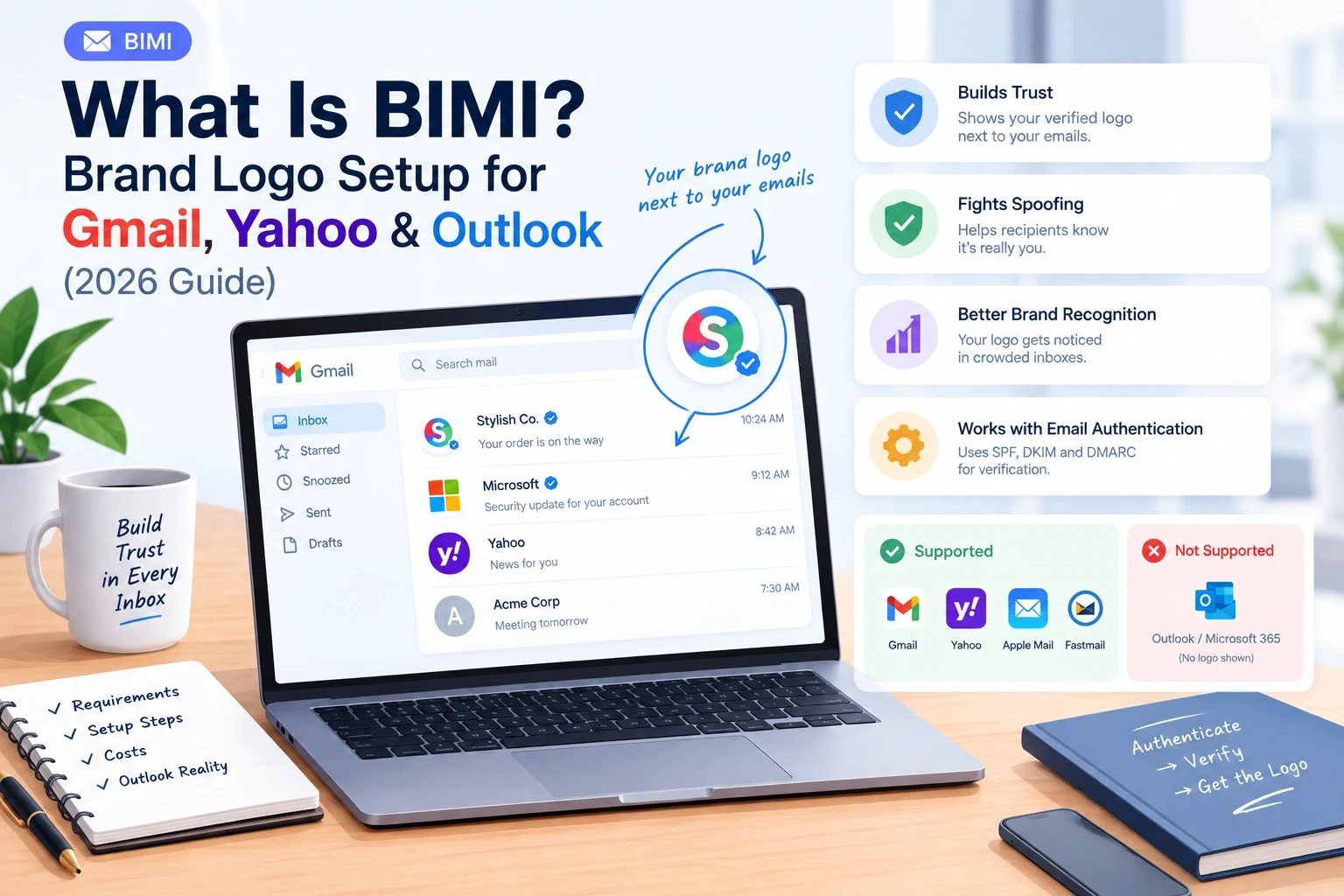
Open your inbox and look at the little circle next to each sender. Most are gray initials. A few are crisp brand logos, and some Gmail senders even carry a blue checkmark. Those logos are not a design trick. A sender had to earn them by proving, through email authentication, that the message really came from them.
That is BIMI, and in 2026 it is easier to get than it used to be. Gmail now accepts a cheaper certificate that does not require a trademark. But there is a catch most guides bury: Outlook and Microsoft 365 still do not show BIMI logos to recipients. If your audience lives in Outlook, your logo will not appear there.
This guide explains what BIMI is, how it works, what you need, how to set it up step by step, what it really costs, and whether it is worth it for you. We checked it against Google's own documentation and cross-checked the Outlook situation across multiple sources, because they disagree.
Quick answer: BIMI (Brand Indicators for Message Identification) is an email standard that displays your verified brand logo next to your emails in supported inboxes. It works in Gmail, Yahoo, AOL, Apple Mail and Fastmail, not in Outlook or Microsoft 365. To set it up you need DMARC enforcement (p=quarantine or p=reject), a logo in SVG Tiny PS format, a BIMI DNS TXT record, and, for Gmail and Apple Mail, a VMC or CMC certificate (Yahoo can show your logo without one).
Table of Contents
What is BIMI?
How BIMI works
Which inboxes support BIMI (including Outlook)
BIMI requirements checklist
VMC vs CMC vs no certificate
How to set up BIMI, step by step
How to create a BIMI-ready SVG logo
Gmail DMARC requirements and what to do when DMARC fails
Why your BIMI logo isn't showing
How much does BIMI cost?
Is BIMI worth it?
BIMI and cold email: what outbound teams should know
Why choose LiteMail as your sending foundation
BIMI checklist
FAQ
What Is BIMI?
BIMI stands for Brand Indicators for Message Identification. It is an email specification that lets mailbox providers display your official logo next to messages that pass your domain's authentication.
Think of it in layers:
Layer | What it does |
|---|---|
SPF | Says which servers may send mail for your domain |
DKIM | Adds a signature proving the message was not altered |
DMARC | Tells receivers what to do when SPF/DKIM fail |
BIMI | Shows your logo, but only if all of the above pass |
BIMI is not a replacement for SPF, DKIM or DMARC. It sits on top of them. If a spammer fakes your domain, the message fails DMARC and no logo appears. That is why the logo works as a trust signal.
What BIMI is not: it is not a spam-filter bypass and it does not boost inbox placement by itself. No provider ranks your mail higher just because you have BIMI. The indirect benefit is real, though: getting to BIMI forces you to finish your authentication setup.
How BIMI Works
You publish a BIMI TXT record in DNS at
default._bimi.yourdomain.com. It points to your logo (and certificate, if you have one).You send an email. The receiving server checks SPF, DKIM and DMARC.
If DMARC passes at an enforcement policy, the server looks up your BIMI record.
It fetches your SVG logo (and validates your certificate where required).
The inbox displays your logo next to the sender name.
Providers also apply their own checks on sender reputation. Everything can be technically correct and the logo can still take days or weeks to appear on a newer or low-reputation domain.
Which Inboxes Support BIMI (Including Outlook)?
Inbox | Shows BIMI logo? | Certificate needed | Blue checkmark |
|---|---|---|---|
Gmail | Yes | VMC or CMC | VMC only |
Apple Mail (iOS 16+ / macOS Ventura+) | Yes | VMC | n/a |
Yahoo Mail / AOL | Yes | Not required (reputation and DMARC still apply) | n/a |
Fastmail | Yes | Varies | n/a |
Outlook / Outlook.com / Microsoft 365 | No | n/a | n/a |
The truth about Outlook and BIMI
This is where search results contradict each other. Some guides say Outlook "rolled out BIMI in 2024" or "partially supports it in 2025+". Most current sources, including the BIMI Group's provider list as cited by Red Sift, Microsoft's own Q&A moderators and several deliverability vendors, say the opposite: Outlook, Outlook.com, Exchange Online and Microsoft 365 do not render inbound BIMI logos as of 2026, and no date has been announced.
One nuance: Microsoft supports BIMI as a sender in one product (Dynamics 365 Customer Insights - Journeys), so your Dynamics emails can show logos in Gmail or Yahoo. It does not display BIMI logos to people reading mail in Outlook.
What this means for you: if most of your recipients use Outlook or Microsoft 365 (common in B2B), BIMI will not reach them. Check your audience mix before spending money.
BIMI Requirements Checklist
You need all of these:
SPF and DKIM passing, with at least one aligned to your From domain
DMARC at enforcement:
p=quarantineorp=reject.p=nonedoes not qualify. Google also requires the policy to apply to 100% of mail.A square SVG logo in the SVG Tiny Portable/Secure (SVG Tiny PS) profile
A public HTTPS URL hosting the logo (and certificate file)
A BIMI TXT record at
default._bimi.yourdomain.comA VMC or CMC if you want the logo in Gmail or Apple Mail
Decent sender reputation on the domain
Google's own help page says Gmail requires third-party certification (a VMC or CMC) for your domain and logo. A standalone SVG without a certificate is not supported in Gmail.
VMC vs CMC vs No Certificate
Until late 2024, Gmail required a Verified Mark Certificate, which meant owning a trademark. The BIMI Group then introduced the Common Mark Certificate (CMC), and Gmail accepts it. That opened BIMI to businesses without a registered trademark.
Self-asserted (no certificate) | CMC (Common Mark Certificate) | VMC (Verified Mark Certificate) | |
|---|---|---|---|
Trademark required? | No | No. You prove the logo has been in public use (commonly 12+ months) | Yes, registered trademark or government mark |
Gmail logo | No | Yes | Yes |
Gmail blue checkmark | No | No | Yes |
Apple Mail | No | No | Yes |
Yahoo / AOL | Yes | Yes | Yes |
Typical cost (Aug 2026, vendor-reported) | $0 | ~$650-$1,150 / year | ~$750-$1,550 / year |
Best for | Testing, Yahoo-heavy lists | Brands without a trademark who need Gmail | Brands wanting the checkmark and Apple Mail |
Certificates are issued by authorized certificate authorities such as DigiCert, GlobalSign, SSL.com and Entrust. Check the BIMI Group's current issuer list before buying, because it changes and each mailbox provider decides which issuers it accepts.
Trademark timing: Google notes a trademark can take 6 to 12 months to obtain. If you do not have one, a CMC is the faster route.
Apple alternative: Apple also runs Branded Mail through Apple Business Connect, which can show your logo in Apple Mail independently of BIMI.
How to Set Up BIMI, Step by Step
Realistic timeline: 1-3 months end to end, because most of the time goes into DMARC enforcement. The BIMI record itself takes about 30 minutes.
Step 1: Get SPF and DKIM passing
Authorize every service that sends mail from your domain (Google Workspace, Microsoft 365, your CRM, newsletter and cold-email tools). Turn on DKIM signing for each. If you are on Google Workspace, set these up in the Admin console. For SPF details, see our guide on how to set up an SPF record.
Step 2: Move DMARC to enforcement, safely
Do not jump straight to p=reject. A safe rollout:
Weeks 1-2: publish
v=DMARC1; p=none; rua=mailto:dmarc@yourdomain.comand read the reports to find every sender.Weeks 3-6: fix failing legitimate senders, then move to
p=quarantine.After 2-4 stable weeks: consider
p=reject.
An enforcement record looks like:
Step 3: Prepare your logo (SVG Tiny PS)
See Section 7 for the exact rules. Do not export a normal SVG and hope it works. Roughly half of BIMI-enabled domains have at least one setup error, and the most common one is a non-compliant SVG (URIports analysis, via Knak).
Step 4: Choose your certificate path
Have a registered trademark and want the checkmark and Apple Mail: get a VMC.
No trademark, need Gmail: get a CMC.
Just testing or Yahoo-heavy audience: skip the certificate and publish a record with the SVG only.
Step 5: Host your files over HTTPS
Upload the SVG (and the PEM certificate file, if you have one) to a public HTTPS URL that never redirects and stays online permanently. Google recommends TLS 1.2 or later.
Step 6: Publish the BIMI DNS record
Create a TXT record:
Host/Name:
default._bimiType: TXT
Value (with certificate):
v=BIMI1; l=https://yourdomain.com/bimi/logo.svg; a=https://yourdomain.com/bimi/certificate.pemValue (SVG only, Yahoo and similar):
v=BIMI1; l=https://yourdomain.com/bimi/logo.svg;
Note: for Gmail, the certificate PEM is what carries your logo. Google's example uses an empty l= with the a= PEM URL when the logo is embedded in the certificate file.
Step 7: Validate and test
Check the record with the BIMI Group's inspector or a BIMI lookup tool.
Send a test email to a Gmail and a Yahoo address.
Allow time. Google says it can take up to 48 hours after adding the record, and reputation checks can stretch that to a few weeks.
Test in the right place: the Gmail and Yahoo mobile apps and the open message view on desktop show logos most reliably. Some desktop inbox lists do not render the logo even when BIMI is correct.
A tip from the field: choose your domain carefully
When you publish BIMI on a domain, that logo can override individual profile photos for everyone sending from it. Knak reported this when it enabled BIMI on its main domain and found staff photos replaced. Their fix was to publish BIMI on a dedicated subdomain used for marketing mail.
How to Create a BIMI-Ready SVG Logo
A normal website SVG will be rejected. Use these rules (Google plus the BIMI standard):
Requirement | Detail |
|---|---|
Format | SVG Tiny Portable/Secure (SVG Tiny PS) |
Root attributes |
|
Shape | Square, logo centered (some inboxes crop to a circle) |
Size | At least 96 x 96 px, specified in absolute pixels (for example |
Background | Solid color; transparent backgrounds may display badly |
File size | 32 KB or smaller |
Forbidden | Scripts, animations, external links or references, embedded raster images, |
Recommended | A |
Gmail DMARC Requirements and What to Do When DMARC Fails
BIMI depends on DMARC passing, so it helps to know what Gmail expects.
Gmail and Yahoo bulk-sender rules (since February 2024): senders of about 5,000+ messages a day to Gmail or Yahoo must authenticate with SPF, DKIM and DMARC. Even below that, authentication strongly affects whether you reach the inbox.
A message "passes DMARC" when: SPF or DKIM passes and that passing result is aligned with the visible From domain.
How to see why DMARC failed in Gmail
Open the message, click the three dots, choose Show original.
Read the
Authentication-Resultsblock forspf=,dkim=anddmarc=.dmarc=failmeans neither SPF nor DKIM passed with alignment.
Common causes and fixes
Cause | Fix |
|---|---|
A sending tool is missing from SPF | Add its |
Two SPF records on the domain | Merge into one record |
DKIM not enabled for that sender | Generate the key, publish it, then turn on signing |
Passing but not aligned (tool signs with its own domain) | Set up a custom DKIM / return-path domain on your domain |
Strict policy applied before all senders were fixed | Drop back to |
Why Your BIMI Logo Isn't Showing
Run through this list in order
Proble | How to check | Fix |
|---|---|---|
DMARC not enforcing | Look for | Move to |
Wrong SVG profile | Run it through a BIMI validator | Convert to SVG Tiny PS |
Record on the wrong name | It must be at | Match the record to the domain recipients see |
Certificate and logo mismatch | Compare the SVG with the artwork inside the certificate | Reissue the certificate after any logo change |
No certificate for Gmail | Gmail requires a VMC or CMC | Obtain one, host the PEM, add |
Provider doesn't support it | Outlook and Microsoft 365 never show BIMI | Nothing to fix; set expectations |
Reputation or time | Everything validates but no logo | Keep volume steady, wait days to weeks, retest |
Testing in the wrong view | Desktop inbox list may not show logos | Check the mobile app or open message |
How Much Does BIMI Cost?
Item | Typical cost |
|---|---|
DNS record | $0 |
SVG logo conversion | $0 (self) to ~$200 (designer) |
DMARC setup and monitoring | $0 (DIY) to ~$2,000 (managed service) |
Trademark (only for VMC) | Roughly $250-$2,000 depending on country |
CMC | ~$650-$1,150 / year (Aug 2026, vendor-reported) |
VMC | ~$750-$1,550 / year |
First-year total usually lands between $0 (self-asserted, Yahoo only) and a few thousand dollars if you also need trademark and DMARC help. Prices vary by issuer and reseller, so always get a current quote.
11. Is BIMI Worth It?
Honest answer by situation:
Consumer and e-commerce brands sending volume to Gmail, Yahoo and Apple users: Yes. The recognition lift and anti-spoofing value are strongest here.
B2B senders whose audience is mostly on Outlook: The logo will rarely be seen. Do the DMARC work anyway for security and deliverability, and treat BIMI as optional.
Small senders without a trademark: Much more realistic now through CMC or free Yahoo display.
What the data actually says about open rates
Valimail reports engagement up to 10% higher with BIMI, while noting case-study data is thin.
A Red Sift/Entrust survey reported opens up to 38-39% higher in some markets. Treat this as a ceiling, not a promise, because it is vendor-sponsored.
One Red Sift customer reported 4-6% better engagement.
Our take: expect a modest, brand-dependent lift, not a guaranteed jump. The most reliable payoff is that BIMI pushes you to DMARC enforcement, which protects your domain from spoofing.
BIMI and Cold Email: What Outbound Teams Should Know
If you run cold outreach, the BIMI question is different:
BIMI does not fix deliverability. If your cold emails land in spam, a logo will not rescue them. Inbox placement comes from authentication, warm-up, list quality and sensible sending volume.
Cold email usually runs on secondary domains. Those domains are often new, with no public logo history. A CMC requires proof your logo has been in genuine public use on the domain, so a fresh outreach domain generally cannot qualify, and a VMC needs a trademark tied to the brand.
Costs multiply per domain. If you run many sending domains, a certificate on each is rarely worth it.
Where it can make sense: your main brand domain, used for customer and marketing mail, if your audience is mostly on Gmail, Yahoo and Apple Mail.
What you should absolutely do: get SPF, DKIM and DMARC right on every sending domain. That is the real prize BIMI points toward.
Start with the fundamentals in our cold email deliverability guide, see how Google's sender rules shifted, and read how to stop cold emails being filtere
Why Choose LiteMail as Your Sending Foundation
Let us be clear about what LiteMail is and is not. LiteMail does not issue BIMI certificates or host your logo. LiteMail provides pre-warmed Google Workspace and Microsoft 365 mailboxes for cold email outreach, which you connect to your sequencing tool.
Why that matters for this topic:
If you care about... | What matters first | Where LiteMail fits |
|---|---|---|
Reaching the inbox | Authentication plus healthy, warmed mailboxes | Pre-warmed inboxes skip the riskiest early sending period |
Gmail and Outlook audiences | Matching mailbox type to your recipients | Both Google and Microsoft 365 mailboxes are available |
Scaling volume safely | Spreading sends across several mailboxes | Add mailboxes to keep each one at a safe daily limit |
Avoiding wasted spend | Fixing basics before cosmetic upgrades | Get delivery right first, consider BIMI later on your main brand domain |
Practical advice: before you pay for a certificate, check that the basics are solid. Authenticate each domain, warm your mailboxes, keep bounce rates low, and watch reply rates. If replies are weak, the cause is almost always deliverability, targeting or copy, not a missing logo.
Choosing a provider for Instantly? See the best pre-warmed inbox for Instantly. Comparing costs? Read the cold email tool pricing comparison.
Explore LiteMail's pre-warmed inboxes
BIMI Checklist
SPF passing and DKIM signing for every sender
DMARC at
p=quarantineorp=reject, applied to all mailAudience check: how many recipients use Gmail, Yahoo, Apple Mail (supported) vs Outlook (not supported)?
SVG Tiny PS logo, square, 96x96+ absolute pixels, under 32 KB
Certificate chosen (VMC, CMC or none) and logo artwork matches it
Files hosted on stable HTTPS URLs with no redirects
TXT record at
default._bimi.yourdomain.comValidated with a BIMI inspector
Tested on mobile Gmail, Yahoo and an opened desktop message
Monitoring DMARC reports and renewing the certificate on time
Frequently Asked Questions
What does BIMI stand for?
Brand Indicators for Message Identification. It is an email standard that shows your verified logo next to authenticated messages in supported inboxes.
Does Outlook support BIMI?
No. As of 2026, Outlook, Outlook.com, Exchange Online and Microsoft 365 do not display BIMI logos to recipients, and Microsoft has not announced a date. Microsoft supports BIMI only on the sending side in Dynamics 365 Customer Insights - Journeys.
Do I need a trademark for BIMI?
Only for a VMC. Since late 2024, a Common Mark Certificate (CMC) lets Gmail display your logo without a trademark, if you can show the logo has been in public use. A CMC does not give the Gmail checkmark or Apple Mail support.
Does BIMI work without a certificate?
Partly. Yahoo and AOL can display a logo from the DNS record alone once DMARC is enforced and your reputation is good. Gmail and Apple Mail require a certificate.
Does BIMI improve email deliverability?
Not directly. No provider ranks your mail higher for having BIMI. Indirectly, the DMARC enforcement it requires improves security and trust, and a recognizable logo can lift engagement.
Why is my BIMI logo not showing in Gmail?
The usual causes are DMARC not enforcing, a non-compliant SVG, a missing or mismatched certificate, a record on the wrong domain, low sender reputation, or testing in a view that does not display logos. See Section 9.
How long does BIMI take to work?
DNS usually propagates within a day, and Google says logos can take up to 48 hours to show. Reputation checks can extend that to a few weeks. Getting DMARC to enforcement is the longest step, often 1-3 months.
How much does a VMC or CMC cost?
Vendor-reported 2026 pricing runs roughly $750-$1,550 per year for a VMC and $650-$1,150 per year for a CMC, depending on issuer and reseller.
What DMARC policy does BIMI need?
p=quarantine or p=reject, applied to all of your mail. p=none does not work.
Final Thoughts
BIMI turns authentication work into something recipients can see. Done well, it adds trust and recognition in Gmail, Yahoo and Apple Mail. But it will not appear in Outlook, it will not fix deliverability, and it needs DMARC enforcement before anything else.
So start in the right order: authenticate, enforce DMARC, check where your audience reads email, then decide on a certificate. And if you send cold email, get your inbox foundation right first. A logo only helps if the email arrives.
Need dependable sending infrastructure underneath your outreach? See LiteMail's pre-warmed Google and Microsoft 365 inboxes.






