
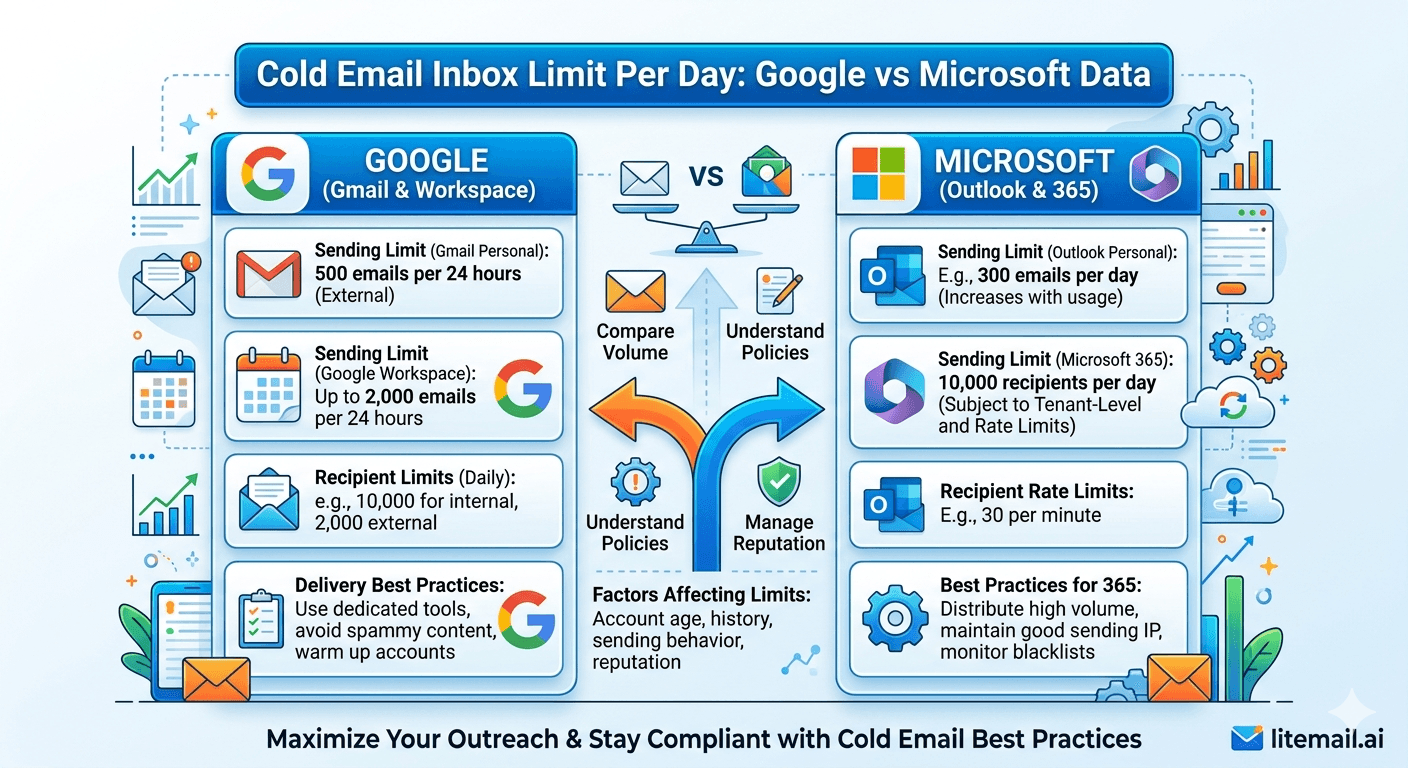
Google says 2,000 emails per day. Microsoft says 10,000. Both numbers are meaningless for cold email. The real safe sending limits per inbox — the numbers that keep your domain reputation intact — are a fraction of those technical ceilings. Here's the actual data.
Official Limits vs the Numbers That Actually Matter
Platform sending limits and cold email safe zones are completely different things. Confusing them is one of the most common reasons people burn domains that took weeks to warm up.
Platform | Official Daily Limit | Cold Email Safe Zone | Risk Zone | Account Suspension Risk |
|---|---|---|---|---|
Google Workspace | 2,000/day per account | 30–50/day | 51–100/day | 500+/day from cold list |
Microsoft 365 | 10,000/day per account | 30–50/day | 51–100/day | 300+/day from cold list |
The safe zone is identical on both platforms: 30–50 emails per inbox per day. The technical limit is irrelevant for cold email senders because reputation degradation — not account suspension — is the real constraint. You can send 200 emails per day from a GWS inbox without hitting Google's 2,000 limit. But your domain reputation will degrade within days, and inbox placement will drop from 94% to 40–60% before any platform action occurs.
🚩 The Reputation Ceiling Is What Limits You — Not the Platform Limit
Most guides explain platform sending limits and stop there. The real limit for cold email is sender reputation — the score that mail servers assign your domain based on engagement signals, complaint rates, and bounce rates. Reputation degradation begins well below the technical platform limits when sending to cold lists. Treat 30–50 emails per inbox per day as your ceiling, regardless of what the platform's technical limit says.
What Happens When You Exceed the Safe Cold Email Limit
The consequences of exceeding the safe daily sending zone are graduated — not immediate. Understanding the progression helps you catch problems before they become catastrophic.
Stage | Trigger | Symptom | Recovery Time |
|---|---|---|---|
Stage 1: Reputation Softening | Consistently above 50/day with rising complaint rate | Postmaster drops from Good to Medium | 7–14 days of clean sending |
Stage 2: Inbox Placement Drop | Medium reputation + continued high volume | Placement drops to 60–70% primary inbox | 14–30 days clean sending |
Stage 3: Domain Flagging | Low reputation + spam complaint rate above 0.3% | Emails route to spam on most providers | 30–60 days of minimal sending |
Stage 4: Account Suspension | Continued policy violations after flagging | Account suspended — no sending possible | Appeal process — not guaranteed |
Stage 1 is recoverable in under 2 weeks. Stage 4 may not be recoverable. Catching the problem at Stage 1 — a Postmaster reputation drop from Good to Medium — is a 20-minute fix: reduce volume and pause the worst-performing list segments. Missing it until Stage 3 or 4 means starting over with new infrastructure.
Google Workspace: The Real Cold Email Data
Google Workspace Business Starter and Business Standard accounts share the same 2,000 emails per day per user limit. For cold email purposes, the relevant thresholds are far lower.
Based on our data at Litemail across GWS inboxes in Q1 2026:
Under 35 emails/day: Domain reputation stays Good or High in Postmaster Tools indefinitely when list hygiene is maintained.
35–50 emails/day: Reputation stays Good or High if bounce rate is under 2% and complaint rate is under 0.05%. Start monitoring Postmaster weekly.
50–80 emails/day: Reputation degrades to Medium within 30–45 days even on clean lists. The volume-to-signal ratio shifts unfavourably. Monitor Postmaster every 48 hours.
Above 100/day: Reputation drops to Low within 10–14 days on a cold list. Domain effectively unusable for cold email within 3 weeks.
Google Workspace sender reputation is harder to build and easier to damage than Microsoft 365. Google's filtering algorithm is more aggressive on domain reputation signals from cold email patterns. Keep GWS inboxes under 40/day for long-term campaign sustainability.
Microsoft 365: The Real Cold Email Data
Microsoft 365 has a higher technical limit (10,000/day) and a slightly more forgiving reputation recovery system than Google. But the practical safe ceiling for cold email is identical.
Microsoft 365 cold email thresholds from Litemail's data:
Under 40 emails/day: Stable reputation with Microsoft mail servers (tracked via SNDS). Consistent delivery to Outlook.com and corporate MS365 tenants.
40–60 emails/day: Manageable with clean lists. SNDS status stays green if complaint rate stays under 0.08%.
60–100 emails/day: SNDS status starts showing yellow. Delivery to corporate Outlook tenants with aggressive filtering (Proofpoint, Defender) degrades noticeably.
Above 100/day: SNDS shows red within 2–3 weeks even with clean lists. Outlook.com delivery becomes unreliable. Corporate MS365 tenant delivery drops to 50–60%.
✅ Microsoft's Slight Edge Over Google for Volume Tolerance
In practice, Microsoft 365 inboxes tolerate slightly higher cold email volumes before reputation degradation compared to Google Workspace. MS365 inboxes with clean lists can run at 45–50/day sustainably. GWS inboxes perform best at 35–40/day. The practical difference is small — both platforms cap cold email safely at 30–50/day per inbox.
How to Scale Volume Without Hitting Limits
Scaling cold email volume means adding inboxes — not pushing existing inboxes harder. The math is simple and the constraint is clear.
Target Daily Volume | Inboxes at 35/day | Monthly Cost (Litemail $4.99) | Platform Mix |
|---|---|---|---|
200 emails/day | 6 inboxes | $29.94 | 4 GWS + 2 MS365 |
500 emails/day | 15 inboxes | $74.85 | 9 GWS + 6 MS365 |
1,000 emails/day | 29 inboxes | $144.71 | 18 GWS + 11 MS365 |
2,000 emails/day | 58 inboxes | $289.42 | 35 GWS + 23 MS365 |
Add new inboxes at a rate of 3–5 per week when scaling. Don't onboard 20 new inboxes in one day — sudden network expansion triggers the same pattern-matching that simultaneous warmup starts trigger. Gradual addition keeps the expansion below algorithmic detection thresholds.
Scale Safely — Pre-Warmed Inboxes on Demand from Litemail
Litemail pre-warmed inboxes for both GWS and MS365. $4.99/inbox. No minimum order. Add exactly the inboxes you need — ordered today, campaign-ready tomorrow.
Get Pre-Warmed Inboxes from $4.99 →
GWS and MS365 · Dedicated US and EU IPs · Automated DNS · No minimum order
About Litemail — Litemail provides pre-warmed Google Workspace and Microsoft 365 inboxes for cold email outreach. From $4.99/inbox with automated DNS, dedicated US and EU IPs, and full admin access. View pre-warmed inbox plans →
Related reading:
Pre-Warmed Inbox Sending Limits: Safe Daily Volume 2026 · Google Workspace Cold Email 500 Per Day Limit · Cold Email Inbox Sending Volume · How Many Inboxes Do You Need? · Inbox Rotation Strategy High Volume
Key Takeaways
Official platform limits (Google: 2,000/day, Microsoft: 10,000/day) are irrelevant for cold email. Sender reputation degrades long before these technical limits are reached.
The real safe cold email limit is 30–50 emails per inbox per day on both platforms. Above this ceiling, domain reputation degrades within weeks even on clean lists.
Google Workspace inboxes are slightly less tolerant of volume — keep GWS at 35–40/day for long-term sustainability. MS365 manages 40–50/day with clean lists.
Reputation damage is graduated: Good → Medium (recoverable in 1–2 weeks) → Low (30–60 day recovery) → account suspension (potentially unrecoverable). Catch issues at Medium — don't let them reach Low.
Scale total send volume by adding more inboxes to the rotation, not by pushing individual inboxes harder. Add 3–5 new inboxes per week when scaling to avoid sudden network expansion signals.
At $4.99/inbox from Litemail, 15 inboxes for 500 emails per day costs $74.85/month — less than most CRM subscriptions.
Frequently Asked Questions
How many cold emails can I send per day per Google Workspace inbox?
The safe cold email limit for a Google Workspace inbox is 30–40 emails per day. Google's technical account limit is 2,000/day, but domain reputation begins degrading well before that when sending to cold lists. Above 50/day, Postmaster Tools reputation typically softens from Good to Medium within 30–45 days. Keep GWS cold email at 35–40/day for sustainable long-term campaigns.
How many cold emails can I send per day per Microsoft 365 inbox?
The safe cold email limit for a Microsoft 365 inbox is 35–50 emails per day. Microsoft's technical limit is 10,000/day per account, but SNDS (Microsoft's sender reputation tool) starts showing yellow status above 60/day on most cold lists. MS365 tolerates slightly higher volume than Google Workspace before reputation softening, but the practical safe zone overlaps: treat 30–50/day as the ceiling for both.
What happens if I send more than 50 cold emails per day from one inbox?
Domain reputation softens from Good to Medium in Google Postmaster Tools, typically within 30–45 days. Primary inbox placement drops from 94%+ to 60–70%. Continued high volume after Medium reputation drops it to Low, where spam folder placement dominates. Recovery from Low takes 30–60 days of minimal or no sending. Above 100/day, even clean lists accelerate this degradation to 10–14 days.
Why is the cold email safe limit so much lower than the platform limit?
Platform limits are technical ceilings — they prevent individual accounts from overwhelming mail servers. Cold email safe limits are determined by engagement-to-send ratios and complaint rates that affect domain reputation. A cold list generates far lower engagement rates and higher complaint rates than a transactional or warm email list. Those signals tell mail servers the domain is bulk-sending — and reputation degrades accordingly, long before any technical platform limit is hit.
How do I scale cold email volume beyond 50 emails per day without hitting limits?
Add more inboxes. Each inbox in your rotation sends 30–50 emails independently. 10 inboxes × 40 emails/day = 400 emails per day total. No single inbox exceeds its safe ceiling. Add new inboxes at 3–5 per week when scaling — gradual network expansion avoids the pattern-matching that simultaneous bulk inbox additions trigger. Litemail pre-warmed inboxes at $4.99 each can be ordered on demand and delivered in 24 hours.
Are Litemail pre-warmed inboxes already at the safe daily sending limit from delivery?
Yes. Litemail pre-warmed inboxes arrive with 4–12 weeks of genuine sending history, verified Good or High Postmaster reputation, and the ability to send 30–50 cold emails per day from day one. You don't need to ramp from a low baseline as with fresh inboxes. Start at 30/day on day one and ramp to your full target over the first week — this gives receiving servers time to observe your specific sending pattern before full volume.
Cold Email Sending Limits: Google vs Microsoft | Litemail
Pre-warmed GWS and MS365 inboxes supporting 30–50 cold emails per day from day one. $4.99/inbox. No ramp-up wait.
View Plans & Pricing →
Related reading:
Pre-Warmed Inbox Sending Limits 2026 · GWS 500 Per Day Limit · How Many Inboxes Do You Need? · Inbox Rotation Strategy · MS365 vs GWS 2026






