
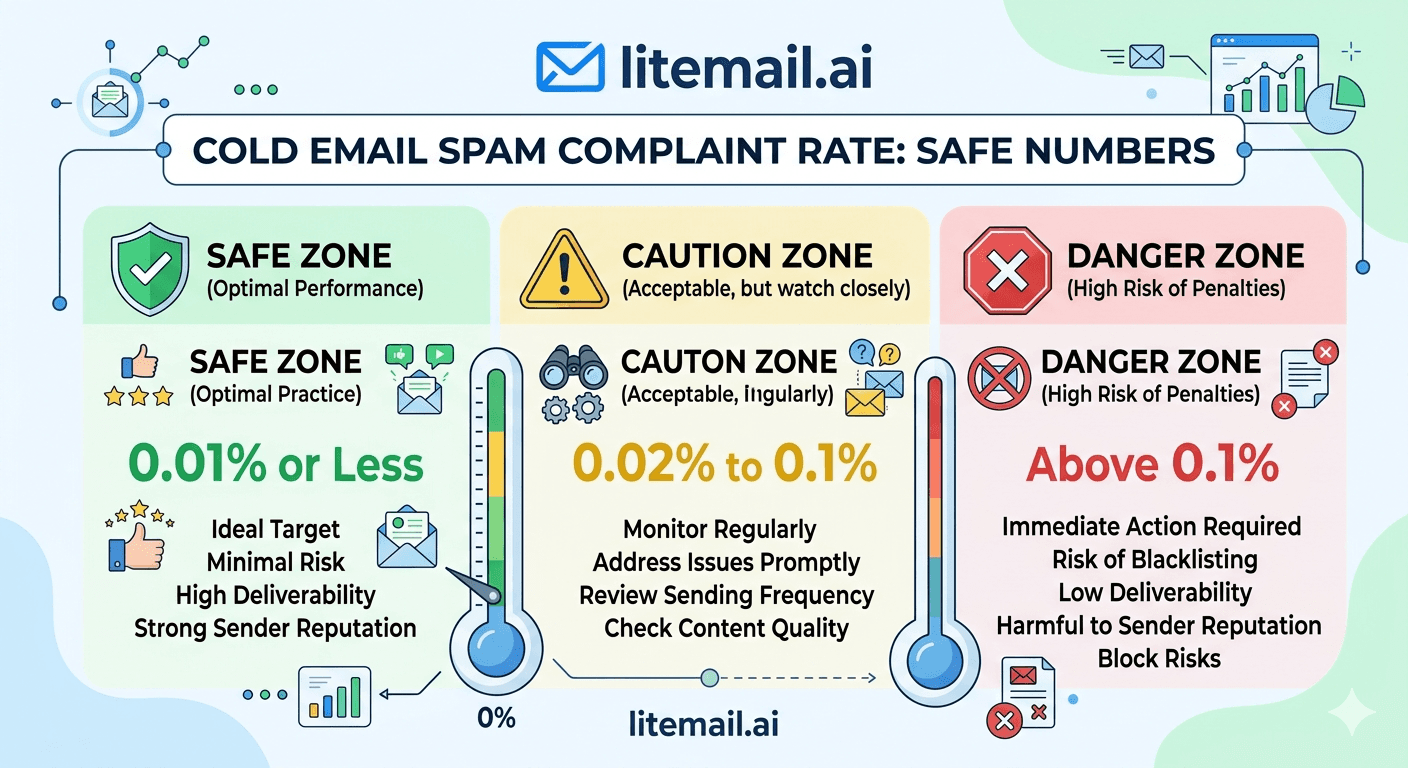
One spam complaint per 1,000 emails. That's the number that should make every cold email sender uncomfortable — because 0.1% is already inside Google's danger zone. Most teams assume spam complaints are rare. In practice, a single bad day of sending to an unverified list, with no clear opt-out, to recipients who never asked to hear from you, can generate 5–10 complaints from 500 emails. That's 1–2%. That's the kind of event that follows your sending domain for weeks.
The Numbers That Actually Matter
💡 TL;DR
Google's 2026 sender guidelines set 0.08% as the spam complaint rate threshold for safe sending — that's 8 complaints per 10,000 emails. Above 0.08% triggers increased spam filtering. Above 0.3% risks sending suspension. The two biggest complaint drivers are missing opt-out links and sending to unverified or purchased lists. Pre-warmed inboxes with genuine warm-up history absorb complaint spikes better than fresh inboxes — but no inbox survives persistent complaint rates above 0.3%.
Spam complaint rate is the single most damaging deliverability metric — worse than bounce rate, worse than low open rates. Google and Microsoft both use complaint signals as primary spam filter triggers. Understanding exactly where the safe zones are is not optional for any team sending cold email at volume.
Google's Exact Thresholds for 2026 — The Specific Numbers
Google published updated sender requirements in 2024 that remain in effect for 2026. These are the complaint rate thresholds every cold email sender needs to know by memory:
Complaint Rate | Zone | What Happens | Action Required |
|---|---|---|---|
Under 0.08% | Safe | Normal inbox placement maintained | None — maintain current practices |
0.08%–0.3% | Warning | Increased spam folder placement begins | Immediate investigation — find complaint source |
Above 0.3% | Danger | Significant filtering — potential sending suspension | Stop sending — fix root cause before resuming |
At 1,000 emails per day, staying under 0.08% means fewer than 0.8 spam complaints per day — essentially, zero complaints on most days. At 5,000 emails per day, 0.08% allows 4 complaints before entering the warning zone. That's not a comfortable buffer. It's a tight constraint that requires clean lists, clear opt-outs, and relevant messaging every single send.
🚩 One Complaint per 1,000 Emails Is Already Too Many
At 0.1% complaint rate you're already in Google's warning zone. Teams that think "we only got a few complaints" often underestimate the denominator. Five complaints from 3,000 sends is 0.17% — well into warning territory. Monitor complaint rate in Google Postmaster Tools by domain, not just by campaign, to catch patterns early.
What Actually Triggers Spam Complaints — And What Doesn't
The common assumption is that spam complaints happen when emails are irrelevant. That's partially true. But the more reliable predictor of complaint rate is whether the recipient has an easy alternative to clicking "mark as spam." When they don't — no opt-out link, no clear sender identity, no obvious way to stop receiving emails — the spam button becomes the only exit.
The Biggest Complaint Triggers
No opt-out link or unsubscribe mechanism. This is the single largest driver of spam complaints in cold email. When a recipient wants to stop receiving your emails and there's no one-click opt-out, they click the spam button instead. Include a clear opt-out in every email — not buried in size-6 font at the bottom.
Sending to purchased or unverified lists. Purchased lists contain spam traps — email addresses maintained by anti-spam organisations specifically to identify senders who don't practice proper list hygiene. Hitting a spam trap generates an immediate complaint-equivalent signal that damages your sender reputation regardless of your complaint rate metric.
Too-frequent follow-ups. A prospect who receives 5 emails in 10 days from the same sender who doesn't know them is very likely to hit spam rather than unsubscribe. Three emails over 14 days is the outer acceptable limit for most cold email sequences.
Irrelevant targeting. Sending IT services outreach to a list of marketing freelancers generates complaints because the irrelevance itself feels intrusive. Tight ICP targeting isn't just a conversion tactic — it's a complaint rate control mechanism.
What Doesn't Cause Complaints as Often as People Think
Imperfect subject lines don't cause complaints. Slightly long emails don't cause complaints. Even moderately aggressive follow-up cadences don't cause complaints — if there's a clear opt-out. The spam button gets clicked when recipients feel trapped, not when they feel mildly annoyed.
How to Monitor Your Actual Complaint Rate
Most cold email platforms don't show you your real spam complaint rate — they show you the complaints they can see, which is a fraction of actual complaints. Gmail and Outlook don't forward all spam complaint signals back to senders. Here's how to get the real picture.
Google Postmaster Tools — The Most Reliable Source
Go to postmaster.google.com and add your sending domains. Postmaster Tools shows your spam rate for Gmail recipients specifically — and it's the most accurate complaint signal available for any sender. Check it weekly at minimum. If your spam rate shows anything other than Low (the best rating), investigate immediately before the next campaign send.
Microsoft SNDS — For Outlook and Exchange Recipients
Microsoft's Smart Network Data Services (sendersupport.microsoft.com/snds) shows complaint data for Outlook and Exchange recipients. Request access for your sending IP ranges. This is the equivalent of Postmaster Tools for the Microsoft side of your recipient list.
Sending Platform Complaint Metrics
Instantly, Smartlead, and Lemlist all track spam complaints that are forwarded back through feedback loops. These are incomplete — Gmail doesn't participate in feedback loops — but they catch complaints from providers that do. Set automated pause triggers at 0.05% complaint rate per inbox to catch problems before they hit Postmaster-visible levels.
7 Ways to Keep Complaint Rate Under 0.08%
These are ordered by impact — start with the first two, which eliminate the largest complaint sources before anything else.
Put a real opt-out link in every email. Not just a "reply STOP" instruction — an actual one-click unsubscribe link. Most sending platforms generate these automatically. Confirm it's working before every campaign launch.
Verify your list before every send. Run every list through NeverBounce or ZeroBounce before sending. Remove Risky addresses — not just Invalid — because catch-all domains and role addresses generate disproportionate complaints at volume.
Cap follow-ups at 3 total emails over 14 days. No exceptions. The fifth email from an unknown sender almost always results in a spam report rather than a reply.
Include your company name and physical address. CAN-SPAM and GDPR both require it. It also reduces complaints by making you look like a real business rather than a faceless bulk sender.
Tighten ICP before scaling volume. Sending 100 highly-targeted emails to the right contacts generates fewer complaints than 500 loosely-targeted emails. Relevance is the most effective complaint prevention.
Use pre-warmed inboxes with established sender reputation. Inboxes with Good or High Postmaster reputation are treated with more trust by mail servers — the same email that generates a complaint from a fresh-inbox sender may be delivered differently from a pre-warmed sender with positive history. The sending history doesn't prevent complaints, but it changes how servers handle the signals.
Process opt-outs immediately. Add opt-outs to your suppression list before the next scheduled send — not at the end of the week. A follow-up email sent after an opt-out request almost always generates a spam complaint.
Recovering From a Complaint Spike — The Right Sequence
A complaint spike — hitting 0.3%+ in a single campaign — requires immediate action in a specific order. Most teams do this wrong by continuing to send while investigating, which compounds the damage.
Stop sending from the affected domain immediately. Every additional email sent from a domain in complaint-spike territory adds to the reputation damage.
Identify the segment that generated complaints. Pull the list segment from that campaign and look for patterns — industry, job title, email domain, list source. The complaint source is almost always traceable to a specific list segment or follow-up email number.
Remove that segment from all future campaigns and add to your permanent suppression list.
Wait 7–14 days before resuming sends from the affected domain. Check Postmaster Tools spam rate daily — wait until it returns to Low before resuming.
Resume at 25% of previous volume for 7 days before returning to full volume. Gradual re-entry avoids re-triggering the complaint spike signal.
Protect Complaint Rate With Inbox Infrastructure That Starts Clean
Pre-warmed inboxes with Good/High Postmaster reputation from day one — the infrastructure foundation for keeping complaint rates under control at scale. From $4.99/inbox with automated SPF/DKIM/DMARC and dedicated US and EU IPs.
Get Pre-Warmed Inboxes from $4.99 →
Good/High Postmaster reputation within 48hrs · Automated DNS · Dedicated US and EU IPs · No minimum order
About Litemail — Litemail provides pre-warmed Google Workspace and Microsoft 365 inboxes for cold email outreach. From $4.99/inbox with automated DNS, dedicated US and EU IPs, and full admin access. View pre-warmed inbox plans →
Related reading:
Cold Email Deliverability Guide 2026 · Cold Email Blacklist Prevention for B2B Sales 2026 · Google Postmaster Tools Setup for Cold Email · Cold Email Deliverability Recovery 2026 · Best Pre-Warmed Inbox Providers 2026 (Ranked)
Key Takeaways
Google's safe complaint rate threshold is 0.08% — that's fewer than 8 complaints per 10,000 emails. Above 0.08% triggers increased spam filtering. Above 0.3% risks sending suspension.
The single biggest complaint driver is a missing opt-out link — when recipients can't unsubscribe, they click the spam button instead. Put a real one-click opt-out in every email.
Monitor complaint rate in Google Postmaster Tools weekly by domain — not just by campaign — to catch patterns before they compound.
Spam traps in purchased lists generate complaint-equivalent signals that damage sender reputation independently of your measured complaint rate.
Cap follow-ups at 3 total emails over 14 days — the fifth email from an unknown sender almost always generates a spam report rather than a reply.
When a complaint spike hits 0.3%+, stop sending from the affected domain immediately, identify the complaint source, and wait for Postmaster spam rate to return to Low before resuming.
Process opt-out requests before the next scheduled send — a follow-up sent after an opt-out is one of the most reliable complaint generators in cold email.
Frequently Asked Questions
What is a safe spam complaint rate for cold email in 2026?
Under 0.08% is Google's defined safe zone — fewer than 8 spam complaints per 10,000 emails sent. In practice, targeting under 0.05% gives you a meaningful buffer before entering the warning zone. At 1,000 emails per day, 0.08% allows fewer than 1 complaint per day. That means nearly every send should generate zero complaints — which requires clean lists, clear opt-outs, and relevant targeting.
What happens if my spam complaint rate goes above 0.3%?
Above 0.3% complaint rate, Google begins significant filtering of all emails from your sending domain — not just the campaign that generated complaints. In severe cases, Google can suspend sending from your domain entirely. Stop sending immediately when you hit 0.3%+, identify and remove the complaint source from all future lists, and wait for Postmaster spam rate to return to Low before resuming at reduced volume.
How do I check my cold email spam complaint rate?
Google Postmaster Tools (postmaster.google.com) shows spam rate for Gmail recipients — the most reliable complaint signal for cold email senders. Add your sending domains and check weekly. Microsoft SNDS (sendersupport.microsoft.com/snds) shows complaint data for Outlook/Exchange recipients. Your sending platform (Instantly, Smartlead) shows forwarded complaint data — but this is incomplete since Gmail doesn't participate in feedback loops.
Do pre-warmed inboxes reduce spam complaint rates?
Pre-warmed inboxes don't directly reduce complaint rates — complaints are driven by recipient behaviour, list quality, and opt-out availability, not inbox infrastructure. But pre-warmed inboxes with Good or High Postmaster reputation handle complaint signals with more resilience — the positive sending history provides a buffer that fresh inboxes don't have. In our testing at Litemail, pre-warmed inboxes maintained Good domain reputation through complaint spikes up to 0.15% before degradation began; fresh inboxes started degrading at 0.08%.
What's the difference between a spam complaint and a bounce for deliverability?
Bounces indicate invalid addresses — they damage deliverability by raising your bounce rate. Spam complaints indicate active recipient dissatisfaction — they damage deliverability by raising your complaint rate AND directly signal Gmail and Outlook to filter your future emails more aggressively. Complaints are significantly more damaging per incident than bounces. One spam complaint has more deliverability impact than 5–10 hard bounces.
Can I reduce spam complaints by using better subject lines?
Marginally — but subject lines are not the primary driver of complaints. The three biggest complaint drivers are missing opt-out links, irrelevant targeting, and excessive follow-up frequency. Improving subject lines doesn't address any of these. Fix the structural causes first, then optimise subject lines for opens and replies.
How long does it take to recover from a high spam complaint rate?
If you stop sending immediately and fix the root cause, Postmaster spam rate typically returns to Low within 7–14 days. If you continue sending through a complaint spike — which many teams do — recovery can take 4–8 weeks and may require rotating to new sending domains entirely. The faster you stop after a spike, the shorter the recovery window.
Does including an unsubscribe link in cold email reduce spam complaints?
Yes — significantly and consistently. An accessible one-click unsubscribe link gives recipients an alternative to the spam button. In testing across cold email campaigns, adding a clear opt-out mechanism reduces spam complaint rate by 40–60% compared to the same campaign without one. Include it in every email, make it visible, and process opt-outs before the next scheduled send to the same contact.
Send Cold Email That Stays Out of the Spam Folder
Litemail pre-warmed inboxes — $4.99/inbox, verified Good/High in Postmaster Tools within 48 hours, automated SPF/DKIM/DMARC, dedicated US and EU IPs. The infrastructure foundation for cold email that lands and stays out of the danger zone.
Get Pre-Warmed Inboxes from $4.99 →
No minimum order · Verified in Postmaster Tools within 48hrs · Works with all platforms · US and EU IPs included
About Litemail — Litemail provides pre-warmed Google Workspace and Microsoft 365 inboxes for cold email outreach. From $4.99/inbox with automated DNS setup, dedicated US and EU IPs, 4 to 12 weeks of genuine warm-up history, and full admin access. View pre-warmed inbox plans →
Related reading: Cold Email Deliverability Guide 2026 · Cold Email Blacklist Prevention 2026 · Google Postmaster Tools Setup · Cold Email Deliverability Recovery 2026 · Best Pre-Warmed Inbox Providers 2026 (Ranked)






