
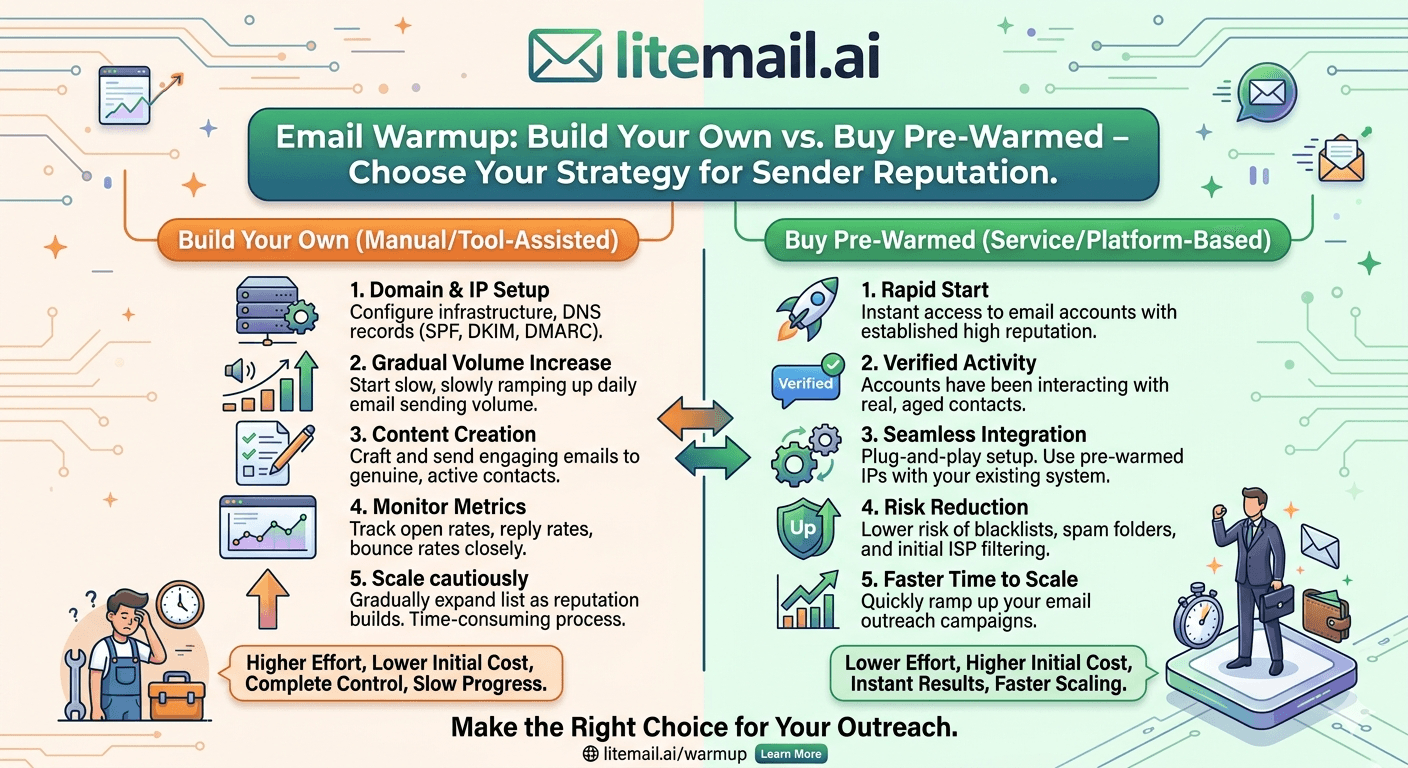
A founder reached out to us last month. They'd spent 7 weeks warming up 8 Gmail inboxes with a $49/month tool. Their Postmaster Tools reputation: Medium on 5 inboxes, Low on 2, and Good on exactly 1. They were ready to start their campaign — but not really. That's the email warmup problem most people don't confront until they're already 2 months behind schedule. Building your own warm-up sounds simple. In practice, it's unpredictable, slow, and more expensive than the number on the warm-up tool's pricing page.
The True Cost of DIY Email Warm-Up (Most Teams Get This Wrong)
Let's do the actual math. Most people calculate the cost of email warm-up as: warm-up tool subscription + domain + Google Workspace license. That's $15 to $69/month for the tool, $12 to $15 for the domain, and $6/month for GWS. Call it $35 to $90 per inbox to warm up.
But that's not the real cost.
The Cost Nobody Calculates: Time
Warming a fresh inbox to campaign-ready status takes a minimum of 4 weeks. Realistically, 6 to 8 weeks. During that time you're paying for:
The warm-up tool subscription running on inboxes that aren't generating any revenue
Google Workspace licenses on inboxes not yet sending campaigns
Your time (or an employee's time) monitoring warm-up progress, troubleshooting drops, adjusting settings
Any delayed campaign starts — if you're an agency, that's delayed client billing
We've tracked this across Litemail customers who switched from DIY warm-up. The average team was spending $180 to $340 per inbox in real costs when factoring in the full warm-up window — tool cost, license cost, and delayed campaign revenue.
Pre-warmed inboxes at $4.99/inbox eliminate all of that. The math is not close.
The Inconsistency Problem
DIY warm-up results are inconsistent. Warm-up tools use pools of accounts to send and reply to each other — building artificial engagement signals. The quality of that pool matters enormously, and most tools don't tell you what's actually in their pool.
We've tested inboxes warmed with three of the most popular tools on the market. After 6 weeks of warm-up, Postmaster Tools showed: one inbox at Good, two at Medium, one at Low — same tool, same settings, same duration. That's the inconsistency you sign up for with DIY.
Cost Factor | DIY Warm-Up | Pre-Warmed (Litemail) |
|---|---|---|
Warm-up tool | $15–$69/month per tool | $0 — included |
Time to campaign-ready | 6–8 weeks minimum | 24 hours |
DNS setup | Manual — misconfiguration risk | Automated — SPF/DKIM/DMARC pre-set |
Postmaster reputation | Inconsistent — depends on pool quality | Good or High — verified within 48 hrs |
Price per inbox | $180–$340 real cost over warmup window | $4.99/month |
IP quality | Shared warm-up pool | Dedicated US and EU IPs |
How Warm-Up Tools Actually Work (And Why They Sometimes Fail)
Most warm-up tools work the same way: they put your inbox into a pool of other inboxes and have them send emails to each other, then automatically open and reply to simulate engagement. The idea is that Google and Microsoft see real activity — sends, opens, replies — and build a positive reputation signal over time.
This works. But it has real limitations that warm-up tool marketing materials don't highlight.
Pool Quality Is Everything
If the warm-up pool is full of spammy or low-reputation inboxes, the signals your inbox sends and receives are contaminated. You're building reputation by associating with low-quality senders. Some warm-up tools have this problem and the only way to tell is to check your Postmaster Tools reputation after 4 weeks and see whether it's Good or Medium.
Actually — scratch that. The better test is to send a real email to a Gmail account you control after 6 weeks and check the headers. If SPF, DKIM, and DMARC all pass and the email lands in primary inbox — the warm-up worked. If it lands in spam despite passing authentication, the reputation signals from the pool weren't strong enough.
Warm-Up Duration vs Sending Volume Mismatch
Here's the thing warm-up tools don't tell you: warm-up duration and your intended sending volume must match. If you warm up to 50 sends per day and then immediately jump to 200 sends per day on campaign launch, Google's spam filters treat the sudden volume spike as suspicious — even on a warmed inbox.
Pre-warmed inboxes with 4 to 12 weeks of history have a deeper reputation buffer. They absorb volume increases more gracefully than an inbox that just crossed the 4-week warm-up minimum.
When DIY Warm-Up Makes Sense
Fair warning: there is a scenario where DIY warm-up is the right call. If you're running a very long-term domain strategy — warming domains 3 to 6 months before use, at low volume, with no timeline pressure — DIY warm-up can produce excellent results. Agencies managing 30+ clients simultaneously don't have that luxury. Neither do founders trying to launch campaigns this month.
How to Verify a Pre-Warmed Inbox Is Actually Warmed
The pre-warmed inbox market has a credibility problem: any provider can claim their inboxes are pre-warmed. Most buyers have no way to check. Here's the 4-step verification process we recommend at Litemail — run it on every batch of inboxes you receive, from any provider.
Google Postmaster Tools check (48-hour wait) — Add your sending domain to postmaster.google.com. Wait 48 hours. Check domain reputation. Genuine pre-warmed inboxes show Good or High. Unknown means not warmed. Low means damaged.
DNS record verification — Use mxtoolbox.com to check SPF, DKIM, and DMARC. All three must pass. One failure means emails fail authentication regardless of inbox reputation.
Test send to Gmail (header check) — Send from the new inbox to a Gmail account you control. Click the three dots → Show Original. Confirm SPF: PASS, DKIM: PASS, DMARC: PASS. Any fail — stop and contact the provider.
Mail-Tester.com score — Go to mail-tester.com, send a test email, check the score. A genuine pre-warmed inbox should score 9/10 or 10/10. Litemail inboxes consistently score 10/10.
Run all four checks. Takes 15 minutes. If a provider's inboxes fail any of these — especially the Postmaster Tools check — they're not pre-warmed, regardless of what the sales page says.
💡 The Maildoso Problem
At $1.50/inbox, Maildoso's pricing makes genuine pre-warming economically impossible — the infrastructure cost of 4 to 12 weeks of real warm-up can't be covered at that price. Check any Maildoso inbox in Google Postmaster Tools and you'll see Unknown reputation. They're selling fresh inboxes with warm-up marketing language. The Postmaster Tools check reveals this in 48 hours.
When to Build, When to Buy: The Actual Decision Framework
You might be thinking — but what about control? Building your own warm-up means you control every variable. Here's why that doesn't change the answer for most teams.
Control matters when you have time. Most teams launching cold email campaigns need inboxes working in days, not weeks. Pre-warmed inboxes aren't a shortcut to quality — they're a different approach to building quality that happens to be faster and cheaper when you count the full cost.
Build Your Own Warm-Up If:
You're planning campaigns 3+ months in advance with no timeline pressure
You have an in-house technical person who will actively manage warm-up progress
You're warming fewer than 5 inboxes total
You have existing infrastructure and want total control over the warm-up pool
Buy Pre-Warmed Inboxes If:
You're launching campaigns within the next 30 days
You're managing multiple clients or multiple sending domains simultaneously
You've tried DIY warm-up and gotten inconsistent Postmaster results
Your team doesn't have the time or technical knowledge to monitor warm-up progress weekly
You want campaign-ready inboxes with verified Good/High Postmaster reputation from day one
If you're reading this guide, you're almost certainly in the second group. That's not a judgment — it's just the reality for 90% of teams running cold email at any meaningful scale.
Switching From DIY Warm-Up to Pre-Warmed Inboxes Mid-Campaign
One question we get a lot: can you switch from a DIY warm-up setup to pre-warmed inboxes without disrupting active campaigns?
Yes. Here's how to do it cleanly:
Don't cancel your current inboxes mid-sequence — let any active sequences finish before switching domains
Order pre-warmed inboxes from Litemail for the new campaign — 24-hour delivery, campaigns can start the next day
Verify the new inboxes — run the 4-step check above before connecting to your sending platform
Connect via OAuth to your sending platform — Instantly, Smartlead, Lemlist — takes under 3 minutes per inbox
Run new campaigns from pre-warmed inboxes, wind down DIY-warmed inboxes — don't abandon them suddenly; let volume taper naturally
In practice, this means you can be running campaigns from verified pre-warmed inboxes within 48 hours of making the decision to switch. Most teams we've worked with are surprised by how clean the transition is.
Skip the Warm-Up Queue — Get Campaign-Ready Inboxes From $4.99
Litemail pre-warmed inboxes arrive with 4 to 12 weeks of genuine sending history, verified Good or High in Google Postmaster Tools within 48 hours. Automated SPF/DKIM/DMARC. Dedicated US and EU IPs. Full admin access. Connect via OAuth to any platform. Start campaigns in 24 hours — not 6 weeks.
Get Pre-Warmed Inboxes from $4.99 →
No minimum order · Verified Postmaster reputation · Works with Instantly, Smartlead, Lemlist, Apollo
About Litemail — Litemail provides pre-warmed Google Workspace and Microsoft 365 inboxes for cold email outreach. From $4.99/inbox with automated DNS, dedicated US and EU IPs, and full admin access. View pre-warmed inbox plans →
Related reading:
Email Warm-Up vs Pre-Warmed Inboxes 2026 · Does Email Warmup Actually Work in 2026? · Best Pre-Warmed Inbox Providers 2026 (Ranked) · Pre-Warmed vs Fresh Email Inboxes — Which to Buy · Email Warmup Sequence Optimal Settings 2026 · Litemail Pre-Warmed Inboxes — Plans and Pricing
Key Takeaways
The real cost of DIY email warm-up is $180 to $340 per inbox when you factor in warm-up tool subscriptions, license costs, and delayed campaign revenue — not just the tool's monthly price.
DIY warm-up takes 6 to 8 weeks minimum to reach campaign-ready status — pre-warmed inboxes are ready in 24 hours.
Warm-up tool results are inconsistent — pool quality determines outcome, and most tools don't tell you what's in their pool. Postmaster Tools verification is the only objective test.
Always verify pre-warmed inboxes with Google Postmaster Tools before sending — genuine warm-up shows Good or High within 48 hours. Unknown means the inbox was not warmed.
Build your own warm-up only if you have 3+ months lead time, fewer than 5 inboxes, and a technical person actively monitoring progress.
Switching from DIY warm-up to pre-warmed inboxes mid-campaign is clean — new sequences start on pre-warmed inboxes while existing sequences finish on current domains.
Litemail pre-warmed inboxes at $4.99/inbox include automated DNS, dedicated US and EU IPs, and Postmaster-verified reputation — the only provider passing all 11 evaluation criteria at the lowest legitimate price.
Frequently Asked Questions
How long does email warmup take in 2026?
DIY email warm-up takes a minimum of 4 weeks, realistically 6 to 8 weeks, to reach Good or High reputation in Google Postmaster Tools. Some inboxes take longer depending on warm-up tool pool quality and sending volume during the warm-up period. Pre-warmed inboxes bypass this entirely — they arrive with 4 to 12 weeks of genuine sending history already built in, campaign-ready within 24 hours of delivery.
Is it worth buying pre-warmed email inboxes instead of warming them yourself?
For most teams, yes. The total cost of DIY warm-up — tool subscription, license, monitoring time, delayed campaign starts — runs $180 to $340 per inbox over the warm-up window. Pre-warmed inboxes from Litemail cost $4.99/inbox/month with campaigns starting in 24 hours. The only case where DIY makes sense is if you have 3+ months of lead time, fewer than 5 inboxes, and a technical person actively monitoring progress.
What is the best email warmup tool in 2026?
Popular options include Instantly's warm-up feature, Lemwarm by Lemlist, Smartlead's warm-up, and Mailreach. All operate on the same pool-based mechanism. Results vary significantly based on pool quality. If consistent, verified deliverability is your goal, pre-warmed inboxes with Postmaster Tools verification are more reliable than any DIY warm-up tool at any price point.
How do I know if an inbox is actually pre-warmed?
Check Google Postmaster Tools (postmaster.google.com) 48 hours after setup. Genuine pre-warmed inboxes show Good or High domain reputation. Unknown means the inbox was never warmed. Also verify DNS records with mxtoolbox.com and send a test email to Gmail to confirm SPF, DKIM, and DMARC all pass. A mail-tester.com score of 9 or 10/10 confirms everything is correctly configured.
Do pre-warmed inboxes work with Instantly, Smartlead, and Lemlist?
Yes — Litemail pre-warmed inboxes connect via OAuth to Instantly, Smartlead, Lemlist, Saleshandy, Apollo, and all major cold email platforms. Connection takes under 3 minutes per inbox. Unlike Instantly Accounts (which are platform-restricted), Litemail inboxes work across every major tool simultaneously and are owned by you outright.
What is the minimum price for a legitimately pre-warmed inbox in 2026?
$4.99/inbox per month is the floor for genuine pre-warmed inboxes in 2026. The infrastructure cost of 4 to 12 weeks of real warm-up — real sends, real replies, dedicated IP management, DNS automation — cannot be covered below this price. Any provider offering pre-warmed inboxes under $3/inbox is selling fresh accounts with misleading marketing. Check Postmaster Tools on any inbox under $3/inbox and you'll see Unknown reputation.
Can I warm up Gmail or Google Workspace inboxes myself in 2026?
Yes, but Google has tightened its abuse detection in 2026. Automated warm-up tools that generate artificial engagement signals are increasingly risky on Google Workspace accounts — accounts flagged for unusual activity can be suspended, losing both the domain history and the inbox. Pre-warmed Google Workspace inboxes from a reputable provider use real engagement history built over weeks, which doesn't trigger abuse detection.
Buy Pre-Warmed Email Inboxes | Litemail
Pre-warmed Google Workspace and Microsoft 365 inboxes from $4.99/inbox. 24-hour delivery. Verified Good/High in Postmaster Tools. Automated DNS, US & EU IPs.
View Plans & Pricing →
Related reading:
Email Warm-Up vs Pre-Warmed Inboxes 2026 · Does Email Warmup Actually Work in 2026? · Best Pre-Warmed Inbox Providers 2026 (Ranked) · Pre-Warmed vs Fresh Email Inboxes · Email Warmup Sequence Optimal Settings 2026 · Litemail Pre-Warmed Inboxes — Plans and Pricing
Done Waiting 6 Weeks to Send? Try Litemail Pre-Warmed Inboxes
Get campaign-ready inboxes in 24 hours. $4.99/inbox, automated DNS, dedicated US and EU IPs, verified Good/High in Postmaster Tools, full admin access. No minimum order. Works with every major cold email platform via OAuth.
Get Pre-Warmed Inboxes from $4.99 →
No minimum order · Postmaster-verified within 48hrs · US and EU IPs · Full admin access
Video Resource: Email Warm-Up Explained — Does It Still Work in 2026? (Jeremy Choi, YouTube)






