
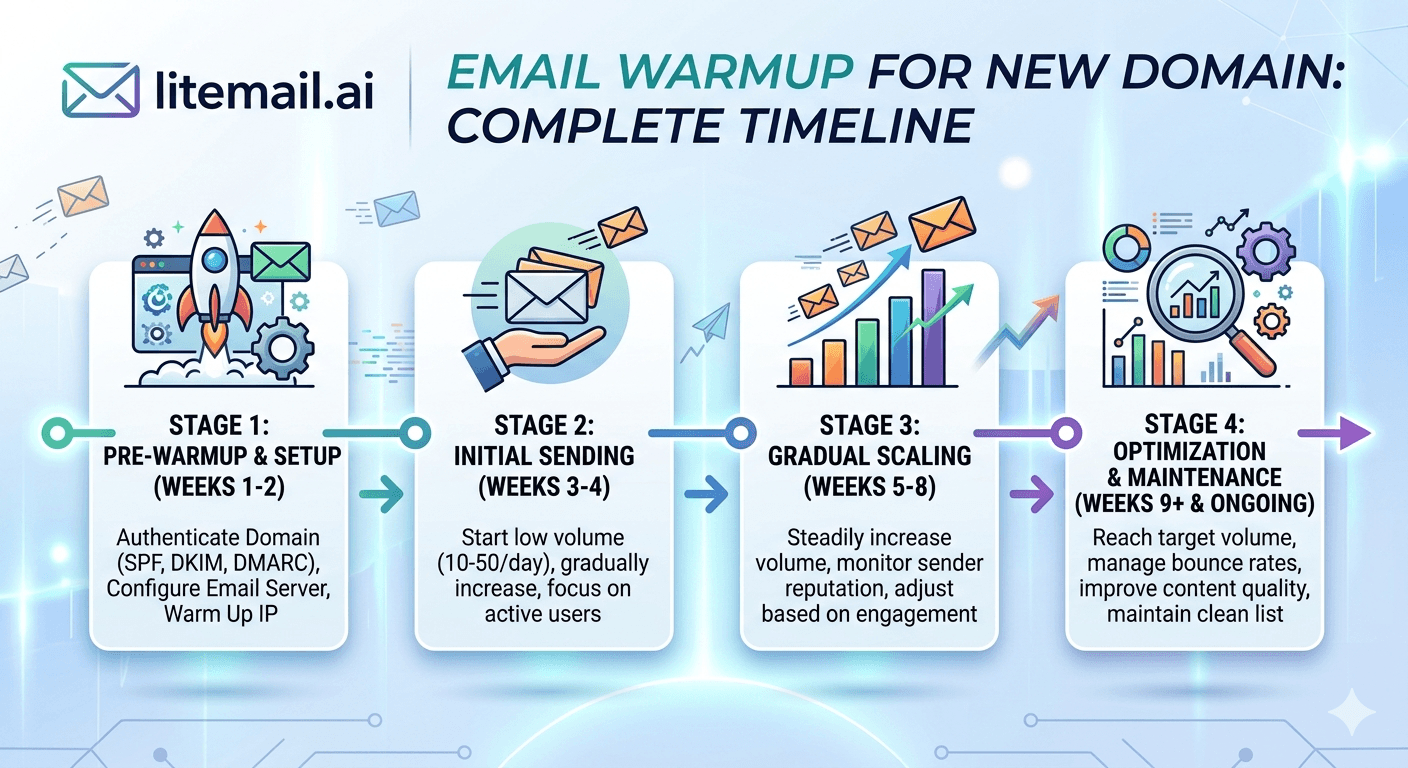
Warming up a new domain takes 6–8 weeks if you do it right. Most people don't do it right. They rush the volume ramp, skip the DNS verification, or use warmup tools that send to each other in closed loops that Google has learned to ignore. Here's what a legitimate new domain warmup actually looks like in 2026 — week by week.
Before Week 1: Non-Negotiable Prerequisites
Starting warmup before these are in place is the #1 mistake. Every day of warmup with broken authentication is wasted — those sends don't build reputation correctly and may actively harm the domain.
✅SPF Record Verified
TXT record live and returning PASS on mxtoolbox.com. For Google Workspace: v=spf1 include:_spf.google.com -all. For MS365: v=spf1 include:spf.protection.outlook.com -all. Not soft fail (~all) — hard fail (-all).
✅DKIM Active and Signing
Must be activated in Google Admin or Microsoft 365 Defender — not just published in DNS. Send a test email to mail-tester.com and confirm DKIM shows as signed and verified before starting warmup sends.
✅DMARC Record Live
Start with p=none for a new domain during warmup — this lets you collect data without rejecting legitimate mail that might fail auth during initial setup. Move to p=quarantine after 4 weeks of clean DMARC reports.
✅Domain Age: At Least 14 Days
Never start warming a brand-new domain (registered within 7 days). Domains registered and immediately used for email sending are a primary spam signal. Register the domain, wait 14 days with DNS configured, then start warmup.
✅MX Records Correctly Set
For GWS: all five Google mail servers configured at correct priorities. For MS365: [domain]-com.mail.protection.outlook.com at priority 0. Incoming and outgoing mail infrastructure must match the same provider.
The Week-by-Week Warmup Schedule
This timeline is for a single inbox on a new domain. If you're warming multiple inboxes on the same domain, apply these volumes per inbox — not total across the domain. Each inbox operates independently.
Week | Daily Send Volume | Recipient Type | Target Open Rate | What to Watch |
|---|---|---|---|---|
Week 1 | 5–10 emails/day | Known contacts, internal team | 80%+ | SPF/DKIM/DMARC pass rate |
Week 2 | 10–20 emails/day | Warmup pool + 30% real contacts | 65%+ | Postmaster Tools first data |
Week 3 | 20–30 emails/day | 50% warmup pool + 50% real contacts | 50%+ | Bounce rate, complaint rate |
Week 4 | 30–40 emails/day | 30% warmup pool + 70% real contacts | 40%+ | Domain reputation in Postmaster |
Week 5–6 | 40–50 emails/day | 100% real contacts | 35%+ | Reputation Good or High |
Week 7+ | 50 emails/day steady | 100% campaign sends | Benchmark | Monitor weekly |
The open rate targets are warmup-phase targets — not campaign performance targets. During warmup, you're sending to a combination of warm-up pool accounts and real contacts who are likely to open. Campaign-phase open rates will depend on your copy and targeting.
Warmup Tools in 2026: What Works and What's Useless
The warmup tool market has a dirty secret. Most tools operate closed-loop networks — inboxes in their pool email each other, open each other's mail, and mark nothing as spam. Google and Microsoft have largely figured this out.
What Google Looks For
Google's algorithm weighs engagement signals by the diversity and quality of the inboxes engaging. A warmup network of 10,000 dedicated warmup accounts all opening each other's mail produces weak reputation signals. The same opens from 10,000 individual Gmail accounts with independent sending history produces strong signals. Closed-loop warmup tool networks sit closer to the weak end of that spectrum.
What Actually Works in Warmup
Real sends to real people who genuinely open and occasionally reply. This is why the warmup timeline above uses a mix of warmup pool and real contacts from the start — real engagement from real inboxes builds stronger reputation signals than 100% warmup pool sends. The warmup tool handles the volume consistency. Real contacts provide the quality engagement signals.
💡 The Warmup Tool That Comes With the Inbox
Pre-warmed inboxes from Litemail have already completed the warmup phase — 4 to 12 weeks of genuine sending history before delivery. Google Postmaster Tools shows Good or High reputation from day one. You skip the 6–8 week timeline entirely. At $4.99/inbox versus spending $25–$69/month per inbox on a warmup tool subscription for 8 weeks — the math heavily favours pre-warmed infrastructure for anyone running more than 2 inboxes.
5 Things That Kill Warmup Progress Mid-Way
Warmup isn't just about following the volume schedule. These five mistakes can reset your progress or permanently damage a domain you've been warming for weeks.
Sending a campaign email before warmup is complete. One sequence of 500 emails to a cold list on week 3 of warmup will tank the domain. The spam signals from a large, unwarmed campaign overwhelm 3 weeks of careful reputation building. Wait until week 6–7 before any real campaign sends.
Skipping weekends in warmup sends. Some teams only send Monday–Friday during warmup. Weekend sending gaps look unnatural to algorithms that expect consistent daily patterns. Warmup tools should run 7 days per week.
DNS changes mid-warmup. Any change to SPF, DKIM, or DMARC records during the warmup period resets authentication verification. If you need to make DNS changes, do them before warmup starts or wait until after.
Switching email providers mid-warmup. Moving from Google Workspace to Microsoft 365 mid-warmup changes your sending IP infrastructure. The warm-up history built on GWS IPs doesn't transfer to MS365 IPs. Commit to one provider before starting.
Letting the warmup tool pause for 3+ days. A multi-day gap in warmup sends resets some of the freshly built reputation signals. Keep the tool running continuously — even at minimum volume — during any gap periods.
When to Skip Warmup Entirely and Just Buy Pre-Warmed
Honestly — for most people, warming a new domain from scratch is the wrong choice. Here's the math.
A warmup tool subscription costs $25–$69/month per inbox. At 5 inboxes, that's $125–$345/month just for warmup tool fees, plus 6–8 weeks of zero campaign sending from those inboxes. That's 6–8 weeks of lost pipeline opportunity cost on top of the tool fee.
A Litemail pre-warmed inbox costs $4.99/month with 4–12 weeks of warmup already done, Good Postmaster reputation from delivery, and automated DNS. You're sending campaigns within 24 hours of ordering. No tool fee. No waiting. No warmup timeline to manage.
The DIY warmup makes sense in one scenario: you have a very small number of inboxes (1–2), you have time to run the process properly, and you're not time-sensitive on campaign launch. Everyone else — agencies, SaaS outbound teams, founders running more than 3 inboxes — should buy pre-warmed.
Skip the 6-Week Wait — Pre-Warmed Inboxes from Litemail
Litemail delivers inboxes with 4–12 weeks of genuine warmup already done. Good/High in Postmaster Tools from day one. $4.99/inbox. Send campaigns within 24 hours of ordering.
Get Pre-Warmed Inboxes from $4.99 →
Warmup already done · Automated DNS · Dedicated US and EU IPs · No minimum order
About Litemail — Litemail provides pre-warmed Google Workspace and Microsoft 365 inboxes for cold email outreach. From $4.99/inbox with automated DNS, dedicated US and EU IPs, and full admin access. View pre-warmed inbox plans →
Related reading:
Email Warm-Up vs Pre-Warmed Inboxes 2026 · Does Email Warmup Work in 2026? · Email Warmup Sequence Optimal Settings 2026 · Cold Email Inbox Warm-Up Mistakes · Email Warmup Failing: What to Do
Key Takeaways
Never start warming a brand-new domain. Register the domain, configure all DNS records, and wait at least 14 days before sending the first warmup email.
A legitimate warmup timeline is 6–8 weeks minimum. Start at 5–10 emails/day and ramp to 50/day by week 6–7. Any faster and you're outrunning the reputation-building signals.
Most warmup tools use closed-loop networks. Google has largely identified these patterns. Supplement warmup pool sends with real contacts who genuinely open emails — the quality of engagement signals matters, not just volume.
DNS changes mid-warmup reset authentication verification. Make all DNS changes before starting warmup or after completing it.
For teams running more than 3 inboxes, buying pre-warmed inboxes (Litemail, $4.99/inbox) is cheaper and faster than DIY warmup when you factor in tool cost, time cost, and lost campaign opportunity during the 6–8 week wait.
One campaign send before warmup is complete can permanently damage the domain. Wait until week 6–7 before any large campaign sends.
Frequently Asked Questions
How long does email warmup take for a new domain in 2026?
A legitimate warmup takes 6–8 weeks minimum when done correctly. Week 1 starts at 5–10 emails per day. By week 5–6 you're at 40–50 emails per day. You can run full cold email campaigns from week 7 onward. Rushing the timeline — trying to reach 50 emails/day by week 2 — produces weak reputation signals and risks spam folder placement.
What's the best email warmup tool in 2026?
Warmly, Instantly's warmup feature, Smartlead warmup, and Mailreach are all used. The tool matters less than understanding its limitations: all warmup tools use pool networks with varying signal quality. Supplement any warmup tool with real sends to genuine contacts who will open the emails — real engagement builds reputation faster than pool-only sends.
Can I send campaigns while warming up a new domain?
Not until week 6 at the earliest. Sending large campaign volumes before warmup is complete — even a small campaign of 100 emails to a cold list — can generate enough spam signals to permanently damage the domain. Wait until Postmaster Tools shows Good reputation consistently for at least 7–10 days before sending any real campaign sequence.
Is buying pre-warmed inboxes better than warming a domain yourself?
For most teams, yes. DIY warmup costs $25–$69/month per inbox in tool fees plus 6–8 weeks of zero campaign output. A Litemail pre-warmed inbox at $4.99/month has warmup already done — you send campaigns within 24 hours. The exception is if you have 1–2 inboxes, no time pressure, and want to manage the process yourself. Otherwise, pre-warmed wins on cost and speed.
What kills warmup progress mid-way?
Five main killers: sending a campaign before warmup completes, skipping weekends in warmup sends, making DNS changes mid-warmup, switching email providers partway through, and letting the warmup tool pause for more than 3 consecutive days. Any of these can reset or damage reputation progress that took weeks to build.
Do Litemail pre-warmed inboxes replace the warmup process entirely?
Yes. Litemail delivers inboxes with 4–12 weeks of genuine warmup history already completed. Google Postmaster Tools shows Good or High reputation within 48 hours of delivery. There's no warmup process to run — the inbox is campaign-ready from day one. SPF, DKIM, and DMARC are pre-configured. Start sending cold email sequences the day the inbox is delivered.
Skip the Warmup Wait | Litemail Pre-Warmed Inboxes
Pre-warmed GWS and MS365 inboxes from $4.99/inbox. 4–12 weeks of warmup history already done. Campaign-ready in 24 hours.
View Plans & Pricing →
Related reading:
Email Warm-Up vs Pre-Warmed Inboxes 2026 · Does Email Warmup Work 2026? · Warmup Sequence Optimal Settings · Warmup Mistakes Guide · Email Warmup Failing: Fix Guide






