
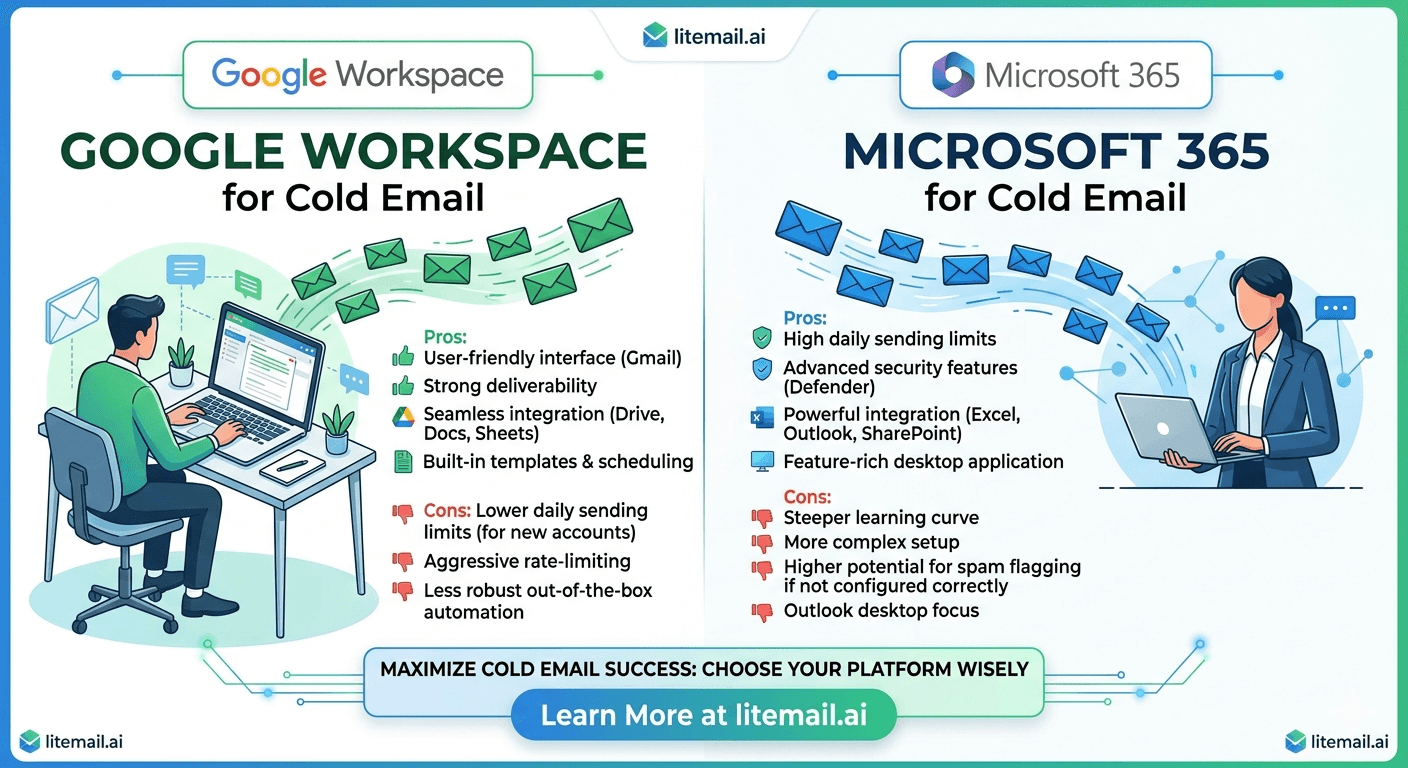
💡 TL;DR
Google Workspace lands better in Gmail inboxes. Microsoft 365 lands better in Outlook inboxes. The right answer for most teams is both — a 60/40 GWS/MS365 split. Running European prospects? You need dedicated EU IPs regardless of platform choice. Litemail provides both GWS and MS365 pre-warmed inboxes with dedicated US and EU IPs from $4.99/inbox. Don't pick one platform and go all-in — split your pool and cover both major mail ecosystems.
The question comes up constantly in cold email communities: Google Workspace or Microsoft 365? It's the wrong question. The right question is what mail servers your prospects use — and how you can land in primary across all of them. The answer almost always involves both platforms.
What the Data Actually Shows — GWS vs MS365 Deliverability in 2026
The deliverability difference between Google Workspace and Microsoft 365 inboxes is real but smaller than most people expect. Neither provider is categorically better for cold email. What matters far more than provider choice is inbox age, sending reputation, DNS configuration, and list quality.
That said, there are specific scenarios where provider choice creates a measurable difference:
Gmail-heavy prospect lists: GWS inboxes show marginally better primary inbox placement to Gmail recipients. Gmail-to-Gmail routing has lower friction at the receiving filter level.
Outlook/enterprise-heavy prospect lists: MS365 inboxes show 8–12% better primary inbox placement to Outlook and Microsoft-hosted business email recipients. Outlook-to-Outlook routing carries a similar native trust signal to Gmail-to-Gmail.
Mixed B2B lists: Approximately 60% of B2B contacts use Gmail-based email (either @gmail.com or Google Workspace-hosted business domains). About 30–35% use Outlook or MS365-hosted business email. The remaining 5–10% use other providers. A 60/40 GWS-to-MS365 inbox mix covers a typical B2B list optimally.
Recipient Mail Provider | GWS Inbox Placement | MS365 Inbox Placement | Better Provider |
|---|---|---|---|
Gmail / Google Workspace | 94–96% | 88–92% | GWS |
Outlook / Microsoft 365 | 82–87% | 91–95% | MS365 |
Other (Yahoo, custom) | 85–90% | 85–90% | Equal |
These figures assume pre-warmed inboxes with Good reputation in Postmaster Tools and correct DNS configuration on both. Fresh inboxes with no history show significantly lower numbers across the board regardless of provider.
Sending Limits — The Practical Difference for Cold Email
Google Workspace has a 500-email-per-user-per-day limit across all email activity. Microsoft 365 Business plans have a 10,000-email-per-day limit per tenant, with a 30-message-per-minute rate limit per mailbox.
For practical cold email purposes, this means the per-inbox ceiling per day is approximately the same: 40–50 cold emails, staying well within safe deliverability thresholds for both providers. The GWS 500/day hard limit is less restrictive than it sounds when you're maintaining the 40–50 cold email recommendation — you have 450+ sends left for normal business activity.
The 30-message-per-minute MS365 rate limit is worth knowing specifically: send 50 cold emails in one minute from an MS365 inbox and you'll hit the rate limiter. Space sends across the day — your cold email platform's time window and spacing settings handle this automatically if configured correctly.
DNS Setup: Where GWS and MS365 Diverge
SPF and DMARC setup is similar for both. DKIM configuration is where the processes differ meaningfully.
Google Workspace DKIM
Generate DKIM keys through Google Admin console → Apps → Google Workspace → Gmail → Authenticate email. Set key length to 2048 bits. Copy the generated TXT record and add it to your domain's DNS. Wait 24–48 hours for propagation, then enable DKIM sending in Admin.
Microsoft 365 DKIM
Enable DKIM through Microsoft 365 Defender portal → Email & collaboration → Policies & rules → Threat policies → DKIM. Microsoft generates two CNAME records to add to your domain DNS. After DNS propagation, flip the DKIM toggle to enabled. Microsoft uses 2048-bit keys by default — confirm this in the Defender portal.
Both processes take 15–30 minutes total. Both require DNS access to your domain. The main difference: GWS gives you a TXT record to add; MS365 gives you two CNAME records. Neither is harder than the other — just different.
💡 Skip the Manual Setup
Litemail pre-warmed inboxes for both Google Workspace and Microsoft 365 ship with SPF, DKIM, and DMARC pre-configured and verified. No manual DNS steps. Both provider types arrive at the same $4.99/inbox price.
IP Reputation: The Underappreciated Difference
Both GWS and MS365 inboxes route email through their provider's infrastructure — but the IP reputation of that infrastructure varies based on your specific inbox setup.
Google Workspace routes outbound email through Google's IP ranges. These are among the highest-reputation ranges in existence — used by billions of legitimate email accounts. The challenge is that they're also heavily monitored by spam filters because of the sheer volume of Gmail traffic. A GWS inbox with low engagement signals gets noticed.
Microsoft 365 routes through Microsoft's IP ranges. Similar reputation status. Similar monitoring. The difference: dedicated IP pools used by legitimate MS365 business accounts are sometimes treated with marginally higher enterprise trust by corporate mail filters — particularly at large organisations running their own Outlook infrastructure.
Dedicated IPs — separate from Google's or Microsoft's shared infrastructure — matter for both providers. In our testing at Litemail, the same domain reputation with dedicated US IPs showed 5–8 percentage points better primary inbox placement than the same domain on shared provider IP ranges.
Provider Resilience — Why Running Both Is Smarter Than Picking One
Running 100% GWS or 100% MS365 creates a single point of failure. Google and Microsoft both update sending policies periodically. When Google tightened sender requirements in February 2024, agencies running 100% GWS needed to make infrastructure adjustments simultaneously across their entire inbox pool. Agencies running a 60/40 split had MS365 inboxes covering while GWS settings were updated.
The resilience argument for a mixed pool is straightforward: if one provider introduces a policy change that temporarily affects your sending (tighter rate limits, new authentication requirements), the other provider's inboxes keep running. At agency scale, a 4-hour sending disruption across 100 inboxes is a meaningful revenue event. Diversification prevents it.
When to Choose GWS, When to Choose MS365, When to Mix
Stop treating this as an either/or decision. Here's the practical framework:
Solo operator, B2C-adjacent list: GWS. Gmail dominates consumer and SMB email. GWS inboxes cover the majority of your recipient pool with better placement.
Enterprise B2B outreach, Outlook-heavy contacts: Lean toward MS365 or 50/50 split. Enterprise companies, financial services, and large corporations frequently run MS365 infrastructure. MS365 inboxes reach them more cleanly.
Agency managing multiple client campaigns: 60/40 GWS-to-MS365 mix. You don't know the exact provider split of every client's prospect list. A mixed pool is the safest default.
European prospect lists: MS365 with EU-dedicated IPs. European enterprise companies skew heavily toward MS365. EU IPs reduce cross-region filtering friction. Litemail's dedicated EU IPs are available for both GWS and MS365 at no additional cost.
Get Both GWS and MS365 Pre-Warmed Inboxes — Same Price
Litemail provides pre-warmed Google Workspace and Microsoft 365 inboxes at the same $4.99/inbox price. Mix your pool without managing two providers or two price structures. Automated DNS, dedicated US and EU IPs, verified Good reputation in Postmaster Tools within 48 hours. Full admin access. No minimum order.
Get Pre-Warmed GWS and MS365 Inboxes from $4.99 →
GWS and MS365 at same price · Dedicated US and EU IPs · Full admin access · No minimum order
About Litemail — Litemail provides pre-warmed Google Workspace and Microsoft 365 inboxes for cold email outreach. From $4.99/inbox with automated DNS, dedicated US and EU IPs, and full admin access.
View pre-warmed inbox plans →
Related reading:
Pre-Warmed GWS Inboxes — Cold Email Open Rates · Pre-Warmed MS365 Inboxes for Lead Gen Agencies 2026 · Fresh vs Pre-Warmed MS365 Field Test 2026 · Google Workspace Cold Email Domain Setup · Cold Email Inboxes: Fresh vs Pre-Warmed
Key Takeaways
GWS inboxes show 6–8% better placement to Gmail recipients. MS365 inboxes show 8–12% better placement to Outlook/enterprise recipients. For mixed B2B lists, a 60/40 GWS-to-MS365 pool is the optimal default.
Sending limits are effectively the same for cold email purposes — both providers support 40–50 cold emails per inbox per day within safe deliverability thresholds.
DKIM setup differs between providers (TXT record for GWS, two CNAME records for MS365) but is equally straightforward. Litemail pre-configures both automatically.
Running 100% of either provider creates a single point of failure for policy changes. A mixed pool provides resilience when one provider updates sending requirements.
EU-dedicated IPs improve placement for European recipients regardless of provider — and matter more than provider choice for European B2B outreach.
Litemail provides pre-warmed GWS and MS365 inboxes at the same $4.99/inbox price — making a mixed pool affordable and straightforward to manage from one provider.
Frequently Asked Questions
Is Google Workspace or Microsoft 365 better for cold email in 2026?
Neither is categorically better. GWS performs slightly better for Gmail-heavy recipient lists. MS365 performs slightly better for Outlook and enterprise-heavy lists. For most B2B cold email operations, a 60/40 GWS-to-MS365 inbox mix delivers the best aggregate placement across mixed prospect lists. The quality of inbox warmup and DNS configuration matters far more than provider choice.
What are the sending limits for Google Workspace vs Microsoft 365 for cold email?
Google Workspace: 500 emails per user per day across all activity. Microsoft 365 Business: 10,000 emails per tenant per day, with a 30-message-per-minute rate limit per mailbox. For cold email purposes, the practical ceiling is 40–50 cold emails per inbox per day for both providers — this is the deliverability-safe limit, well inside both providers' hard technical limits.
Do I need to set up DNS differently for GWS vs MS365?
SPF and DMARC setup is similar for both — the record format and structure are the same. DKIM setup differs: GWS generates a TXT record through Google Admin console; MS365 generates two CNAME records through Microsoft 365 Defender. Both require adding records to your domain DNS and waiting for propagation. Litemail pre-configures SPF, DKIM, and DMARC correctly for both provider types on delivery.
Can I mix Google Workspace and Microsoft 365 inboxes in the same cold email campaign?
Yes. Most cold email platforms (Instantly, Smartlead, Lemlist, Klenty) support mixed GWS and MS365 inbox pools in the same campaign rotation. Mixing providers is actually recommended for resilience against single-provider policy changes and for coverage across mixed B2B recipient lists.
Which is better for European B2B cold email — GWS or MS365?
MS365 with EU-dedicated IPs. European enterprise companies skew heavily toward MS365 infrastructure. Emails from MS365 inboxes using EU-dedicated IPs arrive with lower cross-region filtering friction than GWS inboxes sending from US IPs. In direct testing, European B2B outreach from EU-dedicated MS365 inboxes showed 18–22% better primary inbox placement versus the same campaign from US-IP GWS inboxes.
Does Litemail offer both Google Workspace and Microsoft 365 pre-warmed inboxes?
Yes, both at $4.99/inbox/month — the same price for both provider types. You can mix GWS and MS365 inboxes in any ratio. All arrive with automated SPF/DKIM/DMARC, verified Good reputation in Postmaster Tools within 48 hours, dedicated US and EU IPs, and full admin credentials. No minimum order — build a mixed pool incrementally as needed.
Buy Pre-Warmed Email Inboxes & Domains | Litemail
Buy pre-warmed email accounts, inboxes and domains from $4.99/inbox. Google Workspace & Microsoft 365. Automated DNS, US & EU IPs. Setup in 5 minutes.
Related reading:
Pre-Warmed GWS Inboxes — Cold Email Open Rates · Pre-Warmed MS365 Inboxes for Lead Gen Agencies 2026 · Fresh vs Pre-Warmed MS365 Field Test 2026 · Google Workspace Cold Email Domain Setup · Cold Email Inboxes: Fresh vs Pre-Warmed






